Quick Start Guide - MediaStar Evolution 785 HD Video Encoder
Video/Audio Input Indicator LEDs
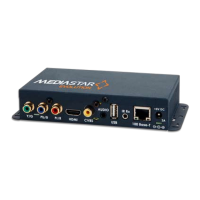
There are green LEDs situated by most of the video and audio input connectors.
These indicate the current video and audio input in use, or whether the internal colour bar generator or search mode is operating.
The Encoder’s active video input is show by the following LED combinations:
Active Video Input LED indicators ON
Composite (NTSC or PAL) with analogue audio Yellow phono, 3.5mm Jack
S-Video (NTSC or PAL) with analogue audio Green phone, Blue phono, 3.5mm Jack
YPbPr or Component (SOG) with analogue audio Green phono, 3.5mm Jack
Component (SCART) with analogue audio Yellow phono, Green phono, 3.5mm Jack
HDMI 1 or 2 (with HDMI digital audio) HDMI 1 or 2
HDMI 1 or 2 (with analogue audio - DVI) HDMI 1 or 2, 3.5mm Jack
Internal colour bar generator All OFF
Search Mode (No input yet found) All ON
Web-Page Configuration Menus
The main configuration of the encoder is carried out using web-pages served by the encoder. Start by entering the IP address (or
hostname) of your encoder into the address bar in your browser. This will show the specification page of the encoder and a list of all the
configuration pages is shown down the left hand side. Click on the configuration page name to open it. The settings will then be shown
with help on the right hand side of the screen (this can be switched off if not required). Make any setting changes you require and then
press the APPLY button at the bottom of the screen to actually apply the changes.
All settings will be retained through power-offs and reboots. Please note that if accurate times are required in the event logs, the
encoder should be configured to use an external NTP time server.
A summary of the configuration pages is listed below:
Status
Shows the current status of the encoder, including:
Part number, Mac address, IP Settings, Software Version, Serial Number, Temperature, Encoder name, Video/Audio encoding standards,
Video source, Stream address and bandwidth, RS232 port status, PoE status. Please note the temperature show is the internal
temperature and anything up to 70°C (158°F) should be regarded as normal.
Video/Audio Input
Specify the video and audio inputs to use here. The indicator LEDs by the Encoder’s input connectors also indicate the video input in use
The Colour Bar generator setting will show a set of colours bars that is internally generated and so is independent of any video input
source. When this is selected, audio from the analogue audio input is streamed along with the colour bar video. Search Mode will look
at each of the video inputs in turn and use the first valid video input signal it finds. This helps facilitate easy setup and is the default
selection. When searching is selected this screen allows the user to specify various detection preferences.
Note: When a fixed video input is being used and no valid video is detected the encoder will stream a solid colour picture and muted
audio. When searching, no stream is produced.
Encoding standard
Provides the stream disable control and the ability to specify how the video and audio is encoded and streamed. Controls include:
Encoding standard, bit rate control strategy, video and audio data rates, video and audio encapsulation, stream unicast/multicast IP
address, TTL, and QoS stream tagging. Stream access URLs are also provided here.



 To Next Page
 Loading...