I
I
N
N
T
T
R
R
O
O
D
D
U
U
C
C
T
T
I
I
O
O
N
N
3
SAFETY AND INSTALLATION
Please read this chapter carefully and observe all listed
notes. This will ensure reliable operation and long life expec-
tancy of your product. Keep these instructions with your
product at all times. The proper set up, use and care can
help extend the life of your product. In the event that you
transfer ownership of this product, please provide these in-
structions to the new owner.
Changing the hard disk must only be performed by a person
who is experienced in repairing and upgrading PCs.
Should you not possess the necessary qualifications, call
in a technician.
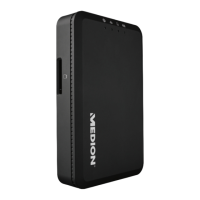
Hard disks are extremely fragile. Never drop or shake the hard
drive - this could irreversibly damage the data on the hard disk.
Be especially careful when transporting the hard disk. We
provide no guarantee for this type of damage.
Follow the user guide for your PC.
Only use the hard disk with the original power supply unit.
The socket must be located near the equipment and be easy
to reach. If the power adapter plug is pulled out, the exter-
nal hard disk will be disconnected from the mains.
Do not insert any objects through the slits and openings
into the interior of the hard disk. This could lead to a
short circuit or even cause a fire.
Never open the hard disk casing. If you do so, the hard disk
will no longer be covered by the guarantee.
Do not let children play unattended with electrical de-
vices. Children cannot always recognize the possible danger.
The hard disk is not designed for use in commercial applica-
tions/situations.
After transportation, wait until the equipment is at room
temperature before turning it on. If there is a large differ-
ence in temperature or humidity, damp can build up through
condensation and cause an electrical short circuit.
In order to avoid damage from a fall, place the hard disk on a
stable and level surface which does not vibrate.



 To Next Page