142
17. Troubleshooting
If a fault occurs, first see whether you can resolve the problem yourself. You might find this
overview useful.
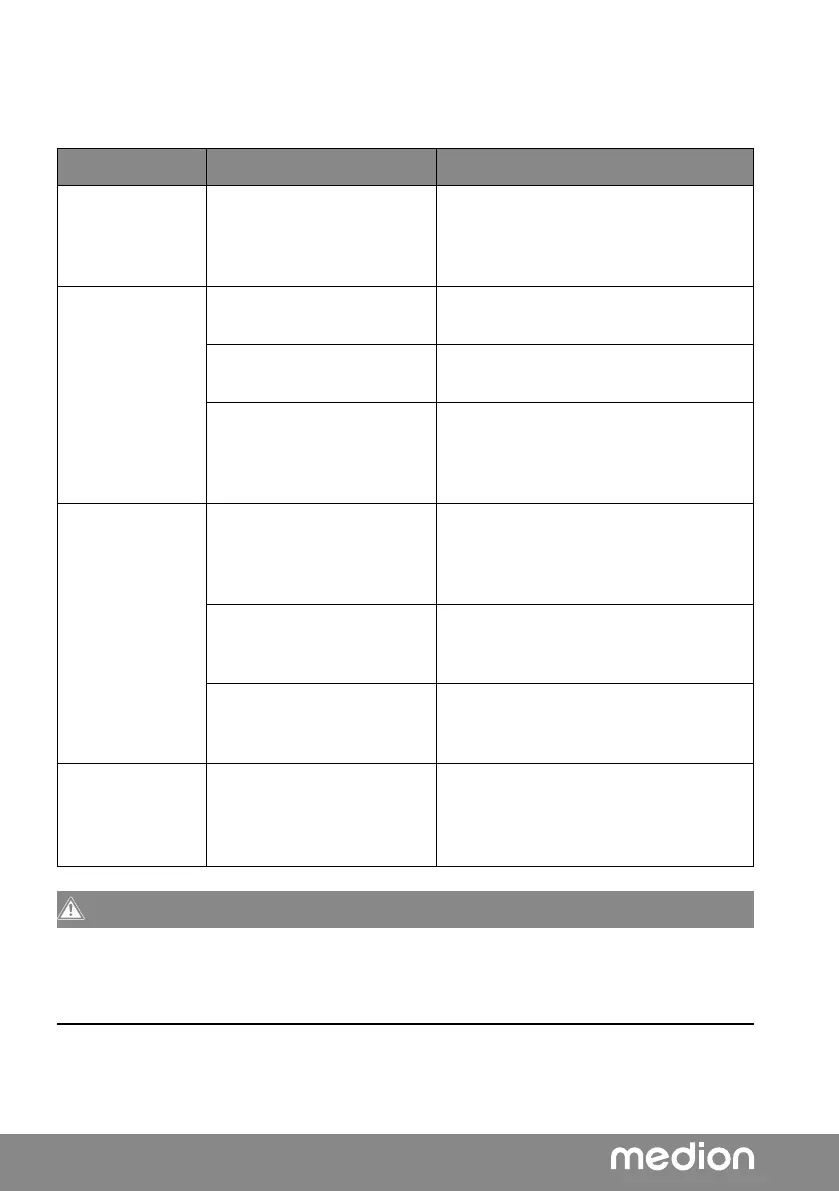
Fault Possible cause Corrective action
No function The device is disrupted by a
thunderstorm, static charge
or another external factor.
Pull the mains plug out of the socket
and then plug it in again.
No sound The current volume is set
too low.
Increase the volume.
The mute setting is acti-
vated.
Switch off the mute setting.
When the device is con-
nected via AUX IN or Blue-
tooth: The volume of the
external device is too low.
Increase the volume on the external
device.
CD is not played. Condensation has formed. Pull the mains plug out of the socket
and wait until the device and the CD
has adapted to the environmental
conditions.
Incorrect CD format. The device only supports the CD for-
mats specified in the technical specifi-
cations.
The CD is dirty or incorrect-
ly inserted.
Clean the CD and insert it into the CD
compartment with the label facing
upwards.
Timer does not
switch on
The timer is not set cor-
rectly.
Check whether the correct alarm time
has been set.
Check whether the alarm has been
activated.
CAUTION!
Risk of injury!
Opening the device can cause injuries.
Never attempt to repair the device yourself. If a repair is necessary, please contact our
Service Centre or a suitable authorised repair workshop.



 To Next Page