DE
ES
EN
IT
FR
NL
47
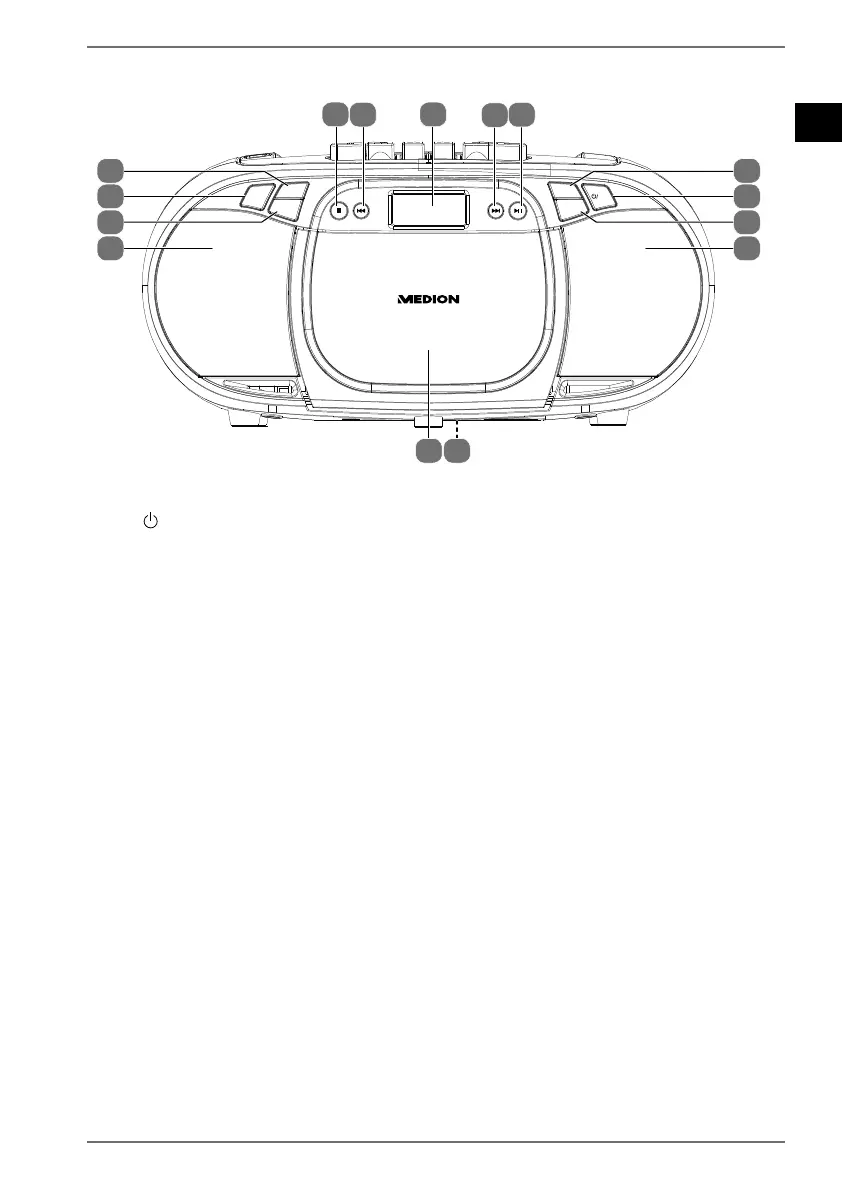
6.2. Front
PORTABLE CD RADIO/CASSETTE PLAYER
SCAN
VOL.+
VOL.-
TUNE+
10/FOLD./
MEM.+
10/FOLD./
MEM.-
PROG./
RAN./REP.
TUNE-STOP
FUNC.
9
10
12
11
17
16
12
15
1314
18
19
20
21
22
9) VOL+ – Increase volume
10) / FUNC. – Switch device on / switch to standby mode / select operating
mode
11) VOL – Decrease volume
12) Speaker
13) Type plate (on the underside)
14) Cassette compartment
15) 10/FOLD./MEM. – Select stored radio station / select folder (USB mode)
16) PROG./RAN./REP. – Store station/programme function / select playback
mode
17) 10/FOLD./MEM.+ – Select stored radio station / select folder (USB mode)
18) – Stop playback (CD/USB mode)
19) / TUNE – Previous track, rewind; previous folder / set radio station
20) Display
21) / TUNE+ – Next track, fast forward; next folder / set radio station
22) / SCAN – Start/pause playback / automatically store radio stations


 To Next Page