EasyManua.ls Logo

Medline MDS2002 - User Manual

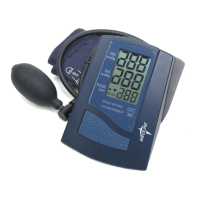
Medline MDS2002
32 pages
Print Icon
To Next Page IconTo Next Page
Loading...
10. Especificaciones técnicas
Peso: 265 g (pilas incluidas)
Dimensiones: 131 x 174 x 73 mm
Temperatura de almacenamiento: –5 a +50°C
Humedad: 15 a 85% de humedad relativa como máximo
Temperatura de funcionamiento: 10 a 40°C
Pantalla: Pantalla LCD (display de cristal líquido)
Método de medición: oscilométrico
Sensor de presión: capacitivo
Alcance de medición:
SYS/DIA: 30 a 280 mmHg
pulso: 40 a 200 por minuto
Límites de indicación de la presión
de la muñequera: 0–299 mmHg
Memoria: almacenamiento automático del último valor
medido
Resolución de las medidas: 1 mmHg
Exactitud:
presión: ± 3 mmHg
pulso: ± 5 % de la lectura
Fuente de Energía: 4 celulas secas (pilas) UM-3, tamaño AA, 1.5 V
Accesorios: brazalete modelo MDS9872 para brazos de
circunferencia 22–30 cm
brazalete modelo MDS9873 para brazos de
circunferencia 30–38 cm
* A reserva de modificaciones técnicas.
30

Questions and Answers

  • S
    Stephanie CampbellAug 14, 2025
    What to do if Medline Blood Pressure Monitor gives incorrect readings?
    • D
      donalddunnAug 14, 2025
      If your Medline Blood Pressure Monitor frequently fails to measure blood pressure, or the values are too low or high: 1. Ensure the cuff is correctly fitted on your arm. 2. Before starting the measurement, make sure the cuff isn't too tight and that clothing isn't exerting pressure on your arm. Remove clothing if needed. 3. Measure again in a completely quiet environment.
  • S
    smithmarkAug 17, 2025
    What to do if the Medline MDS2002 Blood Pressure Monitor display is not working?
    • A
      Andrew JohnsonAug 17, 2025
      Check if the batteries are installed with the correct polarity. If the display remains unusual, remove the batteries and exchange them for new ones.
  • G
    Gloria ThomasAug 21, 2025
    What to do if pressure doesn't rise on Medline MDS2002?
    • E
      emanningAug 21, 2025
      Check the connection of the cuff tube and connect it properly.
  • M
    Mrs. Lauren HawkinsAug 25, 2025
    What does ERR 2 mean on Medline Blood Pressure Monitor?
    • K
      Kimberly HolmesAug 25, 2025
      This error appears when the release valve was pressed during the measurement. Please restart the measurement.
  • J
    jennifersuttonAug 27, 2025
    Why do Medline MDS2002 values differ from my doctor's?
    • T
      Tara JacksonAug 27, 2025
      Blood pressure readings taken in a doctor's office may be higher due to anxiety. It is recommended to record your daily blood pressure values and consult with your doctor.
  • C
    crystal38Aug 30, 2025
    Why does my Medline MDS2002 Blood Pressure Monitor give different readings every time?
    • H
      Hector RodriguezAug 30, 2025
      Blood pressure changes constantly. Please repeat the measurement, considering common sources of error.
  • S
    Steve ThomasSep 3, 2025
    How to fix ERR 1 on Medline Blood Pressure Monitor?
    • M
      Melanie YoderSep 3, 2025
      This error may occur if the tube has loosened or if no pulse was detected. Make sure the cuff connections are tight and that the cuff is placed correctly. Consult the instruction booklet for proper cuff placement.
  • K
    Kristie SchmidtSep 6, 2025
    How to resolve ERR 3 on a Medline MDS2002?
    • M
      Madison KennedySep 6, 2025
      If you see ERR 3 on your Medline Blood Pressure Monitor, it indicates that the cuff is not correctly seated or the hose connection is not tight. Check the connections and repeat the measurement.
  • J
    Jason HardinSep 10, 2025
    What does ERR 5 mean on Medline MDS2002 Blood Pressure Monitor?
    • V
      Victoria MillerSep 10, 2025
      ERR 5 indicates that the difference between systolic and diastolic measurements is excessive. Measure again, carefully following proper cuff procedures, and ensure the measurement is taken under quiet conditions.

Summary

1. Introduction

1.1. Features of Your Blood Pressure Monitor

Details the key features, fast and reliable measurement capabilities, and user-friendly design.

1.2. Important Information About Self-Measurement

Provides critical advice on self-monitoring, emphasizing control, doctor consultation, and avoiding self-medication changes.

2. Important Information on Blood Pressure and Its Measurement

2.1. How Does High;Low Blood Pressure Arise?

Explains the physiological mechanisms and factors that cause fluctuations in blood pressure levels.

2.2. Which Values Are Normal?

Outlines normal blood pressure ranges and provides guidance on when to consult a doctor for abnormal readings.

2.3. What Can Be Done If Regular Increased;Low Values Are Obtained?

Offers advice on lifestyle adjustments and medical consultation for managing persistent high or low blood pressure readings.

3. Components of Your Blood Pressure Monitor

3 a. Measuring Unit

Describes the main measuring unit, including its display and control buttons.

3 b. Cuffs

Details the available cuff types and their corresponding arm circumference ranges.

9. Certifications

Device Standard Requirements

Lists the European and United States standards the device conforms to for non-invasive blood pressure monitors.

Electromagnetic Compatibility

Confirms the device's compliance with European standards for electromagnetic compatibility.

Clinical Testing

Summarizes the clinical performance tests conducted in the U.S. and Germany.

10. Technical Specifications

Weight and Size

Specifies the physical weight and dimensions of the blood pressure monitor.

Environmental Conditions

Details the acceptable storage and operating temperature and humidity ranges.

Measurement Technology

Covers the measuring method, sensor, ranges, resolution, and cuff pressure display.

Accuracy

States the accuracy tolerances for both pressure and pulse readings.

Device Features

Lists display type, memory function, power source, and included accessories.

Medline MDS2002 Specifications

General IconGeneral
BrandMedline
ModelMDS2002
CategoryBlood Pressure Monitor
LanguageEnglish

Related product manuals