EasyManua.ls Logo

MedSource HTD8813C - User Manual

Default Icon
20 pages
Print Icon
To Next Page IconTo Next Page
Loading...
User Manual
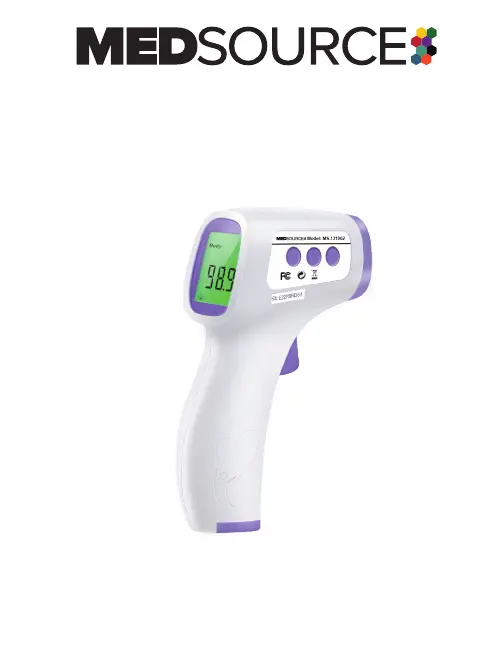
Non-Contact Infrared Body Thermometer
Model MS-131002
Please read this manual before operating this device.
It contains important safety information.
HTD8813C

Questions and Answers

  • M
    Michael BensonAug 7, 2025
    What to do if my MedSource HTD8813C screen is blank?
    • B
      bfranklinAug 7, 2025
      If your MedSource Thermometer screen is blank, it could be due to several reasons: * The power might be off: Press the On/Scan button. * Improper battery installation: Check the battery polarity. * The batteries are depleted: Replace the batteries.
  • A
    Andrew HardyAug 12, 2025
    What to do if MedSource HTD8813C screen flickers and turns off?
    • J
      Jacob TorresAug 12, 2025
      If the screen of your MedSource Thermometer flickers and then turns off, the suggested solution is to replace the batteries. If the error persists after replacing the batteries, the device may be damaged.
  • C
    christine62Aug 17, 2025
    How to fix MedSource HTD8813C when temperature is out of range?
    • P
      Pamela WuAug 17, 2025
      If the temperature measured by your MedSource Thermometer is not within the typical human body temperature range, make sure you are using the correct distance and location to measure the temperature. Also, do not attempt to measure temperatures outside the allowable range.
  • S
    Sonya MorrisAug 22, 2025
    What is the correct distance for using a MedSource Thermometer?
    • J
      Jordan FieldsAug 22, 2025
      To ensure accurate readings with your MedSource Thermometer, maintain a proper distance of 0.4” – 2.0” (1 cm – 5 cm).
  • J
    jimmyrobinsonAug 27, 2025
    What to do if hair or stickers affect MedSource Thermometer reading?
    • S
      sarakeithAug 27, 2025
      If the subject’s hair, antipyretic stickers, or perspiration is affecting the measurement of your MedSource Thermometer, remove any items that may interfere with the measurement.
  • A
    Alyssa DanielsSep 2, 2025
    What to do if MedSource HTD8813C Thermometer exceeds operating temperature?
    • N
      ngardnerSep 2, 2025
      If the device temperature of your MedSource Thermometer exceeds the allowable operating temperature range, move to a location within the operating temperature range and allow the thermometer to adjust to the new temperature.

Summary

Safety Information

Warnings

1 - Overview

Intended Use

Describes the intended purpose and application of the non-contact infrared body thermometer.

Description of Non-Contact Infrared Body Thermometer

Explains the device's operating principle based on infrared sensor technology.

Description of Controls, Indicators and Symbols

Details the components, controls, and symbols found on the thermometer and its display.

Technical Specifications

2 - Operation

2.1 Battery Installation

Provides step-by-step instructions for inserting and replacing batteries in the thermometer.

2.2 Before Using the Thermometer

Outlines essential precautions and environmental considerations before operating the device.

2.3 Thermometer Self-Test

Explains how to initiate and what to expect from the thermometer's self-test function.

2.4 Temperature Modes

Details the device's capability to measure body and surface temperatures.

2.5 Body Temperature

Covers the process for taking body temperature measurements and interpreting results.

2.6 Surface Temperature

Explains how to measure surface temperature and interpret the results.

2.7 Memory Mode

Describes how to access and view stored temperature measurements.

2.8 Parameter Mode

Details the four parameters that can be customized for different user needs and environments.

2.9 Notes

Provides important general notes and troubleshooting advice for the thermometer.

3 - Troubleshooting

4 - Replacing the Batteries

5 - Cleaning, Care and Storage

7 - EMC Declaration

Guidance and Manufacturers Declaration - Electromagnetic Immunity

Provides guidance on electromagnetic immunity requirements and compliance levels for the device.

Guidance and Manufacturers Declaration - Electromagnetic Emission

Details electromagnetic emission compliance and guidance for the thermometer's operation.

MedSource HTD8813C Specifications

General IconGeneral
Accuracy±0.2°C (±0.4°F)
Power Supply2 x AAA batteries
Resolution0.1°C (0.1°F)
TypeInfrared Thermometer
Measuring Distance3 - 5 cm
Automatic Shut-offYes (after 15 seconds of inactivity)
Memory32 readings
Weight105g (without batteries)

Related product manuals