ADDITIONAL INFORMATION
PAIRING A HEADPHONE
This procedure is used to pair an additional headphone
or speaker with the Connect, or to re-pair the Matrix3.
Make sure your Bluetooth headphone or speaker is
turned off. Put it in pairing mode. Consult the user
manual of the headphone or speaker if you are not sure
how to enter pairing mode.
Once the headphone or speaker is in pairing mode, click
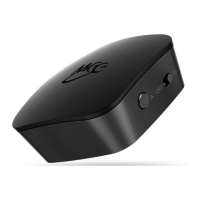
pairing button “A” located on the side of the Connect (use
pairing button “B” when pairing a second headphone or
speaker). A blue light will blink rapidly on the top of the
unit to indicate that the Connect is ready to pair. Once
paired, the light will turn solid blue.
FACTORY RESET/CLEAR MEMORY
The Connect can be reset by holding pairing button “A”
for approximately 5 seconds, until the blue indicator light
stops blinking. All previously paired devices will be
cleared from memory and a new pairing will need to be
created by following the procedure in the previous step.
6



 To Next Page