EMT16_MOS_v11_EMT16_Handout.pub 15 Rev: 080515
Embroidery File Formats
Wire Frame (Outline) Files
.cnd - older Melco condensed format
.ofm - DesignShop and native format
cnd & ofm
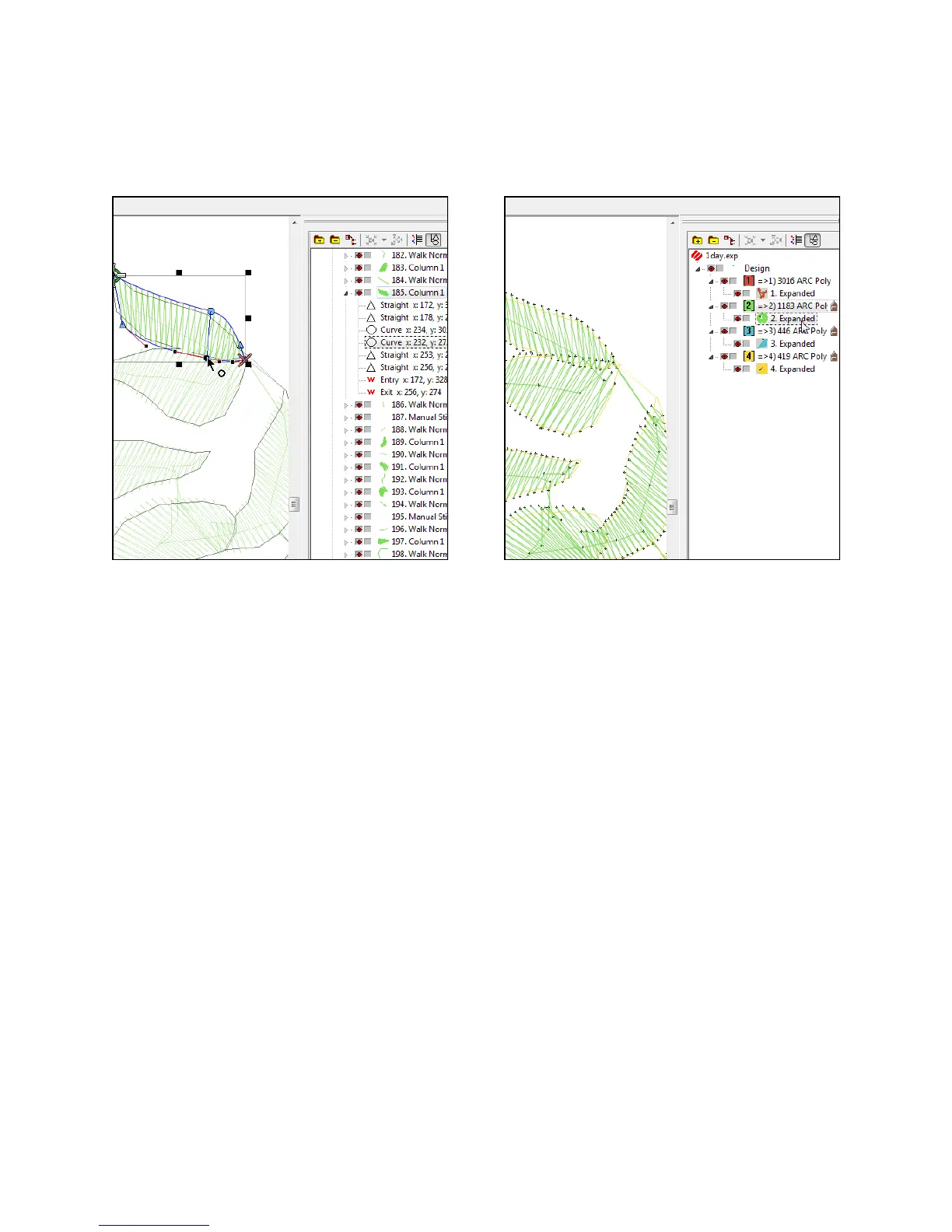
Elements are outlined shapes that con-
tain element properties like density,
stitch length, and stitch direction.
Shapes can be edited.
cnd files saved from DSV9 save as a
manual stitch
ofm only
Contains lettering properties. You can
change spelling, font, size, or any other
property of the lettering.
Notes are available.
Color information is available.
Scaling a Wire Frame File
You can usually scale a wire frame file up
or down in size about 25%.
Stitch Files
.exp - Melco expanded stitch file
.dst - Tajima stitch file
Stitch files do not contain properties. They are
just plotted out needle penetrations. The col-
ors that show up will be the default colors.
If you open an ofm and see expanded data
in the project view, it is plotted stitch infor-
mation. You can save stitch files as ofms to
keep notes and color information, but they
will still be expanded data.
Scaling a Stitch File
Stitch files can usually be scaled 10% up or
down in size, but with the assistance of the
Expanded Stitch Processor, you can push
that to about 25%.
Expanded Stitch Processor
Converts stitch files to wireframe in order to
maintain densities when scaled. This may
change the fill patterns in some designs.


 To Next Page