42
2. Press the Clock/Defrost button three times.
3. Turn the dial until “0.6” is shown in the
display.
4. Press the dial to begin defrosting.
During cooking, the appliance will beep to
remind you that the food needs turning.
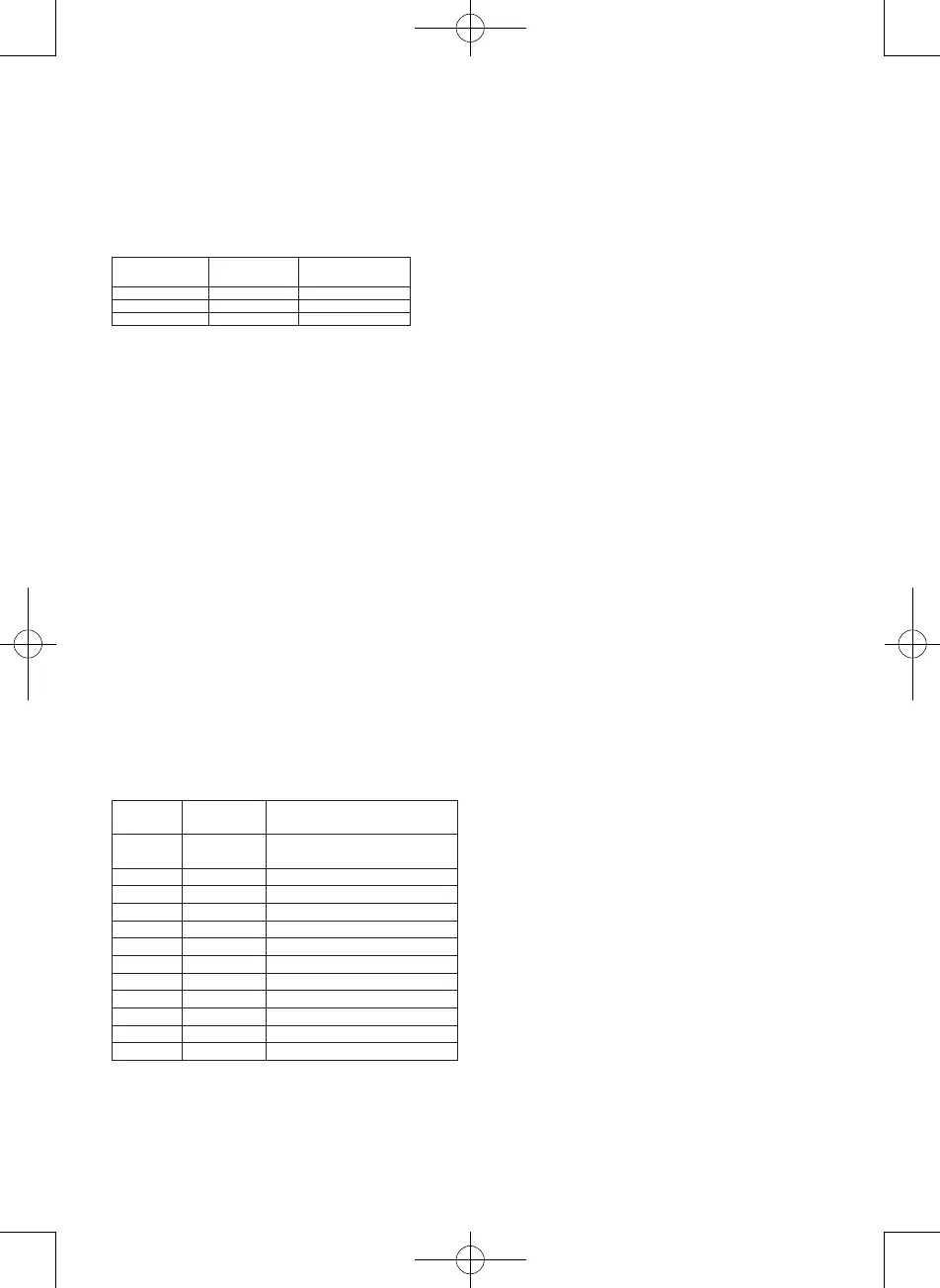
Defrosting
programme
Food item Interval
d1 Meat 0.1-2.0kg
d2 Poultry 0.2-3.0kg
d3 Seafood 0.1-0.9kg
Cooking using auto menu
Theappliancehas12auto-menuprograms
used for different food types and functions (see
auto-menulistinthetablebelow).
1. Turn the dial one setting anticlockwise.
Then turn the dial clockwise or
anticlockwise until the number for the
required auto menu programme is shown
in the display. Press the dial once to select
the auto menu program displayed.
2. Turn the dial clockwise or anticlockwise
until the required weight/number of items
is shown in the display. The setting options
vary according to the auto menu program
selected. The appliance itself calculates the
cooking time and power on the basis of the
weight or the number you specified.
3. Press the dial to begin cooking.
Auto menu
program
Food item Settings
A1 Popcorn 3.0–3.5ounces(approx.85–100
grams)
A2 Potatoes 0.45–0.65kg
A3 Vegetables 0.1–0.2–0.3–0.4–0.5kg
A4 Meat* 0.2–0.3–0.4–0.5–0.6–0.7kg
A5 Fish* 0.2–0.3–0.4–0.5–0.6–0.7kg
A6 Poultry* 0.2–0.3–0.4–0.5–0.6–0.7kg
A7 Lasagne 0.2 – 0.4 – 0.6 – 0.8 – 1.0 kg
A8 Milk/coffee 250–500ml
A9 Rice 0.1–0.2–0.3–0.4–0.5kg
A10 Spaghetti** 0.1–0.2–0.3–0.4–0.5kg
A11 Bread 0.1–0.2–0.3–0.4–0.5kg
A12 Pizza 1-2items
* = Must be turned when the oven beeps.
** = Add boiling water before cooking.
Cooking using the timer
You can set the microwave oven to start
cooking at a given time.
Check that the clock is set correctly.
1. Place the food in the oven.
2. Set the cooking program and power as
described above.
3. Set the cooking time.
4. Hold the Clock/Defrost button pressed for 3
seconds.
5. Setthenumberofhoursforthecooking
start time and press the Clock/Defrost
button.
6. Set the number of minutes for the cooking
start time and press the Clock/Defrost
button.
7. A beep is heard and the clock symbol
flashes in the display.
8. Cooking starts once the set time is
reached.
Once you have set the timer, you can check
when cooking will commence by pressing the
Clock/Defrost button at any time.
The start time for cooking will be shown in the
display for 1 second and the display will then
return to the clock function.
CHILD SAFETY LOCK
The child safety lock prevents young children
from using the appliance. The appliance cannot
be operated as long as the child safety lock
is active. The child safety lock is activated by
holding the Stop/Cancel button pressed for 3
seconds. A beep will be heard, and the display
shows “OFF” and a lock symbol. To deactivate
the child safety lock again, press and hold the
Stop/Cancel button for 3 seconds. The symbol
will then disappear from the display.
TIPS FOR FOOD PREPARATION
When preparing food in the appliance, the
following basic rules apply:


 To Next Page