EasyManua.ls Logo

Memorex MCB328 - User Manual

Memorex MCB328
2 pages
Print Icon
To Next Page IconTo Next Page
Loading...
MCB328 v2185-01
Microphone
NFC Connection Area
DC Power Port
Play/Pause/Pair
Bluetooth
Press and hold to begin
pairing to a Bluetooth device
(Bluetooth Mode).
Press to play or pause audio
(Bluetooth Mode).
Power/Source
Press and hold to power audio
features ON or OFF.
Press to change audio mode.
Snooze/Sleep/Dimmer
Press and hold to dim the display.
Press to set the sleep timer.
Press to Snooze alarm after it has sounded.
AL1/AL2
Press to set alarm times.
Source Mode Indicators
FM / Bluetooth / Aux In
Aux In (3.5mm audio input)
Backup Battery
Compartment
(requires CR2032 battery)
Volume Up/Down
Alarm On/Off Indicator
Low Battery Indicator
(Battery Backup)
PM Indicator
Daylight Savings Time Indicator
Daylight Savings Time
Press and hold to move the
time 1 hour ahead or behind.
Time Zone
Press and hold to begin setting Time
Zone. Press to cycle through different
zones (see Time Zone instructions).
Clock/Preset
Press and hold to set the clock.
Press to cycle through radio presets
Skip Track/Hour/Minute
Press to Skip audio tracks
(Bluetooth Mode).
Pres to adjust the time when
setting the clock.
USB Charging Port
Speaker
Features
NFC & Bluetooth wireless -
range: 60 ft.
Built-in speaker
Microphone for hands free
speakerphone operation
Built-in FM radio with up to 20
radio presets
Digital clock
1.8˝ Blue LED display
Aux In (3.5mm audio input)
5V 2A USB power port for mobile
device fast charging
Battery backup - requires CR2032
button cell battery
Clock Radio with NFC
Includes
AC/DC power adapter
Warranty
Clock Power & Mobile Device Charging
Plug the AC/DC power adapter into a standard power outlet and
the DC power input on the rear of the clock to power it on.
Mobile devices can be
charged by connecting them
to the USB charging port on
the rear of the clock. Power
output is 5V 2A.
Aux In
Requires a 3.5mm audio cable (not included).
1. With the unit powered ON, connect a 3.5mm audio
cable to the Aux In port. Press the Source button to
switch to Aux-In Mode.
2. Use the controls on the connected device to play audio
through the unit.
Setting an Alarm
1. With the radio off, press and hold the AL1 or AL2 buttons to set the time
for Alarm 1 or Alarm 2. The display will ash and show the time the alarm
is set to go off. Press the Hour/Min buttons to adjust the time. Note the
PM indicator.
2. Press the AL1/AL2 buttons again to set a weekly alarm schedule.
1-7 rings Mon-Sun | 1-5 rings Mon-Fri | 6-7 rings Sat-Sun
3. After the alarm is set and the display has stopped ashing, press the AL1/
AL2 buttons again to select the alarm type (Buzzer or Radio). Press once
more to deactivate the alarm entirely. Note the Alarm ON/OFF indicators.
Alarm Details
To cancel the alarm after it has sounded, press the AL button of the
alarm that is sounding.
To delete the alarm, press the AL button of the alarm you wish to cancel
until the indicator on the display turns OFF.
Sleep Timer
Press the Snooze button once to set the Sleep Timer. Press again to adjust
the time in 10 minute intervals from 90 to 0 (OFF).
Clock
When the clock is plugged in, the correct time will be displayed after a few
seconds.
Setting the Clock Manually
1. Press and hold the Clock button. The display will begin ashing.
2. Use the Hour/Minute buttons to set the time. Note the PM indicator.
Daylight Savings Time
Press and hold the DST button to adjust the time one hour ahead or behind for
Daylight Savings Time.
Time Zone
Press and hold the Time Zone button to begin setting the desired time zone.
The display will begin ashing, press the Time Zone button repeatedly select
the appropriate zone.
Bluetooth Wireless
Pairing to a Bluetooth Device and Playing Audio
1. Press and hold the button, a voice prompt will sound from the speaker
indicating that the unit is in Bluetooth Mode and connecting. When pairing,
remain within 3 feet of the unit.
2. Using the controls on your Bluetooth device, select MCB328 from your
Bluetooth settings to pair. When successfully paired, the voice will
announce the successful connection. Refer to the user’s manual for your
specic device for more detailed instructions on pairing and connecting
Bluetooth devices.
3. Audio played through the connected Bluetooth device should now be
heard through the speaker. Use the controls on the connected Bluetooth
device to select and begin playing audio. Play, pause or skip audio using
the controls on the device or the unit.
Speakerphone
To accept or end a phone call coming through the connected Bluetooth
phone, press the button on the speaker.
To decline a call, press the
button twice.
Previously Connected Devices
This unit can remember multiple Bluetooth devices and will always try to
reconnect to the last device used.
To reconnect to a different device, turn off Bluetooth on unwanted devices,
then access the Bluetooth settings menu on the device you wish to use
and connect to MCB328.
If the unit should become unpaired or will not connect normally, delete the
unit for your device's Bluetooth settings menu ("Forget This Device"), turn
the unit off and on again, and perform the Bluetooth connection again.
NFC Connections
Note: Refer to your specic device’s manual for general information, and
instructions on how to check for NFC availability and turn the feature on.
1. Press the Source button to set the unit to Bluetooth mode.
2. After activating your mobile device's NFC, lightly touch your device to the
NFC logo on the unit and hold it there for several seconds. The unit will
connect to your mobile device automatically.
3. When successfully paired and connected, the Bluetooth Indicator on the
display will turn solid .
4. After initial pairing, the unit will stay paired unless unpaired manually by
the user or erased due to a reset of the device.
FM Radio
Note: This unit has a built-in FM antenna. To improve radio reception, adjust the
position of the unit.
1. Press the Source button to switch to FM Mode. A voice prompt will sound
from the speaker and the display will show the radio frequency.
2. To automatically scan radio frequencies and set presets, press and hold
the
button. When nished, press the Preset button to change presets.
3. To manually set presets, press the Preset button to select a preset (1-20).
Tune the radio frequency with the Skip buttons, then press and hold the
Preset button to set it.
1 Atlantic Time UTC-4 hrs 5 Pacic Time UTC-8 hrs
2 Eastern Time UTC-5 hrs 6 Alaska Time UTC-9 hrs
3 Central Time UTC-6 hrs 7 Hawaii - Aleutian Time UTC-10 hrs
4 Mountain Time UTC-7 hrs

Question and Answer IconNeed help?

Do you have a question about the Memorex MCB328 and is the answer not in the manual?

Summary

Clock Power and Mobile Device Charging

Setting the Clock Manually

Instructions for manually setting the clock time.

Daylight Savings Time Adjustment

Adjusting the time one hour ahead or behind for DST.

Time Zone Setting

Setting the desired time zone for the clock.

Alarm Setting and Configuration

Steps to set and configure alarm times and types.

Alarm Cancellation and Deletion

Information on canceling and deleting alarms.

Sleep Timer Operation

Setting the sleep timer for audio playback.

Bluetooth Wireless Features

Pairing and Audio Playback

Connect and play audio from a Bluetooth device.

Speakerphone Functionality

Using the speakerphone for calls.

Managing Bluetooth Connections

Managing previously connected Bluetooth devices.

NFC Connection Guide

Connecting via Near Field Communication (NFC).

FM Radio and Aux Input

FM Radio Operation

Tuning and setting FM radio stations.

Aux Input Audio Playback

Connecting and playing audio via Aux-In.

Important Safety Instructions

General Product Safety

General safety guidelines for operating and maintaining the product.

Battery Handling and Safety

Warnings and precautions related to battery usage and safety.

FCC Compliance Statement

FCC Rules and Interference

FCC rules, compliance, and measures to correct interference.

Customer Support Information

Summary

Clock Power and Mobile Device Charging

Setting the Clock Manually

Instructions for manually setting the clock time.

Daylight Savings Time Adjustment

Adjusting the time one hour ahead or behind for DST.

Time Zone Setting

Setting the desired time zone for the clock.

Alarm Setting and Configuration

Steps to set and configure alarm times and types.

Alarm Cancellation and Deletion

Information on canceling and deleting alarms.

Sleep Timer Operation

Setting the sleep timer for audio playback.

Bluetooth Wireless Features

Pairing and Audio Playback

Connect and play audio from a Bluetooth device.

Speakerphone Functionality

Using the speakerphone for calls.

Managing Bluetooth Connections

Managing previously connected Bluetooth devices.

NFC Connection Guide

Connecting via Near Field Communication (NFC).

FM Radio and Aux Input

FM Radio Operation

Tuning and setting FM radio stations.

Aux Input Audio Playback

Connecting and playing audio via Aux-In.

Important Safety Instructions

General Product Safety

General safety guidelines for operating and maintaining the product.

Battery Handling and Safety

Warnings and precautions related to battery usage and safety.

FCC Compliance Statement

FCC Rules and Interference

FCC rules, compliance, and measures to correct interference.

Customer Support Information

Overview

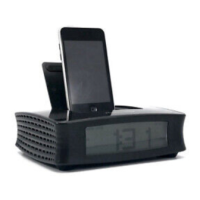
This document describes the Memorex MCB328 v2185-01 Clock Radio with NFC.

Function Description

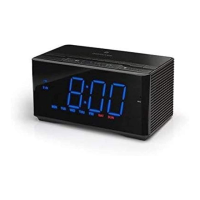
The Memorex MCB328 is a versatile clock radio designed for modern connectivity and convenience. It features NFC and Bluetooth wireless technology for audio streaming, a built-in FM radio with presets, and a digital clock with a clear 1.8" blue LED display. The device also includes a microphone for hands-free speakerphone operation, an Aux-In port for wired audio connections, and a USB charging port for mobile devices. It operates on AC power with a battery backup for clock settings.

Important Technical Specifications

  • Wireless Connectivity: NFC and Bluetooth wireless, with a range of up to 60 ft.
  • Audio Output: Built-in speaker.
  • Microphone: Integrated for speakerphone functionality.
  • Radio: Built-in FM radio with up to 20 radio presets.
  • Display: 1.8" Blue LED display.
  • Audio Input: 3.5mm Aux-In port.
  • Charging Port: 5V 2A USB power port for mobile device fast charging.
  • Power: AC/DC power adapter (included).
  • Battery Backup: Requires CR2032 button cell battery (not included).

Usage Features

Clock and Time Settings:

  • Setting the Clock Manually: Press and hold the "Clock" button until the display flashes, then use the "Hour" and "Minute" buttons to set the time. A PM indicator is present.
  • Daylight Savings Time (DST): Press and hold the "DST" button to adjust the time one hour ahead or behind.
  • Time Zone: Press and hold the "Time Zone" button until the display flashes, then repeatedly press the "Time Zone" button to select the desired zone. Available zones include Atlantic Time (UTC-4 hrs), Eastern Time (UTC-5 hrs), Central Time (UTC-6 hrs), Mountain Time (UTC-7 hrs), Pacific Time (UTC-8 hrs), Alaska Time (UTC-9 hrs), and Hawaii-Aleutian Time (UTC-10 hrs).

Alarm Settings:

  • Setting Alarms: With the radio off, press and hold either the "AL1" or "AL2" buttons to set Alarm 1 or Alarm 2. The display will flash, showing the alarm time. Use the "Hour/Min" buttons to adjust the time, noting the PM indicator.
  • Alarm Schedule: Press the "AL1/AL2" buttons again to set a weekly alarm schedule: 1-7 (Mon-Sun), 1-5 (Mon-Fri), or 6-7 (Sat-Sun).
  • Alarm Type: After the alarm is set and the display stops flashing, press the "AL1/AL2" buttons again to select the alarm type (Buzzer or Radio). Press once more to deactivate the alarm entirely. Alarm ON/OFF indicators are displayed.
  • Canceling a Sounding Alarm: Press the "AL" button of the alarm that is sounding.
  • Deleting an Alarm: Press the "AL" button of the alarm you wish to cancel until its indicator on the display turns OFF.

Sleep Timer:

  • Press the "Snooze" button once to activate the Sleep Timer. Press again to adjust the time in 10-minute intervals from 90 minutes down to 0 (OFF).

Bluetooth Wireless Connectivity:

  • Pairing: Press and hold the "Play/Pause/Pair Bluetooth" button. A voice prompt will indicate "Bluetooth Mode" and "connecting." Remain within 3 feet of the unit during pairing. Select "MCB328" from your Bluetooth device's settings. A voice prompt will announce successful connection.
  • Audio Playback: Audio from the connected Bluetooth device will play through the speaker. Use controls on the device or the unit to play, pause, or skip audio.
  • Speakerphone:
    • Accept/End Call: Press the "Play/Pause/Pair Bluetooth" button to accept or end a phone call.
    • Decline Call: Press the "Play/Pause/Pair Bluetooth" button twice.
  • Previously Connected Devices: The unit remembers multiple Bluetooth devices and attempts to reconnect to the last used device. To reconnect to a different device, turn off Bluetooth on unwanted devices, then connect to MCB328 from the desired device's settings. If the unit becomes unpaired or fails to connect, delete the unit from your device's Bluetooth settings ("Forget This Device"), power the unit off and on, then re-pair.

NFC Connections:

  • Activation: Press the "Source" button to set the unit to Bluetooth mode.
  • Connecting: Lightly touch your mobile device to the NFC logo on the unit for several seconds. The unit will connect automatically.
  • Indicator: The Bluetooth Indicator on the display will turn solid upon successful pairing.
  • Persistence: The unit remains paired unless manually unpaired or reset.

FM Radio:

  • Mode Selection: Press the "Source" button to switch to FM Mode. A voice prompt will sound, and the radio frequency will display.
  • Automatic Scan & Presets: Press and hold the "Clock/Preset" button to automatically scan radio frequencies and set presets. Press the "Clock/Preset" button to cycle through presets.
  • Manual Presets: Press the "Clock/Preset" button to select a preset (1-20). Tune the radio frequency with the "Skip Track/Hour/Minute" buttons, then press and hold the "Clock/Preset" button to set it.
  • Reception: Adjust the unit's position to improve radio reception, as it has a built-in FM antenna.

Aux In:

  • Connection: Connect a 3.5mm audio cable (not included) to the Aux In port.
  • Mode Selection: Press the "Source" button to switch to Aux-In Mode.
  • Audio Playback: Use controls on the connected device to play audio.

General Controls:

  • Power/Source: Press and hold to power audio features ON or OFF. Press to change audio mode (FM/Bluetooth/Aux In).
  • Volume Up/Down: Adjusts the volume.
  • Snooze/Sleep/Dimmer: Press and hold to dim the display. Press to set the sleep timer. Press to snooze an alarm after it sounds.
  • Play/Pause/Pair Bluetooth: Press and hold to begin Bluetooth pairing. Press to play or pause audio in Bluetooth Mode.
  • Skip Track/Hour/Minute: Skips audio tracks in Bluetooth Mode. Adjusts time when setting the clock.

Maintenance Features

  • Backup Battery: Requires a CR2032 button cell battery for clock settings backup during power outages. The low battery indicator will show when the battery needs replacement.
  • Cleaning: Unplug the product from the wall outlet before cleaning. Use only a dry cloth; do not use liquid or aerosol cleaners.
  • Power Cord Protection: Ensure power supply cords are routed to prevent damage from being walked on or pinched.
  • Safety Checks: Refer all servicing to qualified personnel. The manual emphasizes the importance of using manufacturer-specified replacement parts and having safety checks performed after any service or repairs.
  • Battery Warnings: Includes warnings against ingesting coin/button cell batteries, chemical burn hazard, keeping batteries away from children, and proper battery compartment closure. Advises against incorrect battery replacement (use same or equivalent type), charging standard alkaline batteries, exposing batteries to excessive heat, mixing old and new batteries, or mixing different battery types. Recommends recycling or disposing of batteries per state and local guidelines.

Memorex MCB328 Specifications

General IconGeneral
BrandMemorex
ModelMCB328
CategoryClock Radio
LanguageEnglish

Related product manuals