11
CD OPERATION (CONTINUED)
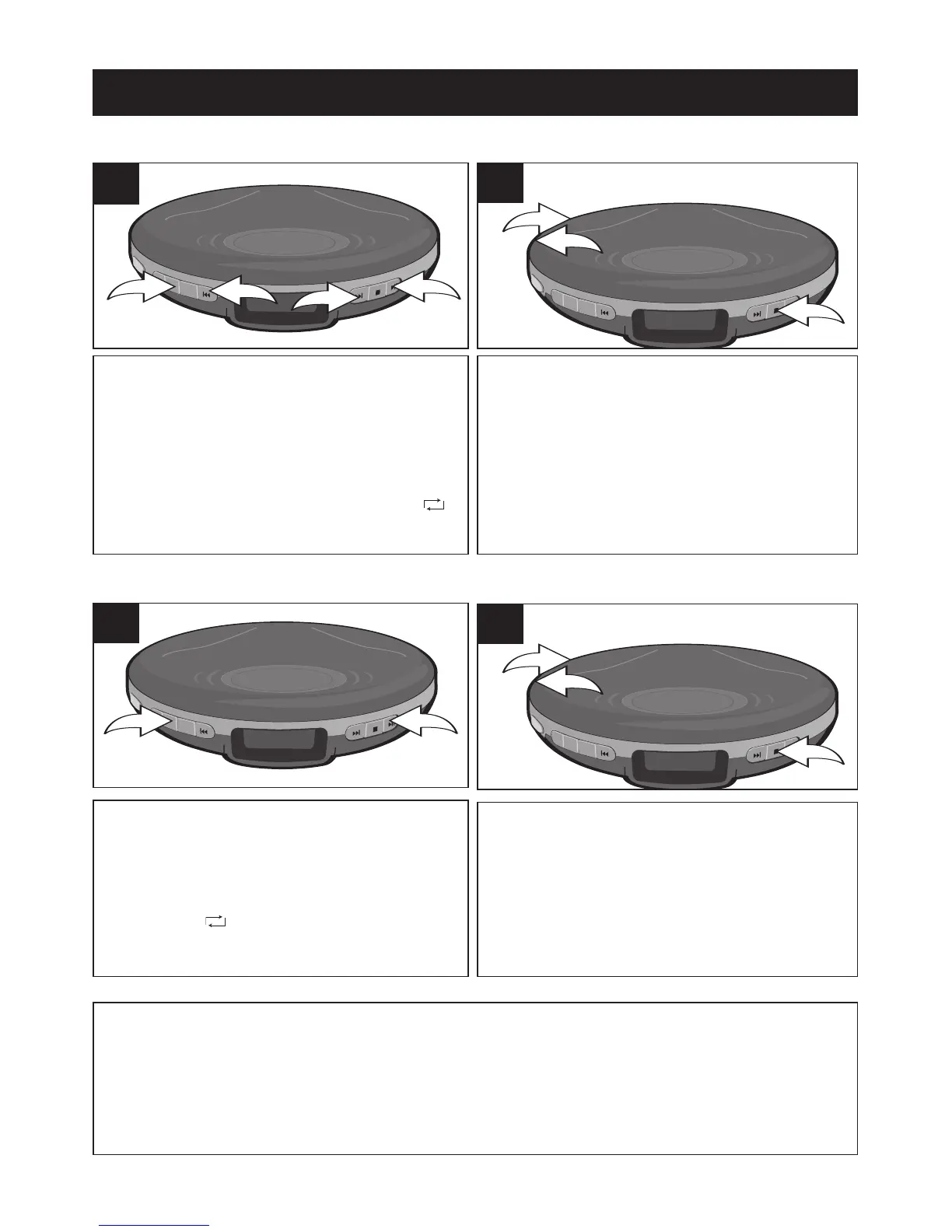
With a CD inserted, press the
PLAY/PAUSE (
®p)/POWER ON
button
❶ to turn the unit on, then select
a track using the SKIP/SEARCH
o 2
or n3button. Press the MODE button
❹ once; the Repeat 1 indicator 1
will appear in the display.
1
The unit will then play the same track
over and over until the STOP
(■)/POWER OFF button ❶ is pressed.
Adjust the VOLUME control
❷ and
DBBS switch
❸ as desired.
2
TO REPEATEDLY PLAY BACK ONE TRACK
With a CD inserted, press the
PLAY/PAUSE (
®p)/POWER ON
button
❶ to turn the unit on. Press the
MODE button
❷ twice; the Repeat All
indicator will appear in the
display.
1
The unit will then play all the tracks on
the CD over and over until the STOP
(■)/POWER OFF button ❶ is pressed.
Adjust the VOLUME control
❷ and
DBBS switch
❸ as desired.
2
TO REPEATEDLY PLAY BACK ALL TRACKS
TO CANCEL REPEAT PLAYBACK, press the MODE button four times if in
Repeat 1 mode, or three times if in Repeat All mode. The unit will continue
normal playback.


 To Next Page