5
LOCATION OF CONTROLS (CONTINUED)
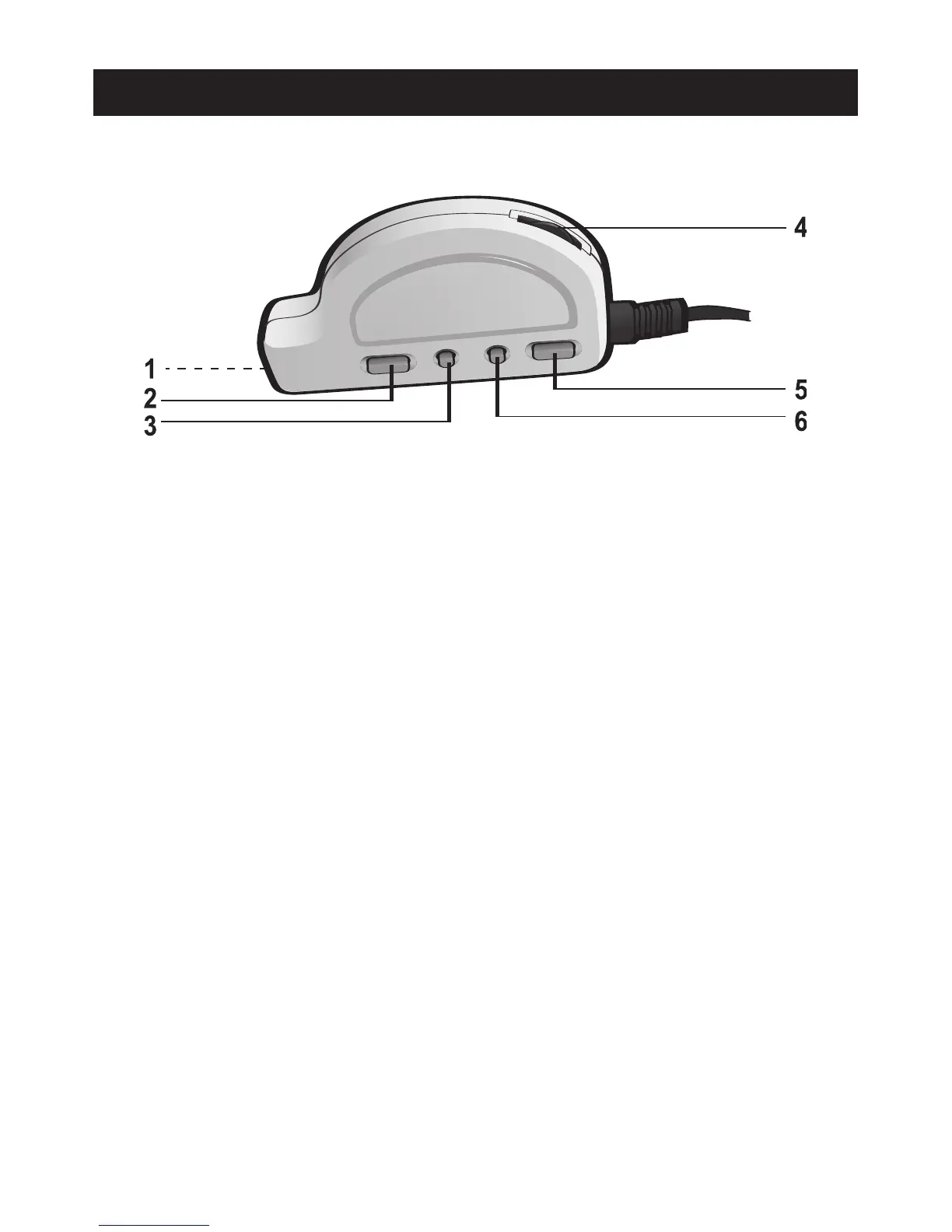
1. PHONES (Headphones) Jack (Side of Remote)
(HEADPHONES PART NO. 098B133BCRBKXX*)
2. PLAY/PAUSE (®p)/POWER ON Button
3. Skip/Search o Button
4. VOLUME Control
5. STOP (
■)/POWER OFF Button
6. Skip/Search n Button
REMOTE PART NO. RC-RCD1004*
*Consumer Replaceable Part (See page 16 to order.)
NOTES:
• To use the remote, plug it into the PHONES (Headphones) jack on the rear of the
main unit. Then plug your headphones into the PHONES (Headphones) jack on
the side of the remote.
• The controls on the remote work in the same way as the controls on the main unit.
• Adjust the Volume control on the main unit before controlling the volume on the
remote. Otherwise, the headphones will not have sound even if you adjust to the
highest volume on the remote.
• When the Hold switch on the main unit is in the hold (ON) position, the remote
can still control the main unit.
REMOTE


 To Next Page