9
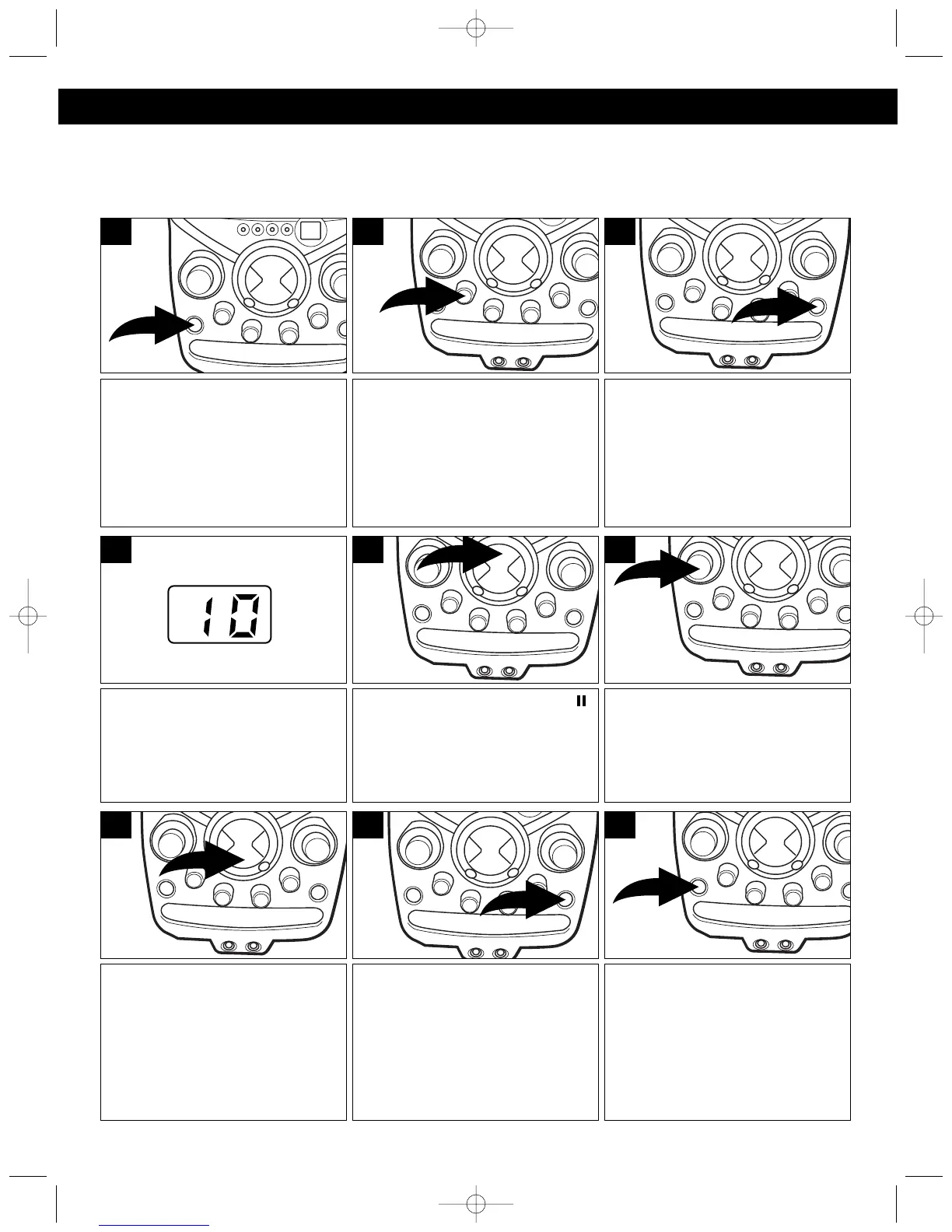
Press the POWER button to turn
the unit on; the POWER indicator
will light.
1
The CD player will read the table
of contents on the disc and the
total number of tracks on the disc
will appear in the display.
4
Press the OPEN/CLOSE button
to open the CD compartment
door. Place a CD on the center
spindle, with the printed label side
facing up. Close the CD
compartment door.
3
Rotate the MONITOR switch to
the CD position.
2
Press the Play/Pause ( )
button to begin playback on
Track 1; the PLAY/PAUSE
indicator will light.
5
Adjust the MAIN VOLUME control
as desired. Playback will continue
until all of the tracks on the disc
have been played.
6
To stop playback before the disc
ends, press the Stop (■) button.
The disc will stop and the display
will show the total number of
tracks.
7
After the last track has been
played, the disc stops auto-
matically and the display shows
the total number of tracks on the
disc. If you are finished listening,
press the OPEN/CLOSE button to
open the CD Compartment door.
8
Remove your disc, close the CD
Compartment door and press the
POWER button to turn the unit
off; the POWER indicator will turn
off.
9
PLAYING COMPACT DISCS
NORMAL PLAYBACK
(For karaoke, please refer to page 13.)
OPERATION (CONTINUED)




 To Next Page