÷
÷
AUDiO/ViDEO JACK CONNECTmONS
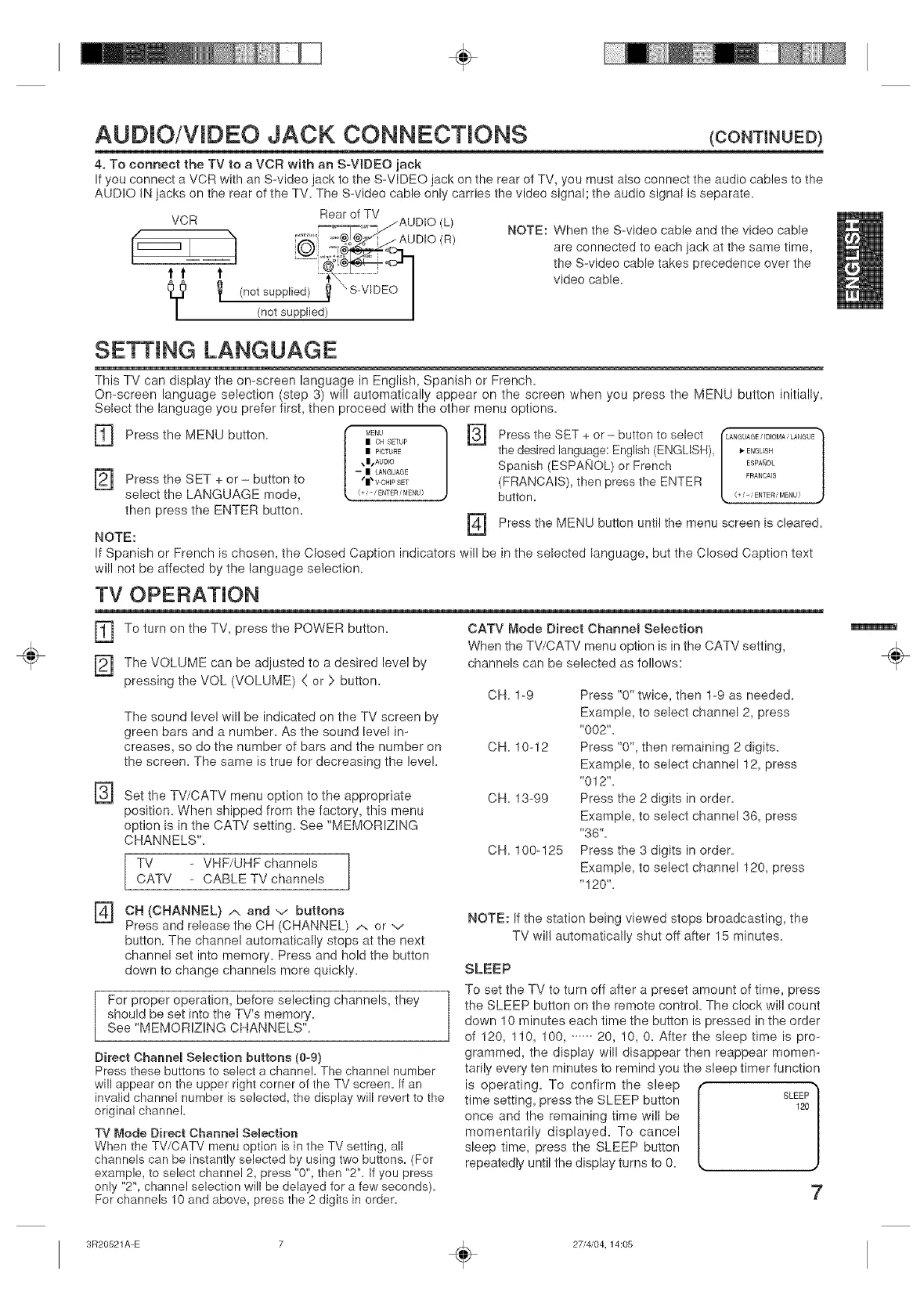
4, To connect the TV to a VCR with an SoVJDEO jack
If you connect a VCR with an S-video jack to the S-VIDEO jack on the rear of TV, you must also connect the audio cables to the
AUDIO IN iacks on the rear of the TV. The S-video cable only carries the video signal; the audio signal is separate.
VCR Rear of TV
,__,___,,_j AU UlO (h)
(_ "_ _'°@_oJ@_,_"/ AUDIO (R)
IL TT
Y/n°tsupp"ed/V s-v'°E°
| (not supplied)
NOTE: When the S-video cable and the video cable
are connected to each jack at the same time,
the S-video cable takes precedence over the
video cable.
] Press the SET button to
+
or
select the LANGUAGE mode,
then press the ENTER button.
SETTING LANGUAGE
This TV can display the on-screen language in English, Spanish or French.
On-screen language selection (step 3) will automatically appear on the screen when you press the MENU button initially.
Select the language you prefer first, then proceed with the other menu options.
] Press the MENU button. {" MENU Press the SET + or- button to select
F3]
| OH SETUP
L
mP_CTURE the desired language: English (ENGLISH),
,B,AUDIO Spanish (ESPAI/OL) or French
-- | LANGUAGE
"|'V-OHIPSET (FRANCAIS), then press the ENTER
(+ ,-' ENTER i MENU) butto n.
NOTE: [_
If Spanish or French is chosen, the Closed Caption indicators will be in the selected language, but the Closed Caption text
will not be affected by the language selection.
•fLANGUAGE/ID_OMA_LANGUE(+i_/ENTERiMENU)_ FRANCA]sESPANoLENGLISH /
Press the MENU button until the menu screen is cleared.
TV OPERATION
[_ To turn on the TV, press the POWER button,
] The VOLUME can be adjusted to a desired level by
pressing the VOL (VOLUME) ( or > button,
The sound level will be indicated on the TV screen by
green bars and a number. As the sound level in-
creases, so do the number of bars and the number on
the screen. The same is true for decreasing the level.
CATV Mode Direct Channel Selection
When the TV/CATV menu option is in the CATV setting,
channels can be selected as follows:
CH. 1-9
CH. 10-12
] Set the TV/CATV menu option to the appropriate CH. 13-99
position. When shipped from the factory, this menu
option is in the CATV setting. See "MEMORIZING
CHANNELS".
TV - VHF/UHF channels
CATV - CABLE TV channels
CH. 100-125
Press "0" twice, then 1-9 as needed.
Example, to select channel 2, press
"002".
Press "0", then remaining 2 digits.
Example, to select channel 12, press
"012".
Press the 2 digits in order.
Example, to select channel 36, press
"36".
Press the 3 digits in order.
Example, to select channel 120, press
"120".
] OH (CHANNEL) and buttons
/% V
Press and release the CH (CHANNEL) ._. or v
button. The channel automatically stops at the next
channel set into memory. Press and hold the button
down to change channels more quickly.
For proper operation, before selecting channels, they
should be set into the TV's memory.
Sea "MEMORIZING CHANNELS".
Direct Channel Semection buttons (0-9)
Press these buttons to select a channel. The channel number
will appear on the upper right corner of the TV screen. If an
invalid channel number is selected, the display will revert to the
original channel.
TV Mode Direct Channel Semection
When the TV/CATV menu option is in the TV setting, all
channels can be instantly selected by using two buttons. (For
example, to select channel 2, press "0", then "2". If you press
only "2", channel selection will be delayed for a few seconds).
For channels 10 and above, press the 2 digits in order.
NOTE: If the station being viewed stops broadcasting, the
TV will automatically shut off after 15 minutes.
SLEEP
To set the TV to turn off after a preset amount of time, press
the SLEEP button on the remote control The clock will count
down 10 minutes each time the button is pressed in the order
of 120, 110, 100,. ..... 20, 10, O. After the sleep time is pro-
grammed, the display will disappear then reappear momen-
tarily every ten minutes to remind you the sleep timer function
is operating. To confirm the sleep -_
time setting, press the SLEEP button SLEEP
J
120
once and the remaining time will be
momentarily displayed. To cancel
sleep time, press the SLEEP button
repeatedly until the display turns to 0.
7
÷
3R20521A-E
÷
27i4/04,14:05


 To Next Page
 Loading...



