÷
÷
MEMOFHZING CHANNELS
This TV is equipped with a channel memory feature which
allows channels to skip up or down to the next channel set
into memory, skipping over unwanted channels.
Before selecting channels, they must be programmed into
the TV's memory, in addition to normal VHF and UHF
channels, this TV can receive up to 113 Cable TV channels.
To use this TV with an antenna, set the TV/CATV menu
option to the TV setting. When shipped from the factory, this
menu option is in the CATV setting.
TV/OATV SELECTION
[_ Press the MENU button.
D
[]
@
__.v_Pressthe SET + or- button until the ( ._NU ]
indicator next to "CH SETUP" begins [ --'m'P_OTUREmCHSETUP
to flash, then press the ENTER mAUD_
| LANGUAGE
hHtic_n | V-CHIPSET
<+/ /ENTER/MENU>
Press the SET + or - button until the
indicator next to "TV/CATV" begins
to flash.
Press the ENTER button to select
the TV or CATV mode. The arrow
indicates the selected mode.
I --_|tTV _ CAW 1
| AUTO OH MEMORY
| ADI) / DELETE
<+ /- I ENT_R / MENU>
] Press the MENU button twice
to
return to normal TV viewing.
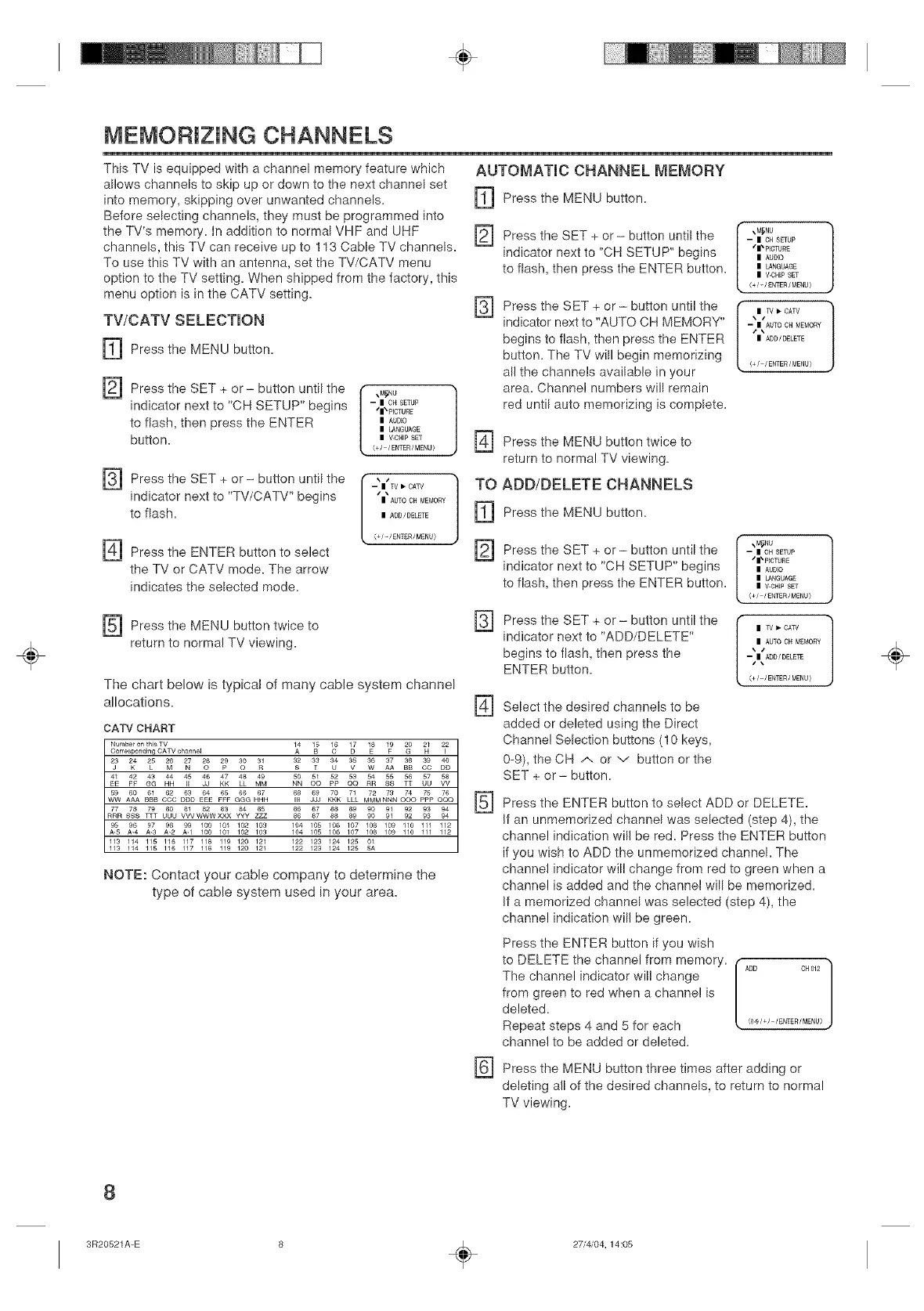
The chart below is typical of many cable system channel
allocations,
CATV CHART
Number on tN8 TV
Corresponding CATV ch_t_nel
E[ FF GG HH dJ KK LL MM
........ d_o& g ....
ww AAA BBB COO GGG HHH
77 78 79 80 81 82 83 84 85
RRR SSS ]_T UUU VVVWWWXXX yyy ZZZ
95 96 97 982 99 ............
A-S A-3 100 101 102 109
113 114 115 116 117 118 119 120 121
113 114 115 116 117 118 119 120 121
[[] LLL MMMNNN o0o ppp 0(3o
86 87 88 89 90 91 92 93 94
86 87 86 89 90 91 92 93 94
11044 1105 1106 1107 q_8 q_9 q1100 q111 112
1122 1123 11244 112550A1
NOTE: Contact your cable company to determine the
type of cable system used in your area,
AUTOMATIC CHANNEL MEMORY
[_ Press the MENU button,
[_ Press the SET button until the
+ or
indicator next to "CH SETUP" begins
to flash, then press the ENTER button,
[]
Press the SET + or - button until the
indicator next to "AUTO CH MEMORY"
begins to flash, then press the ENTER
button. The TV will begin memorizing
all the channels available in your
area. Channel numbers will remain
red until auto memorizing is complete.
-- | CH SETUP
"*1_PICTURE
| AUDIO
| LANGUAGE
| V-CHIPSET
<+/- / ENT£R/ M£NU}
ItTV I_CATV 1
-- | AUTO OH MEMORY
z\
| ADD/DELETE
<+/ /ENTER/MENU>
D
TO
i]]
@
[]
[]
@
Press the MENU button twice to
return to normal TV viewing.
ADD/DELETE CHANNELS
Press the MENU button.
Press the SET + or - button until the
indicator next to "CH SETUP" begins
to flash, then press the ENTER button.
Press the SET + or - button until the
indicator next to "ADD/DELETE"
begins to flash, then press the
ENTER button.
%MSNU
-- I OH SETUP
,t|_ PICTU£E
I AUDIO
I LANGUAGE
I V.CHI£ SET
<+/ /ENTER /MENU}
| TV _. CA_/
| AUTO CH MEMORY
--,|\ ADOi DELETE
<+/_/ENTER/MENU}
Select the desired channels to be
added or deleted using the Direct
Channel Selection buttons (! 0 keys,
0-9), the CH /.. or v button or the
SET + or - button.
Press the ENTER button to select ADD or DELETE.
if an unmemorized channel was selected (step 4), the
channel indication will be red. Press the ENTER button
if you wish to ADD the unmemorized channel. The
channel indicator will change from red to green when a
channel is added and the channel will be memorized.
if a memorized channel was selected (step 4), the
channel indication will be green.
[]
Press the ENTER button if you wish
to DELETE the channel from memory.
The channel indicator will change
from green to red when a channel is
deleted.
Repeat steps 4 and 5 for each
channel to be added or deleted.
Press the MENU button three times after adding or
deleting all of the desired channels, to return to normal
TV viewing.
÷
8
3R20521A-E
÷
27/4/04,14:05


 To Next Page
 Loading...



