EasyManua.ls Logo

MEN G233 - User Buttons Functionality

MEN G233
25 pages
Print Icon
To Next Page IconTo Next Page
To Previous Page IconTo Previous Page
Loading...
Functional Description
20G233-00 E1
2017-10-20
Page 24
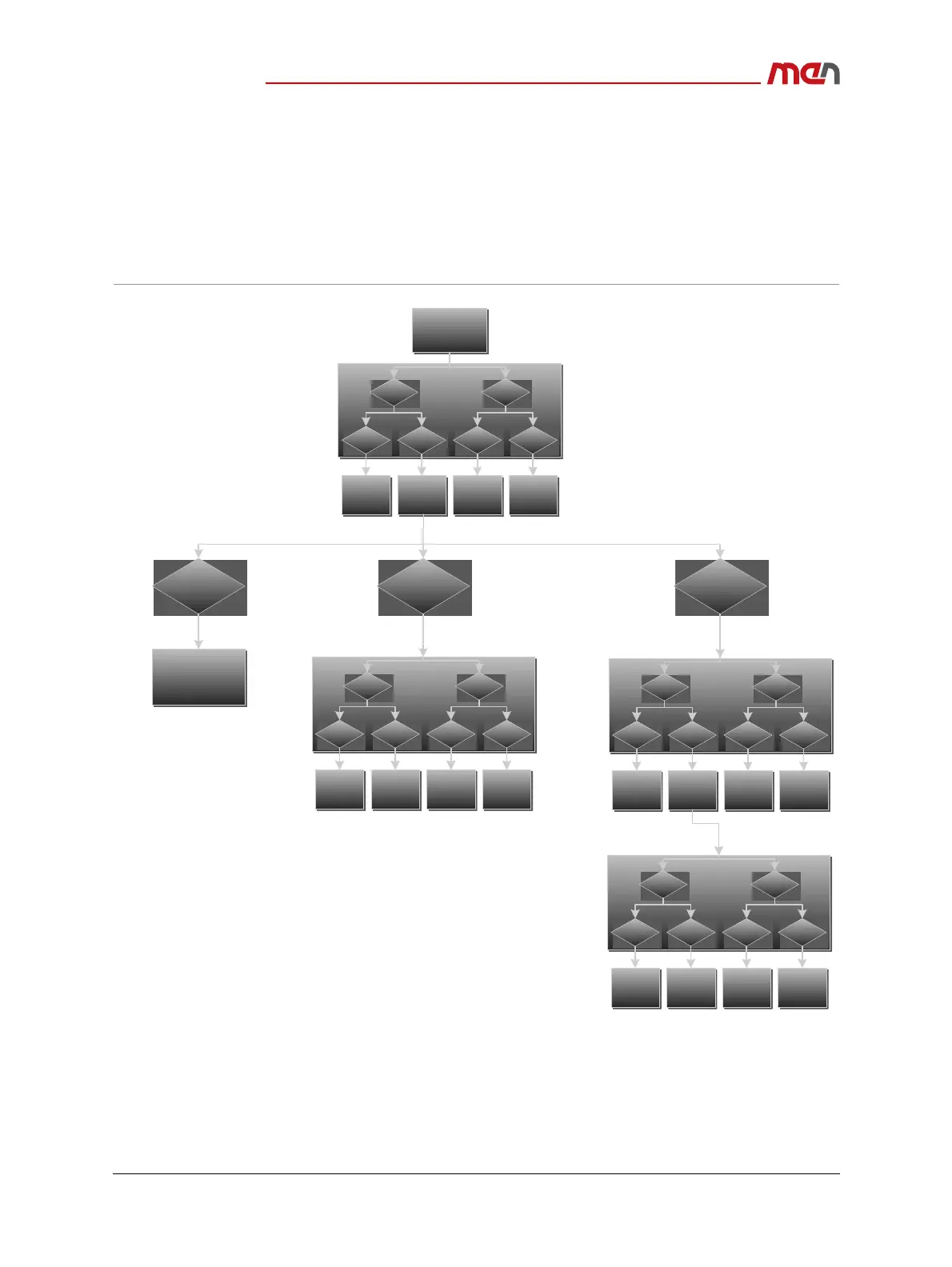
3.7 User Buttons
The functionality of the buttons depends on how long a button is pressed and where the
marker is located in the HTML structure. Short and long pressing is defined as follows:
• Short: shorter than t4=1s
• Long: longer than t4=1s
Figure 6. User button functionality
HTMLElement
B1 B2
short shortlong long
Next
Element
Previous
Element
Choose
Element
Parent
Element
B1 B2
short shortlong long
NextOption
Previous
Option
Choose
Option
Previous
Page
Element=Button/
Submit/Checkbox/
Radiobutton
Element=Select/
dropdown
Transmit
Informationto
Server
B1 B2
short shortlong long
Next
Element
Previous
Element
Choose
Element
Parent
Element
Element=Text
B1 B2
short shortlong long
NextPosition
Previous
Position
Choose
Position
Parent
Element/
Save
B1 B2
short shortlong long
Nexttoken
Previous
token
Choose
token
Cancel