Linking&Unlinking
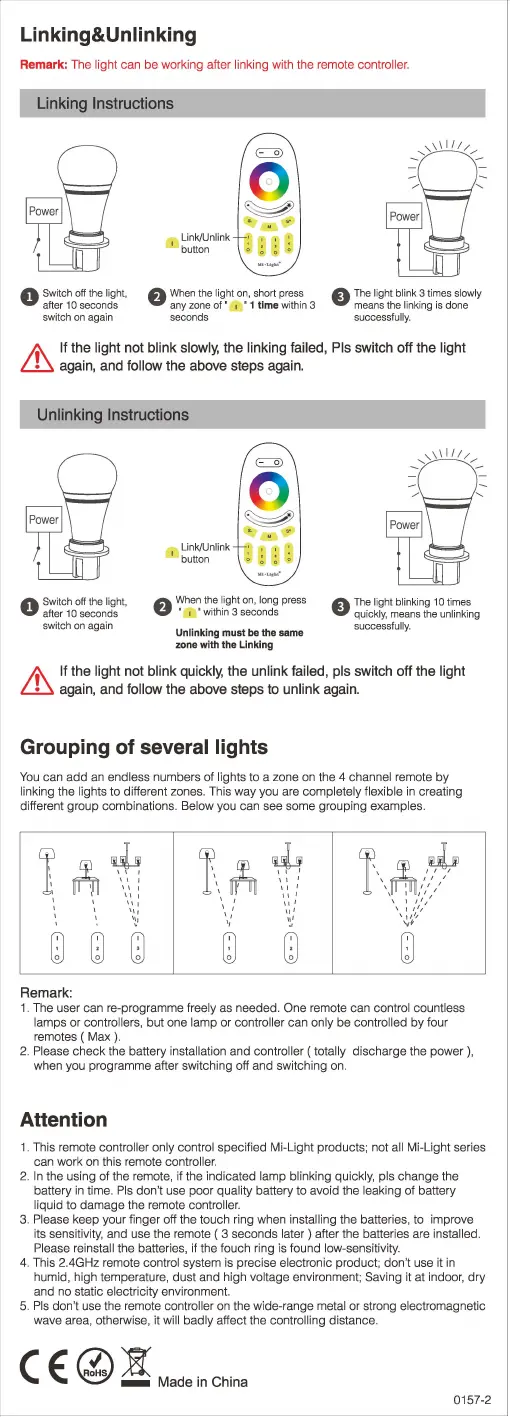
Remark: The light can be working after linking with the remote controller.
Linking Instructions
0
Swi
tch off the ligh
t,
after
1 o
seconds
switch
on
again
Link/Unlink
button
...
.
......
f)
When the light on, short press
any
zone
of'
, • 1 time
within
3
seconds
A
Th
e light blink 3 times slowly
V
mea
ns
the
link
ing
is
done
successfully
.
!.\
If the light not blink slowly, the linking failed, Pis switch off the light
~
again, and follow the above steps again.
Unlinking Instructions
0
Switch off the light,
after
1 O
seconds
switch on again
Link/Unlink
button
f)
When the
li
ght on, long press
' 1 ' within 3 seconds
Unlinking
must
be
the
same
zone
with
the
Linking
e
~~~~i
~~
~:~~n~~~
~
l~~~g
successfully.
!.\
If the light not blink quickly, the unlink failed, pis switch off
the
light
~
again, and follow the above steps to unlink again.
Grouping of several lights
You
can add an endless numbers of lights to a zone on the 4 channel remote
by
linking the lights to different zones. This way you are completely flexible in creating
different group combinations.
Below you can see some grouping examples.
!
rt\
~
'
rm
~
r.
~
:~
,, '
'
'''
"'
'
"'
\ I
/I
I
"'
'
"'
\ :
,'
1:'1
'
'
'
"'
'
'"
'
'
"•
'"
\
11
1
1
'
't1
"
\~
'11
1
1
"
"'
0 0
m
0
m
0
Remark:
1. The user can re-programme freely as needed. One remote can control countless
lamps
or controllers, but one lamp or controller can only be controlled by four
remotes ( Max ).
2.
Please check the battery installation and controller
(totally
discharge the
power)
,
when you programme after switching off and switching on.
Attention
1. This remote controller only control specified Mi-Light products; not all Mi-Light series
can work on this remote
controller.
2. In the using of the remote, if the indicated lamp blinking quickly, pis change the
battery in time.
Pis don't use poor quality battery to avoid the leaking
of
battery
liquid to damage the remote controller.
3. Please keep your finger off the touch ring when installing the batteries, to improve
its sensitivity, and use the remote ( 3 seconds
later)
after the batteries are installed.
Please reinstall
the batteries, if the touch ring is found low-sensitivity.
4. This 2.4GHz remote
control system is precise electronic product; don't use it in
humid, high temperature, dust and high
voltage environment; Saving it
at
indoor, dry
and no static
electricity environment.
5.
Pis don't use the remote controller on the wide-range metal or strong electromagnetic
wave area, otherwise, it will badly affect the controlling distance.
(
L"0.Xf
~
~
- Made
in
China
0157-2


 To Next Page
 Loading...