Mi
•Light®
FUT095
RGBW
remote
control
with
buttons
FUT096
Touch
screen
RGBW
remote
control
Product Features
This manual describes two types of RGBW remote controls used for our RGBW product.
Both of them have same functions but different design. Each remote control can control
the led lights
up
to four different zones,
change
the color, dim/brighten the lights,
warm/cool white, different programs.
In
this manual.
Technical Parameters
Product Name: RGBW remote control with buttons
Model No.: FUT095
Voltage: 3V(AAA • 2PCS)
Transmission Frequency: 2.4GHz
Modulation Method: GFSK
Transmitting Power:
6dBm
Standby Power Consumption: 20uA
Control Distance: 30m
Size:
s2.s
·21·12omm
Product Name: Touch screen
RGBW
remote cont
rol
Model No.: FUT096
Voltage: 3V(AAA • 2PCS)
Transmission Frequency: 2.4GHz
Modulation Method: GFSK
Transmitting Power:
6dBm
Standby Power Consumption: 20uA
Control Distance: 30m
Size:
s2.s·21·12omm
Products Key Diagram
1
20mm
21mm
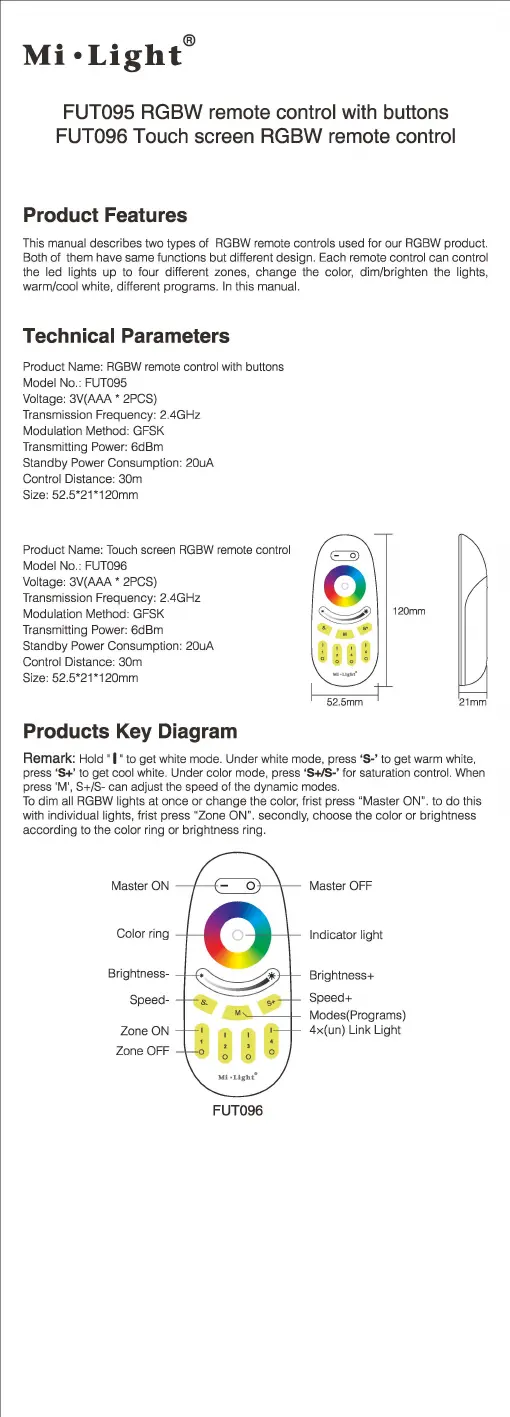
Remark: Hold · 1 · to get white mode. Under white mode, press 'S-' to get warm whi
te,
press 'S+' to get cool white. Under color mode, press '
S+ls-
' for saturation control. When
press 'M', S+/
S-
can adju
st
the speed of the
dy
namic modes.
To
dim
all RGBW lights at once
or
change the color, frist press "Master ON". to
do
this
with individual lights, frist press "Zone ON
".
secondly, choose the color or brightness
according to the color ring
or
brightness ring.
Master ON
Color ring
Brightness-
Speed-
Zone ON
Zone OFF
FUT096
Master OFF
Indicator light
Brightness+
Speed+
Modes(Programs)
4x(un)
Link Light


 To Next Page
 Loading...