5 Intelligent control
(1) Click " Smart " at the bottom.
(2) Click " + " in the upper right corner to create intelligent control.
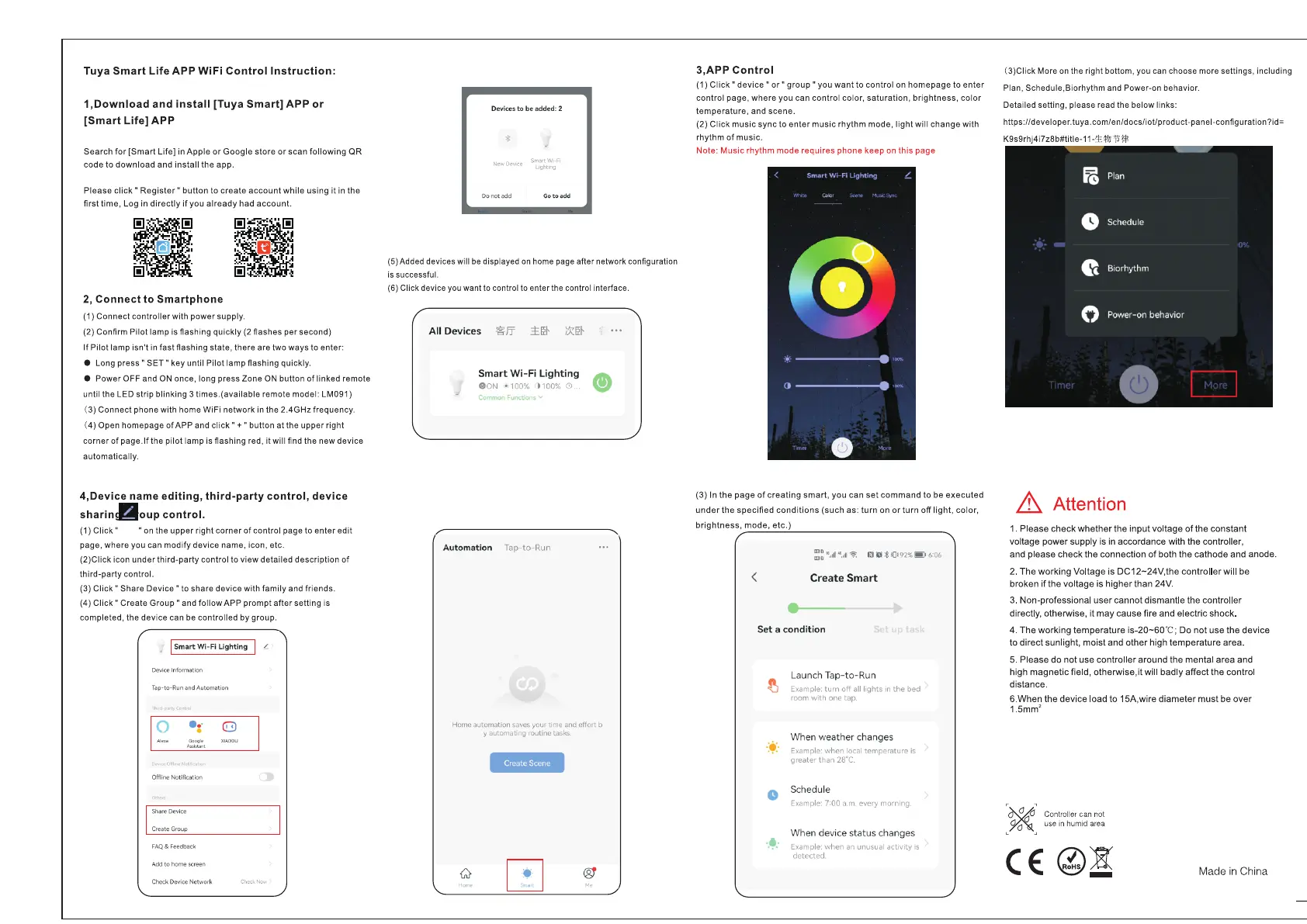
Tuya
Smart
Life
APP
WiFi
Control
Instruction:
1,Download
and
install
[Tuya
Smart]
APP
or
[Smart
Life]
APP
Search
for
[Smart
Life] in
Apple
or
Google
store
or
scan
following
QR
code
to
download
and
install
the
app.
Please
click"
Register"
button to create account while using
it
in the
first time, Log in
directly
if
you
already
had
account.
2, Connect to Smartphone
(1)
Connect
controller
with
power
supply.
(2)
Confirm Pilot lamp is flashing quickly
(2
flashes per second)
If
Pilot lamp isn't
in
fast flashing state,
there
are two ways to enter:
• Long
press"
SET"
key until
Pilot
lamp flashing quickly.
•
Power
OFF and ON once, long press Zone ON button
of
linked remote
until the LED
strip
blinking 3
times.(available
remote model: LM091)
(3)
Connect phone with home WiFi network in the
2.4GHz
frequency.
(4)
Open
homepage of
APP
and
click"+"
button at the upperright
corner
of
page.If
the
pilot
lamp is flashing red, it
will
find
the
new
device
automatically.
4,Device name editing, third-party control, device
sharin.oup
control.
(1)Click"
"on
the
upper
right
corner
of
control page to
enter
edit
page,
where
you can
modify
device name, icon, etc.
(2)Click
icon
under
third-party
control to
view
detailed
description
of
third-party
control.
(3)
Click"
Share
Device"
to share
device
with
family
and friends.
(4) Click" Create Group"
and
follow
APP
prompt after setting
is
completed,
the
device
can be controlled by group.
~
I
Smart
W
i-
Fi
Lighting
I /
Device Information
Tap-to-Run and Automation
•··
.
Offli
neNotificat
ion
I
ShaceDe,ke
:
,.at,G,ocp
FAQ&Feedback
Add to home
sere-en
Che<:kDeviceNetwo
rk
Devices
to
be added: 2
Do
not
add
SmartWi-Fi
Lighting
Goto
add
(5)Added devices will
be
displayed
on
home page after network configuration
is successful.
(6) Click device you want to control to enter the control interface.
All Devices ~
ff
::!::
~r
)X
~r
Smart Wi
-F
i
lighting
8
0N
• 100% 1100% 0
,nF
Ct>n
Automation
Tap-to-
Run
Home automation
saves
your ti
me
and effort b
y
auto
m
ating
routine
tasks
M-MSH:19
<Y
3,APP Control
(1)
Click"
device"
or"
group"
you
want
to
control
on
homepage
to
enter
control
page,
where
you can
control
color,
saturation,
brightness,
color
temperature,
and scene.
(2)
Click
music
sync
to
enter
music
rhythm
mode,
light
will
change
with
rhythm
of
music.
Note:
Music
rhythm
mode
requires
phone
keep
on
this
page
(3)
In
the
page
of
creating
smart,
you
can
set
command
to
be
executed
under
the
specified
conditions
(such
as:
turn
on
or
turn
off
light, color,
brightness,
mode,
etc.)
/
<
\.
Create Smart
-
Set
a condition
0
Launch
Ta
p-
to
-Run
Example:
turn off
all
lights
in
the bed
room
with one
tap.
When
weather
changes
Example:
when
local
temperature is
greater than
28~C.
Schedule
Example:
7:00
a.m.
every
morning
When device
status
changes
Example:
when
an
unusual activity
is
detected
(3)Click
More
on
the right bottom, you can choose more settings, including
Plan, Schedule.Biorhythm and Power-on behavior.
Detailed setting, please read the below links:
https://developer.tuya.com/en/docs/iot/product-panel-configuration?id=
K9s9rh
j4i7z8b#title-11-'E
!lo/)
'Ii-
1$
.&.
Attention
1.
Please check whether the input voltage
of
the constant
voltage power supply is
in
accordance with the controller,
and please check the connection
of
both the cathode and anode.
2. The working Voltage is DC12~24V,the controller will be
broken
if
the voltage is higher than 24V.
3. Non-professional user cannot dismantle the controller
directly, otherwise,
ii
may cause fire and electric shock.
4. The working temperature is-20-60-C; Do not use the device
to direct sunlight, moist and other high temperature area.
5. Please do not use controller around the mental area and
high magnetic field, otherwise.it will badly affect the control
distance.
6.When the device load to 15A,wire diameter must be over
1.5mm
2
Controller
can
not
use
in
humid
area
:~:
(€@&!
Made
in
China


 To Previous Page
 Loading...