Smart Link & Unlink: We have 3 methods to Link and Unlink to APP.
1. Long press "SET" 3 seconds,the purple will blink 3 times, the
device go into Smart Link/Unlink mode.
2. Use Linked remote, long press the linked Zone ON button for
3 seconds, the purple light will blink 3 times, the device go into
Smart Link and Unlink Mode.
3. Switch ON and OFF 3 times(ON-OFF-ON-OFF-ON) within 10
seconds, the purple light will blink 3 times, the device will go into
Smart Link and Unlink Mode.
Note:Pilot lamp red light always ON means device is not linked to
the APP, need to do above steps to link. Green light aways ON
means device is linked to APP; device is controllable.
Manual
Instruction
WiFi&BT 5-in-1 LED Strip
Controller
Model
No.:
WB5
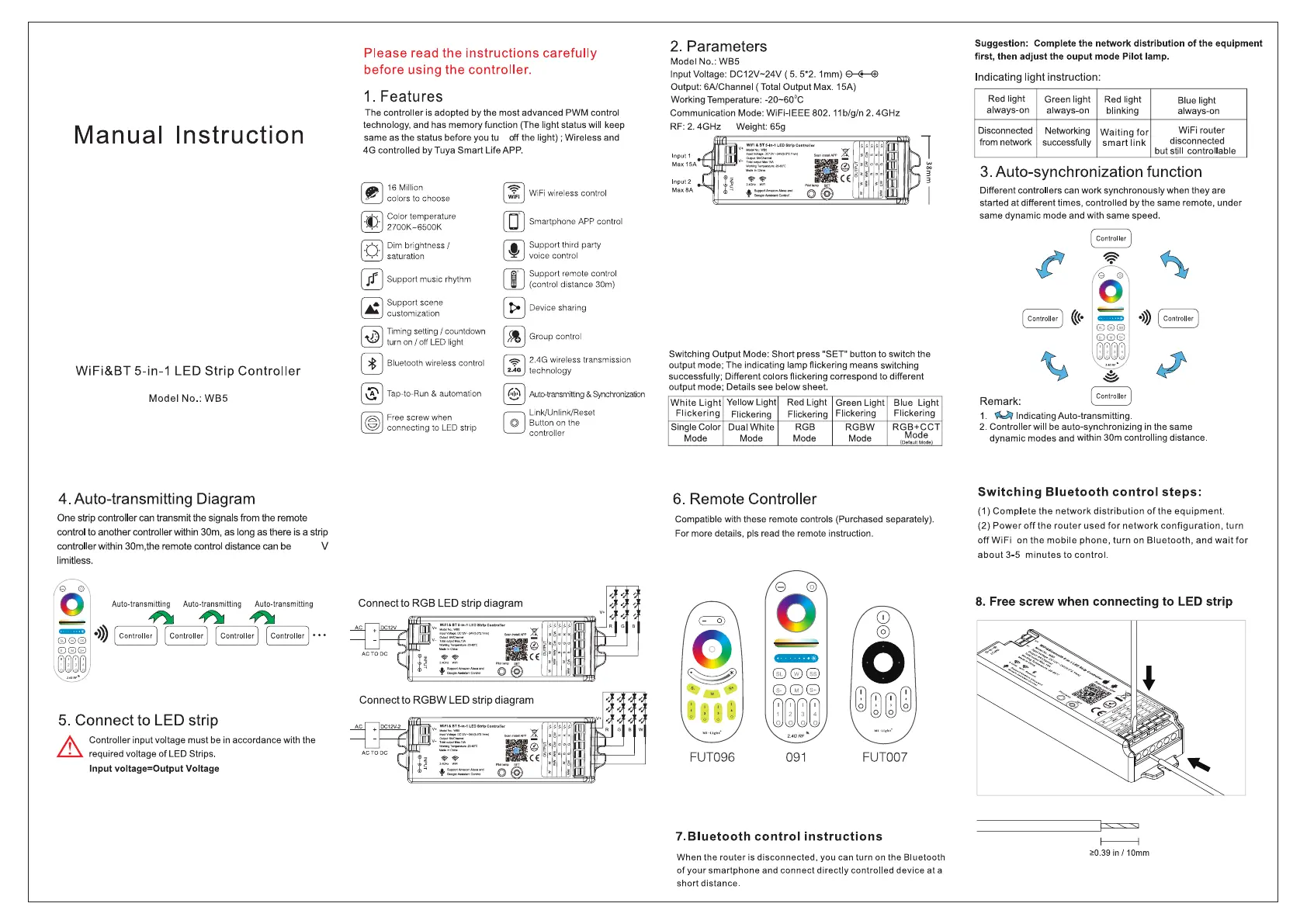
4. Auto-transmitting Diagram
One strip controller can transmit the signals from the remote
control to another controller within 30m, as long as there is a strip
controller within 30m,the remote control distance can be
V
limiHess.
Auto-transmitting
Auto-transmitting
~
~
5.
Connect
to LED strip
t Controller input voltage must be
in
accordance with the
~
required voltage of LED Strips.
Input voltage=Output Voltage
Connect
to
Single
Color
LED
strip
diagram
Please read the instructions
carefully
before using the controller.
1.
Features
The controller is adopted by the most advanced PWM control
technology, and has memory function {The light status will keep
same as the status before you
tu
ctf the light); Wireless and
4G controlled
byTuya
Smart Life APP.
r.-7 16Millionsof
~
colors to choose
~
Color temperature
~
2700K-6500K
~
Dim
brightness/
~
saturation
[lJ Support
music
rhythm
~
Support scene
~
customization
~
Timing
setting/
countdown
~
turn
on/
off
LED
light
[I]
Bluetooth wireless control
~
Tap-to-Run & automation
1/S\l
Free
screw
when
~
connecting to LED strip
~
~
WiFi wireless control
[DJ
Smartphone
APP
control
r:il
Support
third
party
~
voice control
[]J
Support remote control
(control distance 30m)
[EJ
Device
sharing
~
Group
control
($1
2.4G wireless transmission
~
technology
~
Auto-transmitting
&
Synchrorizatbn
~
Link/Unlink/Reset
Button
on
the
controller
Connect
to
CCT
LED
strip
diagram
Connect
to
RGB+CCT
LED
strip
diagram
2. Parameters
Model No.: WB5
Input Voltage: DC12V-24V (
5.
5*2. 1mm) 0-C---@
Output: BA/Channel ( Total Output Max. 15A)
Working Temperature: -20-60"C
Communication Mode: WiFi-lEEE 802.
11
b/g/n
2.
4GHz
RF:
2.
4GHz Weight: 65g
lnpul2
Max
BA
.,
3
3
I
Switching Output Mode: Short press "SET" button to switch the
output mode; The indicating lamp flickering means switching
successfully; Different colors flickering correspond to different
output mode; Details see below sheet.
White
Light
Yellow Light Red Light
Green Light Blue Light
Flickering
Flickering Flickering
Flickering Flickering
Single Color Dual White RGB RGBW
RGB+CCT
Mode Mode Mode Mode
Mode
(Default~odel
6. Remote Controller
Compatible with these remote controls (Purchased separately).
For more details, pis read the remote instruction.
0
®
....a,
0
@0@
CD@@
~~~~
wmrnm
2.
4
GRF
I,,
Ml•U•kt
0
FUT096
091
FUT007
7.
Bluetooth control instructions
When
the
router
is
disconnected,
you
can
turn
on
the
Bluetooth
of
your
smartphone
and
connect
directly
controlled
device
at
a
short
distance.
Suggestion: Complete the network distribution of the equipment
first, then adjust the ouput mode Pilot lamp.
Indicating
light
instruction:
Red light
Green light Red light
Blue light
always-on
always-on
blinking always-on
Disconnected Networking
Waiting
for
WiFi
router
from network successfully
smart
link
disconnected
but sttill controllable
3. Auto-synchronization function
Different controllers can work synchronously when they are
started at different limes, controlled by the same remote, under
same
dynamic
mode
and
with
same
speed.
Controller
((C•
•>))
Controller
cJf
Remark:
1.
~
Indicating Auto-transmitting.
2.
Controller will be auto-synchronizing
in
the same
dynamic modes and within 30m controlling distance.
Switching Bluetooth control steps:
(1)
Complete
the
network
distribution
of
the
equipment.
(2)
Power
off
the
router
used
for
network
configuration,
turn
off
WiFi
on
the
mobile
phone, turn on
Bluetooth,
and
wait
for
about
3-5
minutes
to
control.
8.
Free screw when connecting
to
LED
strip
f----------1
>0.39
in/
10mm
rn


 To Next Page
 Loading...