Instructions for the Monitor
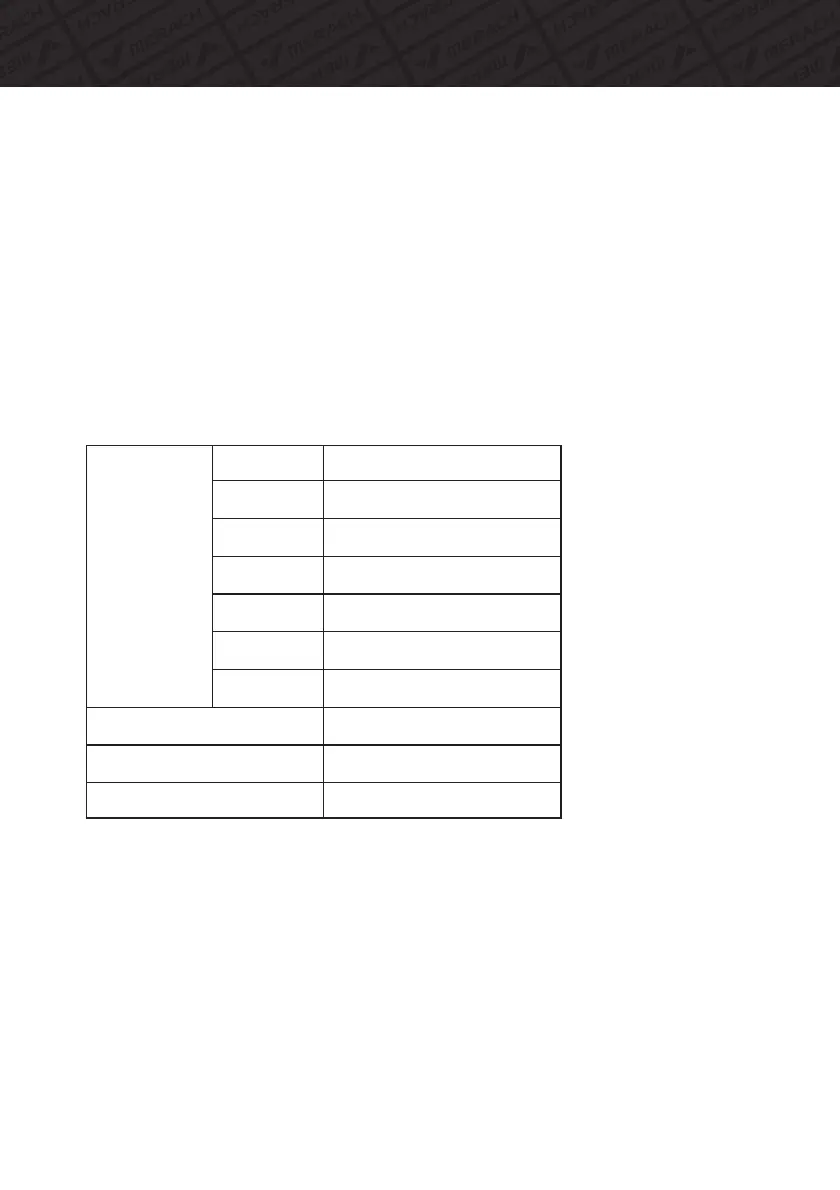
FUNCTION
AutoScan
Time
CurrentSpeed
TripDistance
TotalDistance
(ODO)
Calories
PulseRate
BatteryType
OperatingTemperature
StorageTemperature
Switchdataevery5seconds
0:00-99:59
Maximumspeed999.9km/h
0.00〜9999( ML)KM
0.0〜9999( ML)KM
0.0〜9999Kcal
40〜240BPM
2pcsAAAorUM-4batteries
0℃〜+40℃
-10℃〜+60℃
MONITORMANUAL
Note:
1. If the display is faint or shows no figures ,please replace the batteries.
2. The monitor will automatically shut off if there is no signal received after 4 minutes .
3. The monitor will turn on automatically after restarting the exercise or pressing the
button.
4. The monitor will automatically start calculating when you start to exercise and will
stop calculating when you stop exercising for 4 seconds .
7. PULSE RATE:
(1) Press MODE button until “PULSE” appears. Before measuring your pulse rate,
please place your palms of your hands on both of your contact pads and the monitor
will show your current heart beat rate in beats per minute (BPM) on the LCD after
6~7 seconds.
Remark: During the process of pulse measurement, because of the contact jamming,
the measurement value may be higher than the virtual pulse rate during the first 2~3
seconds, then will return to normal level. The measurement value can not be
regarded as the basis of medical treatment.
(2)Press“MODE”button until“pulse”appears, press“SET”button to set exercise
calories. When the“SET”is zero, the computer will stop about 1 seconds after the
start of the time.
16



 To Next Page