Instructions for the Monitor
FUNCTION AND OPERATIONS:
FUNCTIONAL BUTTONS:
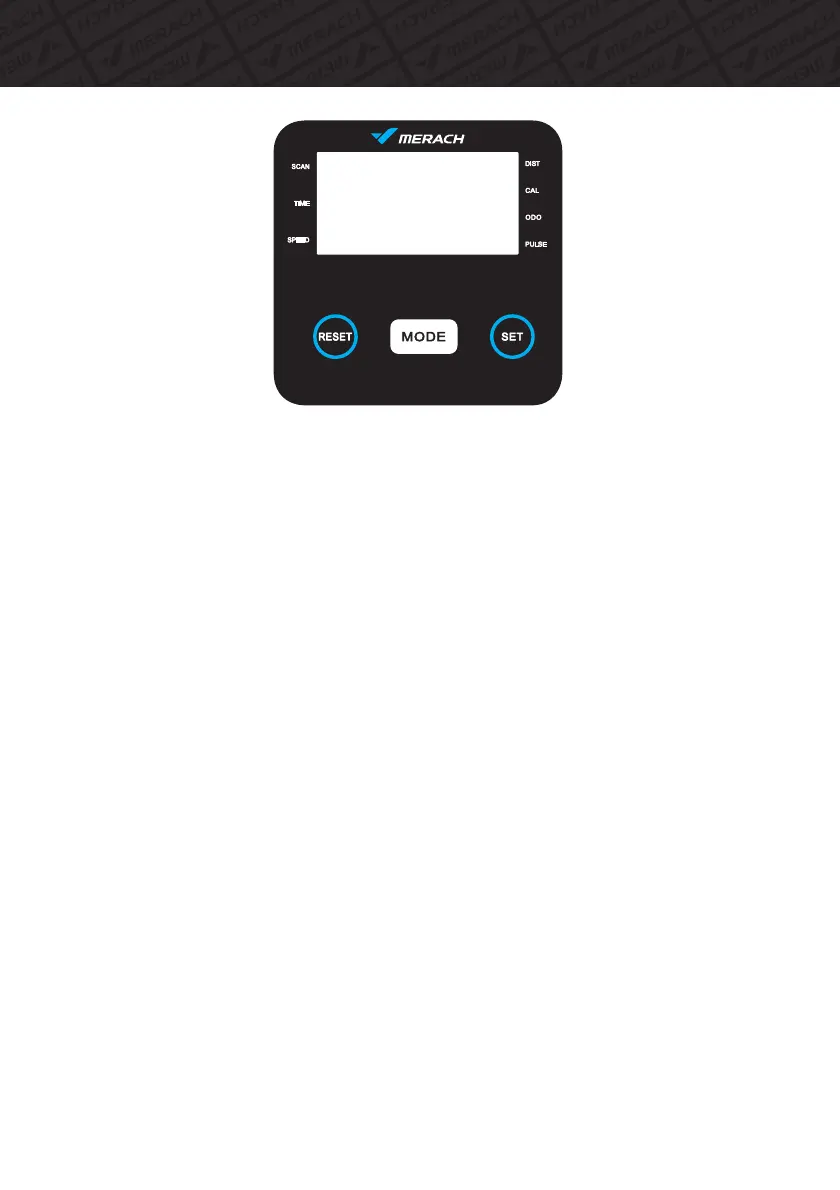
MODE - Press to select function.Long press to reset time/distance/calorie.
SET - To set the values of time/distance/calories and pulse when not in scan mode.
RESET - Press to reset time/distance/calories and pulse.
1. SCAN:
Press “MODE” button until “SCAN” appears, the monitor will switch the display
every 6 seconds in the following order :Time/speed/distance/ODO/calorie/pulse .
2. TIME:
(1)Count the total time from exercise start to end.
(2)Press “MODE” button until“TIME” appears, press“SET” button to set exercise time.
When the“SET” is zero, the monitor will stop 1 second after the start of the time.
3. SPEED: Display current speed.
4. DIST:
(1)Count the distance from exercise start to end.
(2)Press “MODE” button until “DIST” appears, press “SET” button to set exercise distance.
When the“SET” is zero, the monitor will stop about 1 second after the start of the time.
5.ODO:
The total distance which this function is refers to from battery capacity period runs.
6.CALORIES:
(1)Count the total calories from exercise start to end.
(2)Press “MODE” button until “CAL” appears, press “SET” button to set exercise calories.
When the “SET” is zero, the monitor will stop about 1 second after the start of the time.
15



 To Next Page