Smoke and Heat Exhaust Control Unit mcr 9705 – User Instruction Manual
Strona 9 z 24
on the jumpers H6 and H5 (Pic. 3 item 46 and item 47 table of
settings below),
SW1-5 ON - Pressing the button once causes the vent to open for the time
specified by appropriate settings on the H6 and H5 jumpers
(Pic. 3 item 46 and item 47).
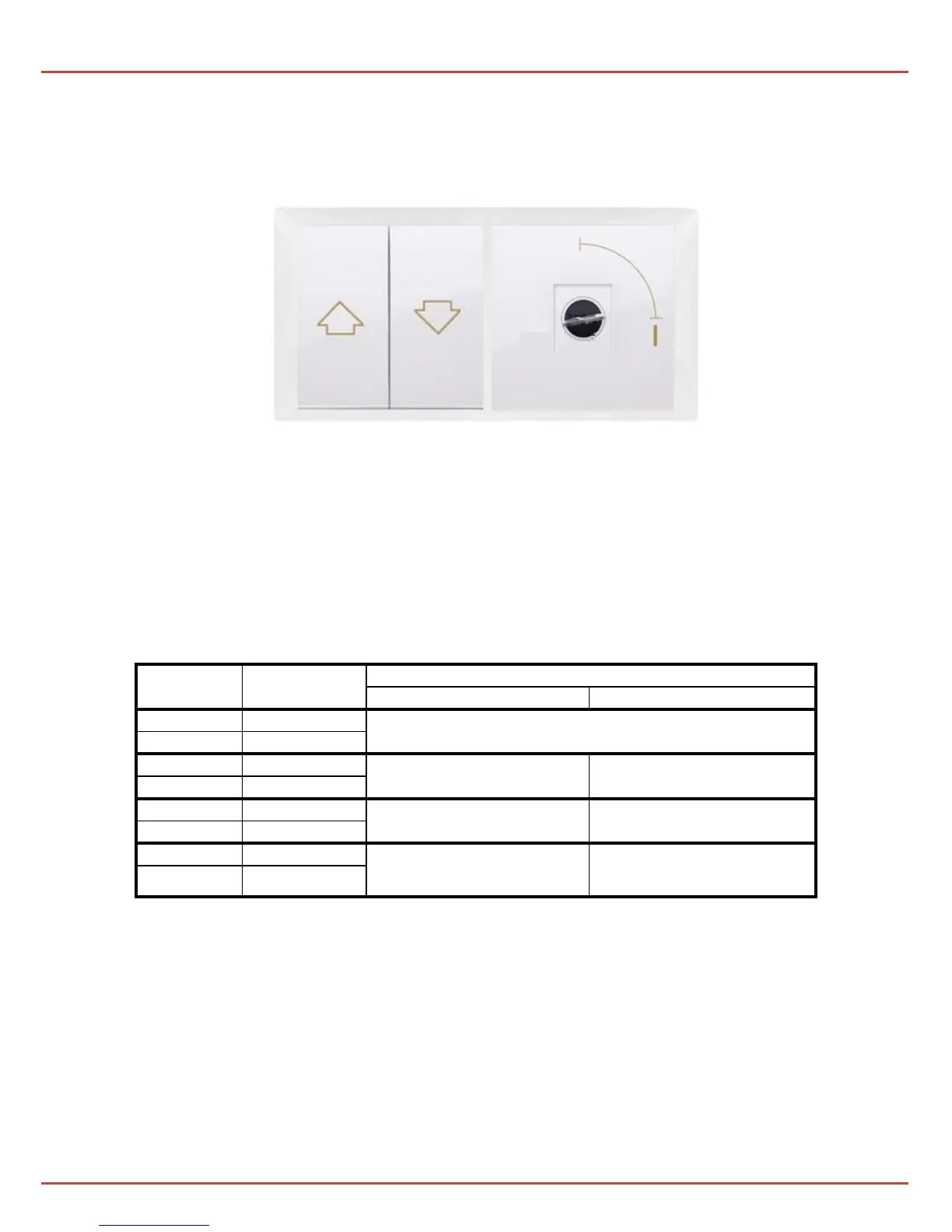
Pic. 4 Sample ventilation button and a two-position key switch.
If the system is additionally equipped with a key switch (Pic. 4), setting the ignition
switch in the "1" position activates the "hatch" mode in place of the "ventilation"
mode. When "hatch" mode is active:
- the weather station’s displays don’t cause vent’s closing,
- it is not possible to close the vent with the ventilation button ,
- the vent opens, just like in "ventilation" mode, by pressing the ventilation button,,
- the time of opening the damper depends on the settings on the H6 and H5 jumpers,
the vents:
*default settings
NOTE!!
The ventilation function is inactive when an emergency alarm is
active or if there’s mains power outage!


 To Next Page