Setting up the surround controller
29
Rear panel
Connecting the surround controller
Audio connections
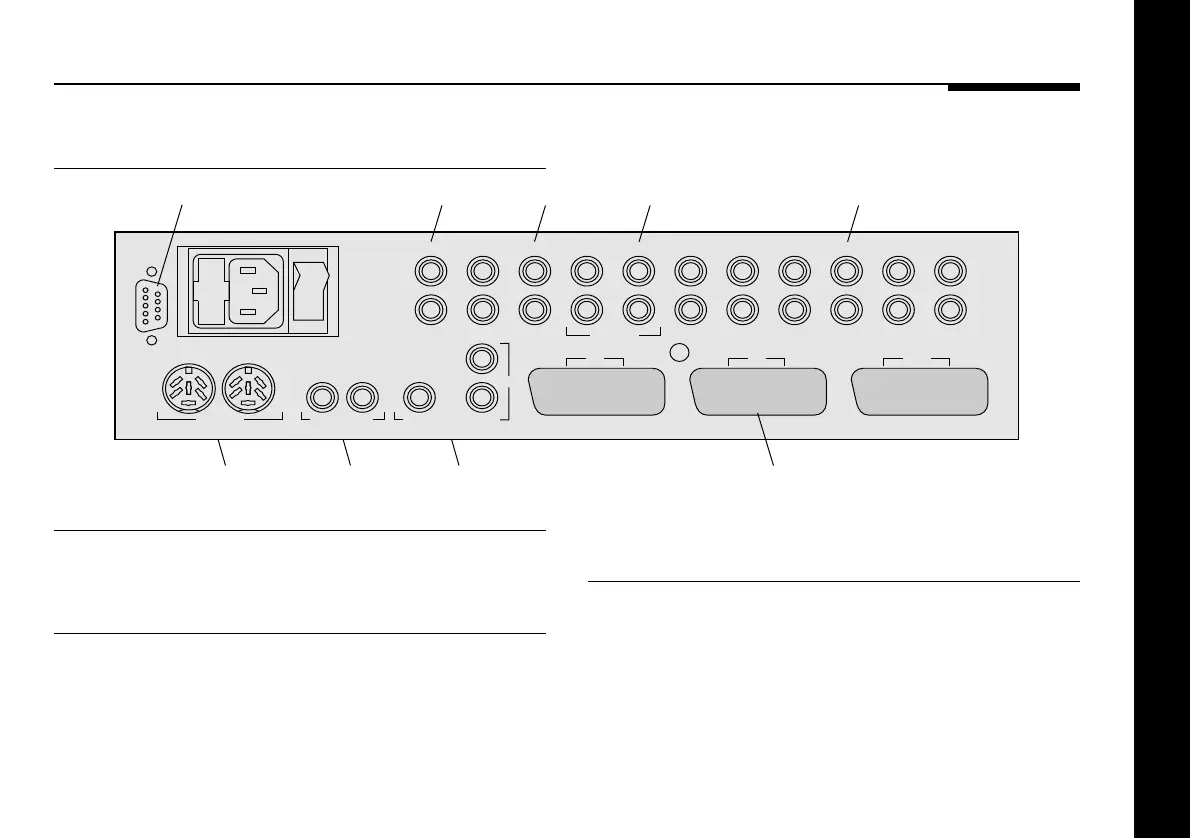
The following table gives details of the six audio inputs:
Use this input To connect to this
A1 A turntable pickup with optional MM/
MC module, or Tape1 input.
A2 to A6 Other audio sources.
The following table gives details of the audio outputs:
Use this output To connect to this
Main-L, Main-R, Centre, Power amplifiers or active
Sub, Surr-L, Surr-R loudspeakers.
Tape Out Tape recorder or two-room outputs.
The audio inputs and outputs should be connected using high-
quality screened cable, taking care to connect the left and right
channels correctly.
OFF
ON
COMMS
Meridian Comms Only
RS232
RS232
connection
VCR TV
C-VIDEO OUT
LD TV
VCR1
VCR1/V3 TV/V2
C-VIDEO IN
LD/V1
TAPE OUT
Trigger
A1SURR-R SUB MAIN-R A6 A5 A4 A3 A2
L
R
L
R
Comms
connections
Video
outputs
Video
inputs
SCART audio/video
connections
Main audio
outputs
TAPE1/LPSURR-L CENTRE MAIN-L VCR1 TV LD RADIO CD
Surround
outputs
Tape/two-room
outputs
Audio
inputs



 To Next Page