5
Changing the volume and
muting the sound
You can adjust the volume between 0dB and
99dB in precise steps of 1dB, where 9dB is
equivalent to doubling the loudness.
To change the volume
Turn the volume knob to the right of the
product.
The display shows the current source and volume
setting:
To mute the sound
Press the volume knob.
The display shows Mute:
To unmute the sound
Press the volume knob again.
Alternatively the sound is unmuted if you increase
the volume.
•
•
•
Setting the alarm
The product includes an accurate alarm clock,
which you can use to wake you up in the morning
or remind you of an appointment with a tone, or
the last radio station you were listening to.
Before using the alarm you should set the clock
to the correct time; see
Adjusting the clock
, page
14.
To set the alarm
Press h, Adjust, Clock, Alarm to display
the ALARM menu.
Press Alarm to turn the alarm On.
The Alarm display allows you to set the alarm
time:
9:45
^
Alarm
On
¬
`
Next
ALARM
Adjust hours
Press ` or ^ to set the hours (24-hour
clock).
Press Next.
In a similar way you can adjust the minutes,
choose the source from Radio or Tone, and set
the volume.
At any stage press ¬ to return to the CLOCK
menu with the settings you have chosen.
To unset the alarm
Press h, Adjust, Clock, Alarm to display
the ALARM menu.
Press Alarm to turn the alarm Off.
•
•
•
•
•
•
•
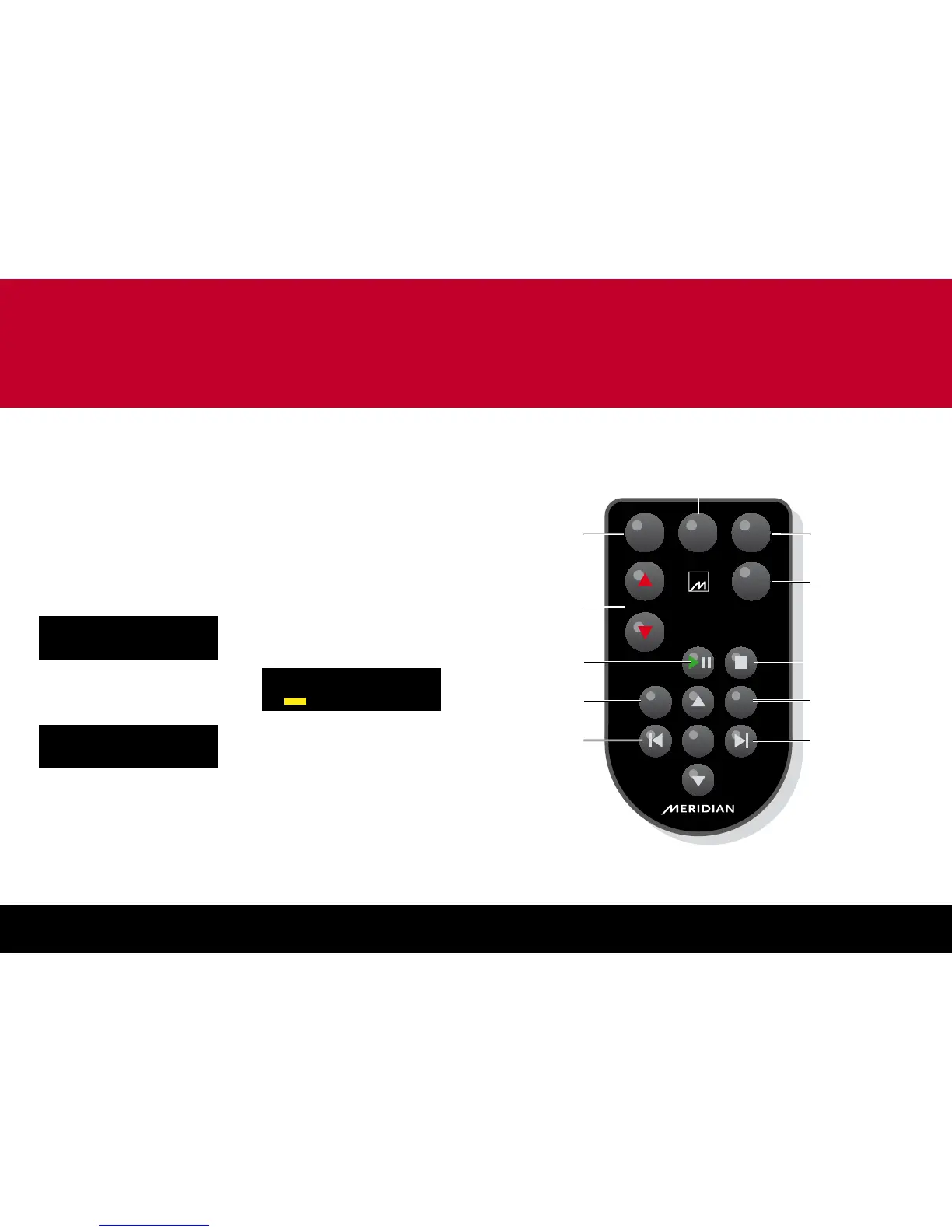
General functions
DISC
RADIO
Band
AUX
OFF
Menu
Mute
No
Enter
Yes
Display
Volume
Select the disc source
Change the volume
Change the displayed
information
Previous station (radio)
Previous track/chapter
(disc, iPod)
Play/pause (disc, iPod)
Select and step
between external inputs
Switch to standby
Next station (radio)
Next track/chapter
(disc, iPod)
Mute
Stop (disc, iPod)
Menu (DVD)
Select the radio and step between bands
Note: The remote control is supplied with a button cell battery already fitted; pull out the plastic tab to
activate the battery.
Operating the product with the remote control


 To Next Page