20
ENABLING THE PROTECTOR SYSTEM:
• The Protector System is automatically enabled once the beams are connected to the opener and the
power is turned on for 2 minute initialising period.
• During this 2 minute initialising period there should be no obstruction placed between the beams, and
n
o door activations. If an activation or obstruction does occur, the door will not reverse and the 2 minute period
will need to be recommenced.
D
ISABLING THE PROTECTOR SYSTEM:
If the protector System is not required, it will be necessary to deactivate the opener so that normal operations
can occur.
NOTE: This process also Erases all the Transmitter codes from the memory.
• Disconnect power, Remove the Protector System wiring from the opener, reconnect power.
• Press and hold the “learn” button until the learn indicator goes out, approx 6 seconds.
• Relearn the transmitter codes you wish to install, see page 21 WIRELESS PROGRAMMING
• The opener can now operate without the Protector System installed.
NOTE: Requires The Protector System
TM
(IR Beams) installed and initialised for 2 minutes
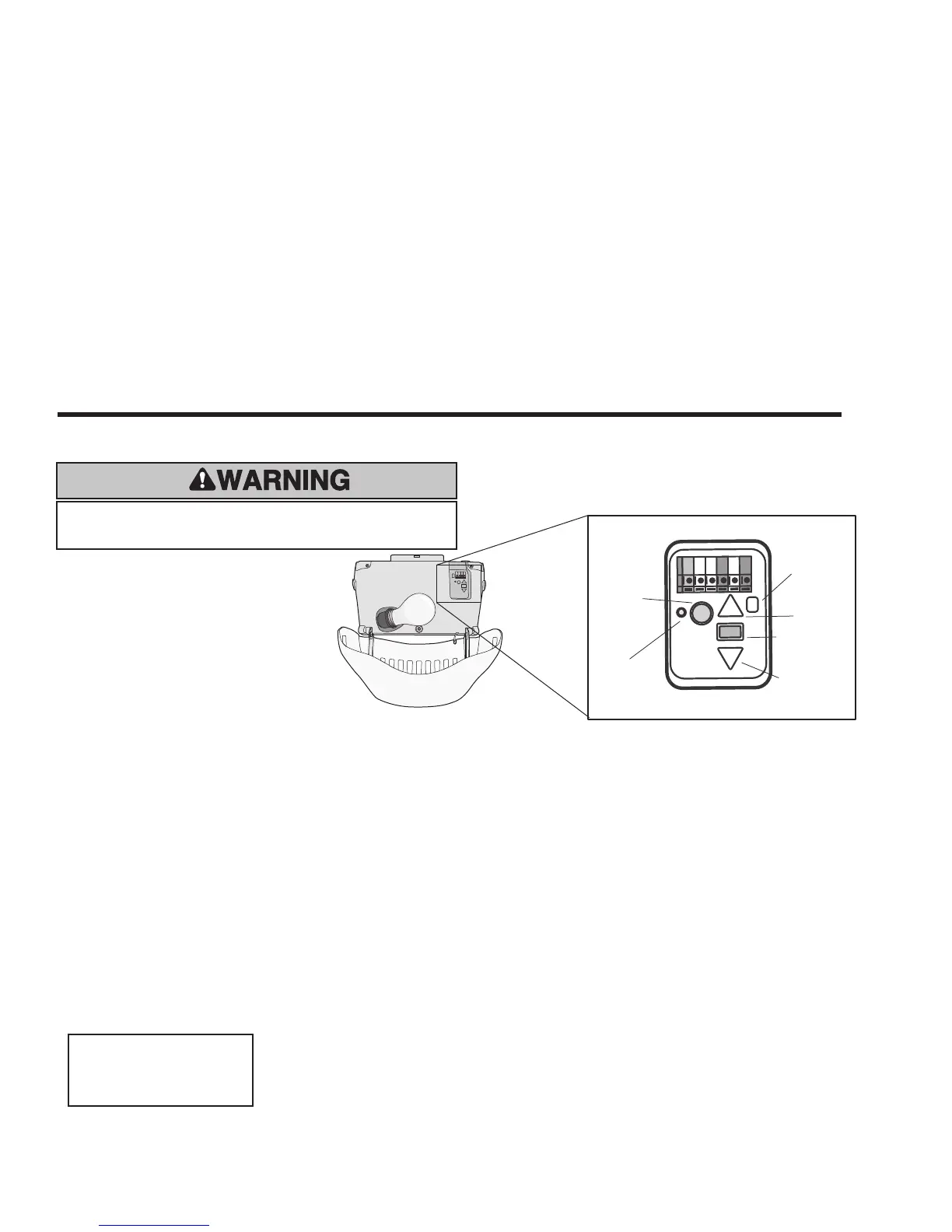
The Timer-to-close feature allows the door to automatically close after a specified time period that can be adjusted using the door
control buttons (figure 1). Prior to the door closing, the ‘Alert-2-close’ feature activates audible (garage door opener beeps) and visual
alerts (garage door opener lights flash) for 8 seconds before the door begins to close.
If the door encounters an obstruction while closing, the opener will make a second attempt to close the door. If an obstruction occurs
on the second attempt, the garage door opener will open, stop and WILL NOT close until the obstruction has been cleared, and the
opener has been operated again.
Enabling TTC using the buttons in Opener
Door must be in the closed position to commence the setup procedure.
With the door closed press and hold DOWN arrow button for 3 seconds to enter setup mode, when activated LED indicator will flash.
Press the Yellow learn button to toggle the 4 available modes shown below. The small LED indicator will flash the number of times
according to time delay set. Press Black rectangle button (learn limits button) to set and exit.
TIMER-TO-CLOSE FEATURE (TTC)
OFF = 1 long flash
1 min = 1 short flash
5 min = 2 short flashes
10 min = 3 short flashes
UP Arrow
Button
Learn Limits
Button
DOWN Arrow
Button
Battery
Status
LED
Learn
Button
LED
Figure 1
Door may operate unexpectedly, therefore do not
allow anything to stay in the path of the door.



 To Next Page