9
WIRELESS PROGRAMING (OPTIONAL ACCESSORIES)
NOTE: Transmitter(s) and wall button supplied with your opener are factory programmed.
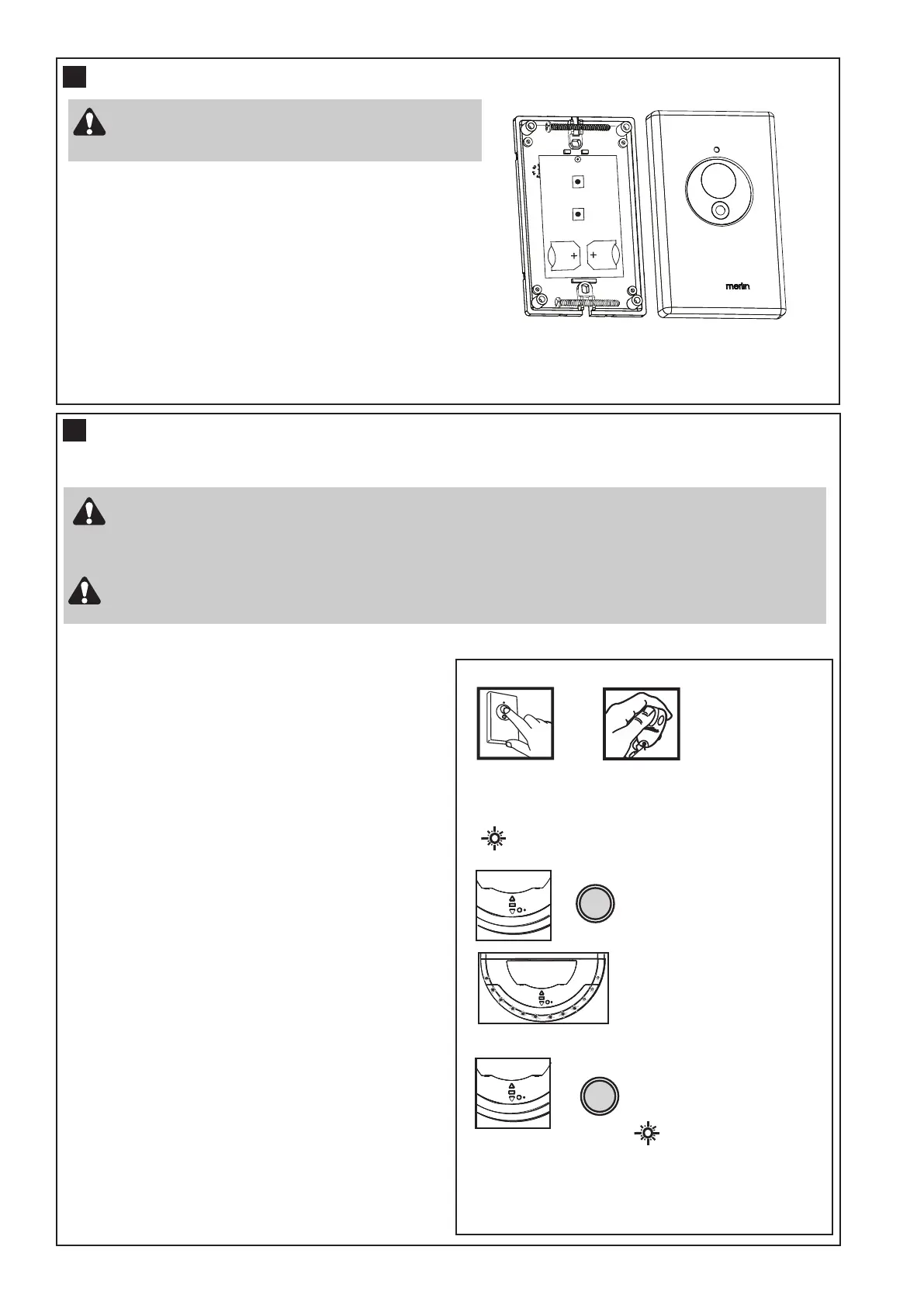
INSTALLING YOUR E128M WIRELESS WALL BUTTON
To install:
• Carefully pry open the E128M and locate the two screws for
mounting.
• Attach to the wall using the two screws and wall anchors
provided if mounting to a plaster wall. If using a recessed wall
box do not use anchors.
NOTE: Do not overtighten screws.
15
16
Disconnect power to the opener whilst installing
this accessory to prevent accidental activation.
Locate minimum 1.5 m above the floor.
Activate the opener only when the door is in full view, free of obstruction and properly adjusted.
No one should enter or leave garage whilst the door is in motion. Do not allow children to operate
push button(s) or transmitter(s). Do not allow children to play near the door.
Fix any wall control at a height of at least 1.5 m and within sight of the door but away from any
moving parts.
NOTE: The wall control supplied with your opener should be pre-programmed by the factory.
If adding a new wall control, program into the opener before mounting the unit as detailed in
section 16.
Press LEARN
or
LED will FLASH
TO ADD Transmitters / Wireless wall button
Press and hold down the desired
Button.
Press LEARN for 9 seconds
TO DELETE ALL REMOTES
LED on WILL TURN ON
After 9 seconds all remotes
are deleted and LED will go
out.
Release LRN button when
Courtesy LEDs
flashes once
NOTE: If adding an installed wall control (E128M)
you will need a second person to press and hold
the desired button. If not installed, program the
wall button into the opener before mounting.
ADDING transmitters using the LRN “LEARN”
button
• Press and hold down the button you wish to program
to the opener.
• The orange LED on the opener will flash to indicate
it is receiving signal from the transmitter.
• Press and release the “LRN” button.
• The courtesy LEDs will flash once.
• Ensure the door is clear of obstruction, then test the
transmitter.
Deleting ALL transmitter codes
NOTE: This deletes all transmitters and codes
• Press and hold the LRN learn button until the orange
indicator light goes out (approximately 9
sec).



 To Next Page