6
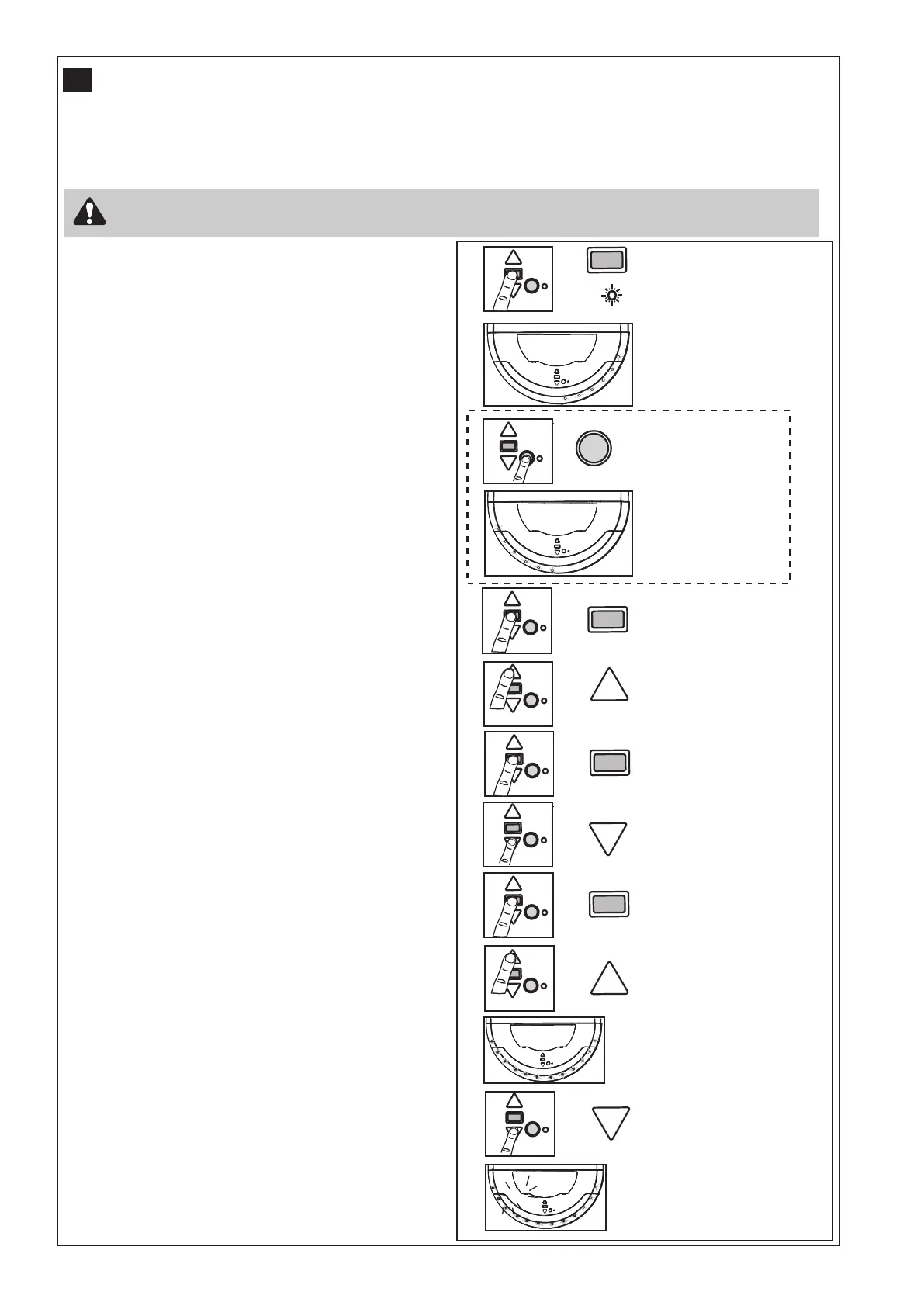
SETTING THE LIMITS FOR RIGHT OR LEFT HAND OPERATION AND FORCE
Travel limits set how far your door goes up and down. Your opener must be configured correctly for right or left
hand installation to operate correctly, if not the door will rotate in the reverse direction.
NOTE: The OVERDRIVE
TM
(MRC950EVO) opener is factory configured for right hand installation.
Press and hold
until
FLASHING
LED
Press & release to accept
selected hand.
If required: Use DOWN button to adjust
Press and hold to drive
door up to open
Press and hold to drive
door down to closed
If required: Use UP button to adjust
Activate door to open
Clo
se the door to test limits
Orange
LED ON &
Courtesy LEDS
on Dim
Motor will make a click &
FULL BRIGHT courtesy
LEDs will turn on
Right bank
will light up
(IF REQUIRED)
To change
press and hold
until correct
bank lights up
Left bank
will light up
for Left hand
installation
Click
Press & release to set the
UP limit
Press & release to set the
DOWN limit
The opener will operate during this procedure. Make sure the door is clear of obstruction.
Ensure your hands are away from any moving parts before activating the door.
Setting right or left hand operation:
• Ensure the door is positioned halfway and the opener
is engaged.
• Turn the power ON. After 2 seconds the Courtesy
LEDs will turn on.
• Press and hold the black (Limit) button until the
orange indicator LED starts flashing, and then
release. Either right or left courtesy LEDs will light
up.
• For right hand installations, the right side bank of
LEDs must light up, and for left hand installations,
the left hand bank must light up.
• If the incorrect bank of LEDs is illuminated, simply
press the Yellow learn button until the opposite bank
lights up.
• Press and release the Black limit set button to
accept hand. UP button will flash.
Setting the open (UP) limit:
• Press and hold the “UP” button, until the door
reaches the desired open position, and then release.
You can adjust the door by using the DOWN button
and UP button to adjust as necessary. Make sure
there is enough room for your vehicle to pass under.
• Press and release the Black limit set button to
acknowledge the Up position.
• Courtesy light flashes twice and DOWN button will
flash.
Setting the bottom (DOWN) limit:
• Press and hold the “DOWN” button until the door
reaches the desired closed position. If the door
closes too hard against the floor, use the UP and
DOWN button to adjust.
• Press and release the Black limit set button to
acknowledge the down position.
• Courtesy light flashes twice and UP button will flash.
Setting the FORCE:
• Press and release the UP button. The door will travel
to the UP limit and the DOWN button will flash.
• Press and release the DOWN button. The door will
travel to the DOWN limit.
• The indicator LED will stop flashing indicating the
force has been learned.
NOTE: The courtesy LEDs will go out after 2.5
min.
• The door must travel through a complete cycle, UP
and DOWN, in order for the force to be set properly.
If the opener cannot open and close your door fully,
inspect your door to ensure that it is balanced
properly and is not sticking or binding.
11



 To Next Page