13
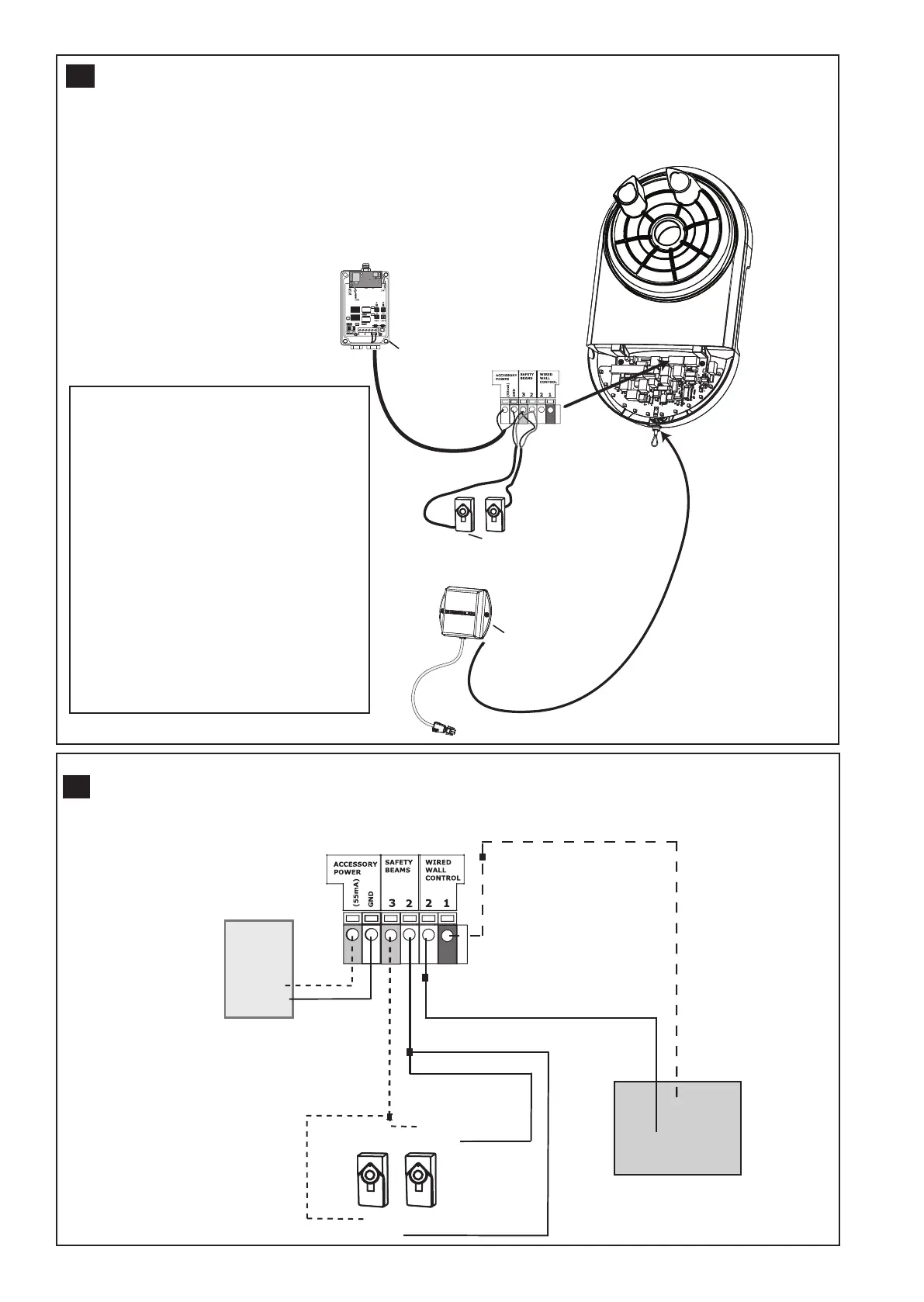
SPECIAL FEATURES (OPTIONAL ACCESSORIES)
1. 12 VDC power output for external devices
2. The Protector System
TM
IR Beams - C77
3. Standby Power Unit (battery backup E475M-12V, included accessory)
20
rx
white/black
white
white/black
white
12 vdc
gnd
External
Device
Keyswitch or
push button
com
no
12V DC
TYPICAL WIRING DIAGRAM OVERDRIVE
TM
(MRC950EVO) -
Information for Service Personnel
21
MOUNTING THE EVERCHARGE
STANDBY POWER UNIT (SPU)
• The SPU can be mounted to either the ceiling
or a wall within 0.9 m (3') of the opener.
• Position the SPU as desired to a structural
support (ceiling joist or wall stud).
• Attach the SPU to the support using the
mounting holes on either side of the SPU.
• Secure the SPU using the 1-1/2" lag screws
(2) provided with the SPU unit.
• Connect the SPU cord into the connector on
the bottom of the opener.
• Follow all instructions included with the
E475M-12V unit to test for proper operation
and testing of the SPU.



 To Next Page