8
OPERATION
2.2.2 CONNECT TO A
The TEROS10 can be purchased for use with non-METER (third-party) data loggers. Refer
to the third-party logger manual for details on logger communications, power, and ground
ports. METER has some sample programs for third-party logger setup (see the METER
Download website).
TEROS10 sensors typically come configured with stripped and tinned (pigtail) lead wires for
use with screw terminals. Refer to the third-party logger manual for details on wriring.
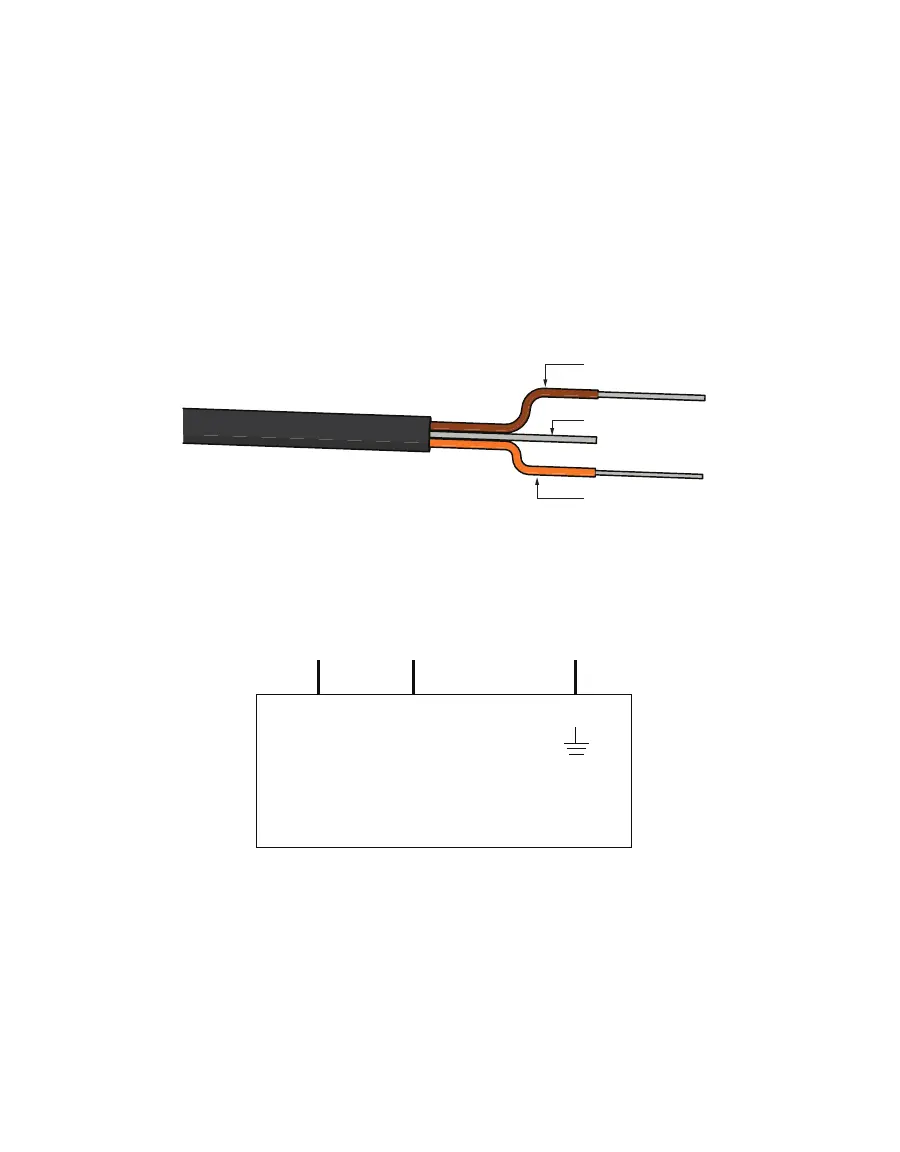
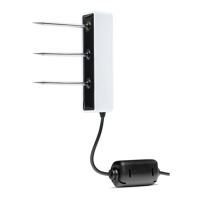
Connect the TEROS10 wires to the data logger as illustrated in Figure2, with the supply wire
(brown) connected to the excitation, the analog out wire (orange) to an analog input, and the
bare ground wire to ground.
Ground (bare)
Data (orange)
Pigtail wiring
NOTE: Some older adapter cables have the older Decagon wiring scheme where the power supply is white, the digital
out is red, and the bare wire is ground.
Exc. H
Analog In
Data Logger
GL
Out Ground
Supply
Wiring diagram
NOTE:


 To Next Page