7
TEROS 10
2.2 CONNECTING
The TEROS10 works most efficiently with METER ZENTRA, EM60, or Em50 data loggers. The
TEROS10 can also be used with other data loggers, such as those from Campbell Scientific,
Inc. (Section2.3).
TEROS10 sensors require an excitation voltage in the range of 3.0 to 15.0VDC.
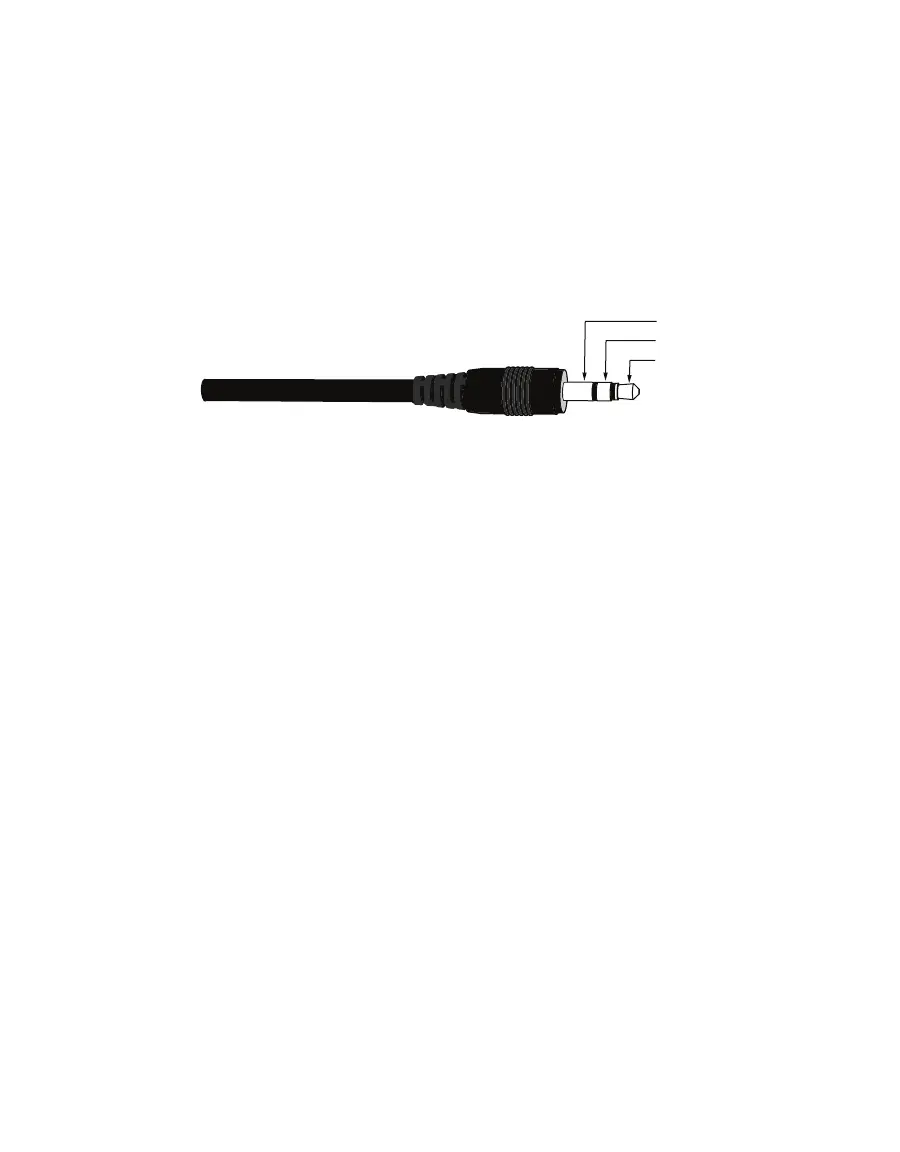
TEROS10 sensors come with a 3.5-mm stereo plug connector (Figure1) to facilitate easy
connection with METER loggers. TEROS10 sensors may be ordered with stripped and tinned
wires to facilitate connecting to some third-party loggers (Section2.2.2).
Data
Power
Stereo plug connector
The TEROS10 sensor comes standard with a 5-m cable. It may be purchased with custom
cable lengths for an additional fee (on a per-meter basis). This option eliminates the need
for splicing the cable (a possible failure point). However, the maximum recommended length
is40 m.
2.2.1 CONNECT TO METER DATA LOGGER
The TEROS10 sensor works seamlessly with METER ZENTRA, EM60, or Em50 data loggers.
Check the METER Download web page for the most recent data logger firmware. Logger
configuration may be done using either ZENTRA Utility or ZENTRA Cloud (Section2.2.2).
1. Plug the 3.5-mm stereo plug connector into one of the sensor ports on the data logger.
2. Once the TEROS10 has been connected to the data logger, use the appropriate software
application, congure the chosen logger port for TEROS10.
NOTE: The TEROS10 is an analog sensor. The METER logger will not automatically identify the TEROS10. Please
use ZENTRA Utility or ZENTRA Cloud to apply the correct configuration.
3. Set the measurement interval.
ZENTRA, EM60, or Em50 data loggers measure the TEROS10 every minute and return the
minute-average data across the chosen measurement interval. TEROS10 data can be
downloaded from these loggers using either ZENTRA Utility (desktop and mobile application)
or ZENTRA Cloud (web-based application for cell-enabled data loggers).


 To Next Page