5
Measuring Capacitance See Figure -8-
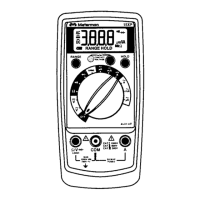
1. Set the Range Switch to
P
.
2. Connect the Test Leads: Red to COM, Black to mA
3. Turn off power to the circuit being measured.
4. Discharge the capacitor using a 100 kΩ resistor.
5. Free at least one end of the capacitor from the circuit.
6. Connect the Test Probes across the capacitor. When measuring an electrolytic
capacitor match the test lead polarity to the polarity of the capacitor.
7. Read the display.
Measuring Temperature See Figure -9-
1. Set the Range Switch to °C or °F.
2. Connect a TEMP adapter plug (XR-TA) to the
E
and COM inputs.
3. Connect the K-type thermocouple to the TEMP adapter.
Match the polarity of the adapter to the polarity of the thermocouple.
Note: Thermocouple is not intended for contact with liquids or electrical circuits.
4. Expose the thermocouple probe to the temperature to be measured.
5. Read the display.
Measuring Frequency See Figure -10-
1. Set the Range Switch to 40 MHz.
2. Connect the Test Leads: Red to Hz, Black to COM
3. Connect the Test Probes to the signal source.
4. Read the display. The Meter will autorange for the best resolution.
Additional Features
Input Test Lead Warning
The meter emits a continuous tone when a test lead is placed in the mA or 10A
input jack and the selector switch is not set to a correct current range. (If the DMM
is connected to a voltage source with its leads connected for current, very high
current could result). All current ranges are protected by fast acting fuses.
MIN MAX Measurements
XW
WARNING
To avoid erroneous readings, do not change the position of the
Function/Range Switch while the MIN MAX function is enabled.
The MIN MAX function reads and updates the display to show the maximum or
minimum value measured after you press the MIN MAX button.
Pressing the MIN MAX button for less than 1 second will put the meter into a mode
of displaying the maximum, minimum, or actual readings. Each time the button is
pressed, the meter will cycle to the next display mode as shown in the table below.
Press the MIN MAX button for more than 2 seconds to disable this feature.
Button Display Value Displayed
< 1 second MAX Maximum value after feature activated
< 1 second MIN Minimum value after feature activated
< 1 second MIN MAX (blinks) Actual input after feature activated
> 2 seconds Exit function


 To Next Page