Kit Assembly 99-3309B
Double DIN radio provision
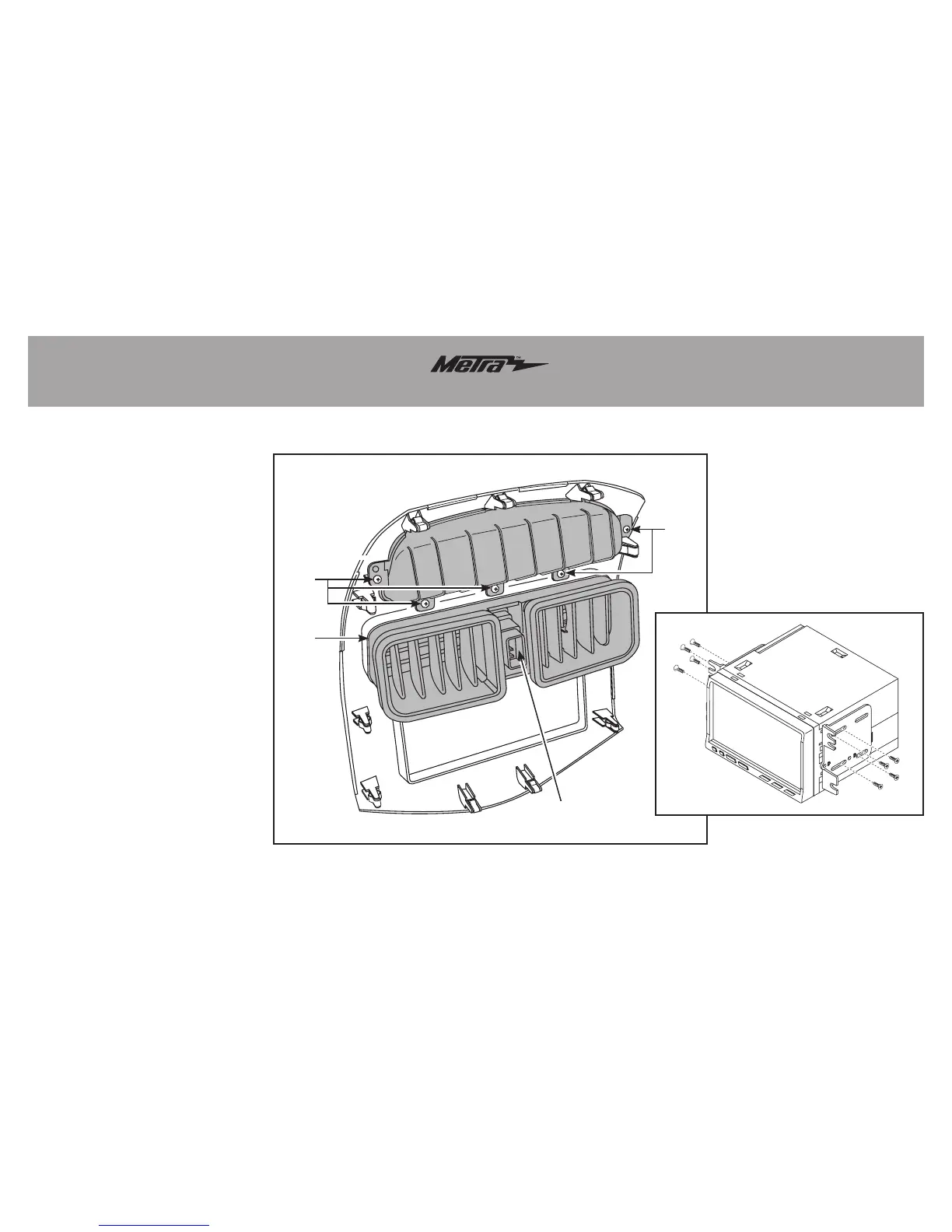
1. Attachthefactoryventsandhazard
buttontotheMetratrimpanel.
(FigureA)
2. Attachtheupperdisplayshroudthe
Metratrimpanelwiththefactory
screws.(FigureA)
3. Attachtheprovided(10)panelclipsto
thelegsoftheMetratrimpanel.
4. Locatethefactorywiringharnessin
thedash.Metrarecommendsusing
thepropermatingadapterfromMetra
orAXXESS.Re-connectthenegative
batteryterminalandtesttheunitfor
properoperation.
5. Attachtheradiobracketstothe
aftermarketradiousingthescrews
suppliedwiththeradio,thenmountthe
assemblyintothesubdash.(FigureB)
6. Reassembledashinreverseorderof
disassemblyusingtheMetratrimpanel
insteadofthefactorytrimpanel.
(Figure B)
(Figure A)
Step 2
Step 1
Step 1
Step 2



 To Next Page