CHAPTER 3: POWERING UP-4XP LOUDSPEAKERS
16
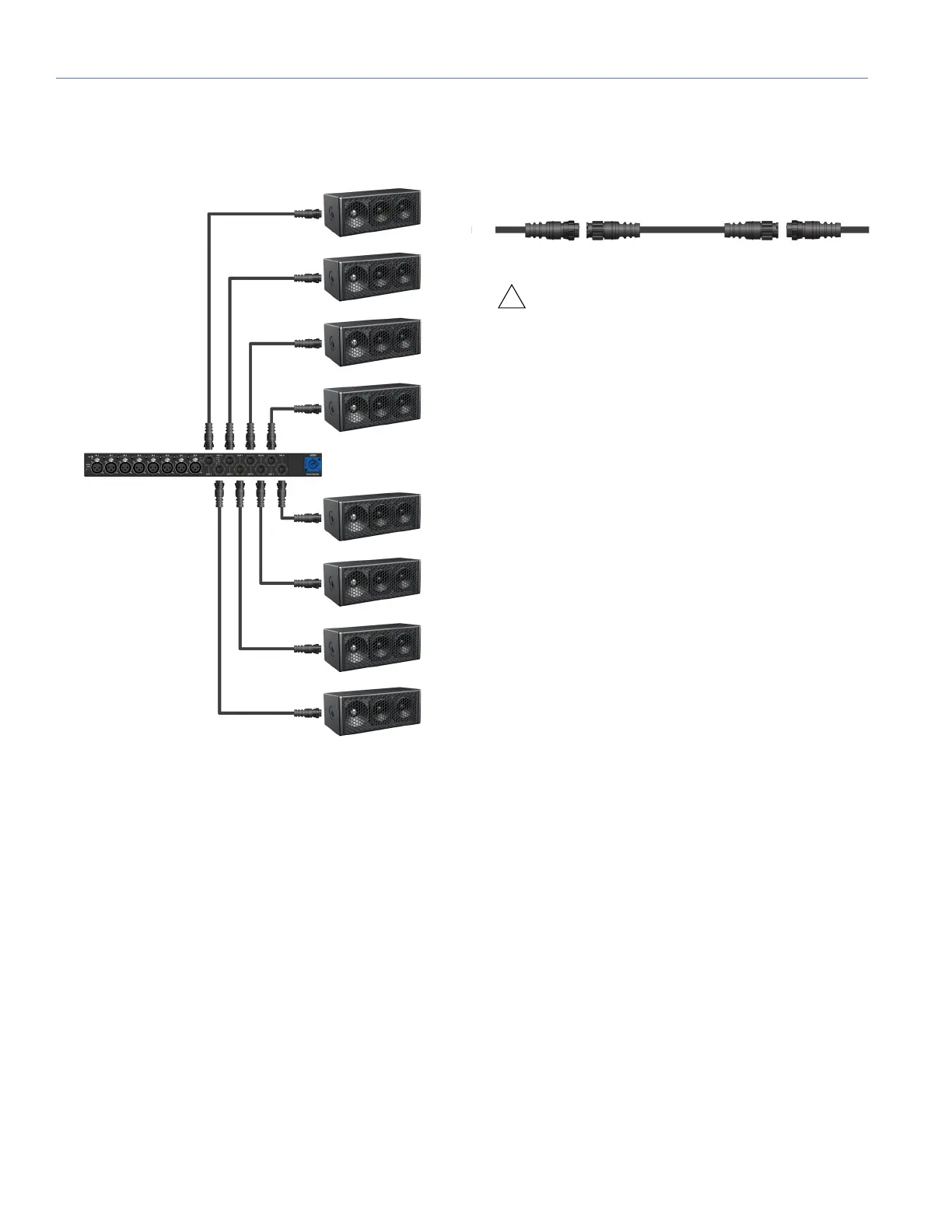
■ When connecting UP-4XP loudspeakers equipped with
EN3 connectors to the MPS-488HPe power supply, use
EN3 5-pin male to EN3 5-pin female cables.
■ To join two EN3 cables, one with an EN3 5-pin male
cable mount connector to one with an EN3 5-pin female
cable mount connector, use an EN3 5-pin female-to-
male cable coupler (PN 28.163.033.01).
CAUTION: Make sure UP-4XP loudspeaker
cables are wired correctly. For details on
assembling loudspeaker cables, see Appendix B,
“Phoenix and EN3 Cable Assembly.”
5. Power on the MPS-488HP and monitor the LEDs on the
front panel to verify connections. For information on the
MPS-488HP LEDs, refer to the MPS-488HP Operating
Instructions.
6. Check the LEDs on the UP-4XP rear panels and verify
they are green (ready to reproduce audio).
7. Enable output from the audio sources (from the mixer or
processor) connected to the MPS-488HP.
MPS-488HPe with Eight UP-4XP Loudspeakers






 To Next Page