R8-PC4A
EM-9795 Rev.4 P. 2 / 6
MG CO., LTD. www.mgco.jp
5-2-55 Minamitsumori, Nishinari-ku, Osaka 557-0063 JAPAN
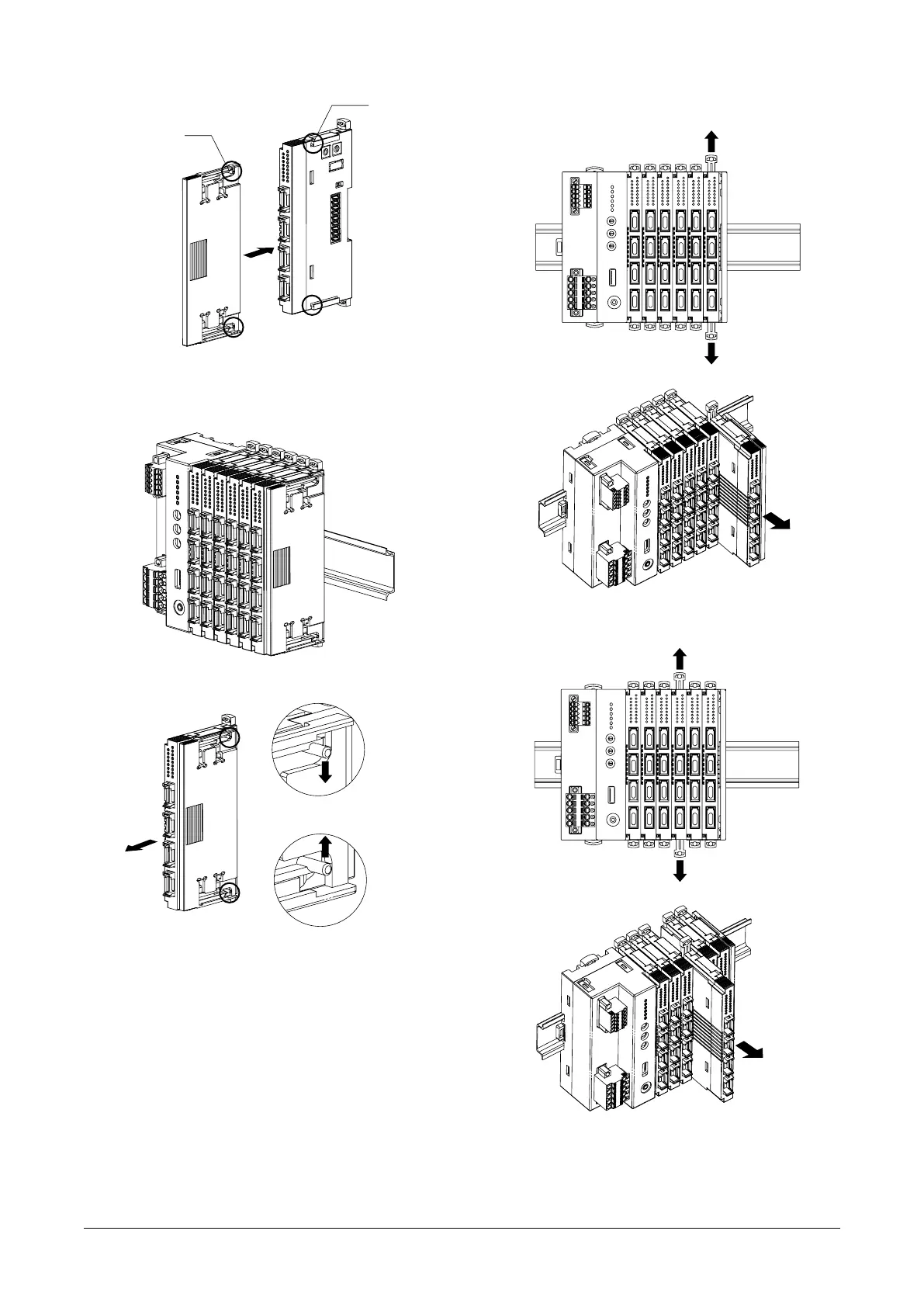
• Protective Cover
The protective cover is to be attached over the connected I/O module
at the right end.
Align the hooks on the cover with the grooves of the module and slide it
straight until the hooks are latched.
When removing the cover, pull it out while squeezing the hooks inward.
Groove
Hook
■ HOW TO UNMOUNT THE MODULE ON DIN RAIL
Release the locking clamps and pull out straight the module.
Caution !
1) Be careful not to hurt your hand by pointed edges of the internal bus
connector.
2) I/O modules cannot hold tightly on the DIN rail by themselves without
power/network module.
Secure them to the position if necessary by using DIN rail end plates.
• Removing an intermediate module


 To Next Page