... 32
12 Drive recorder setting - Voice/Video and user setup
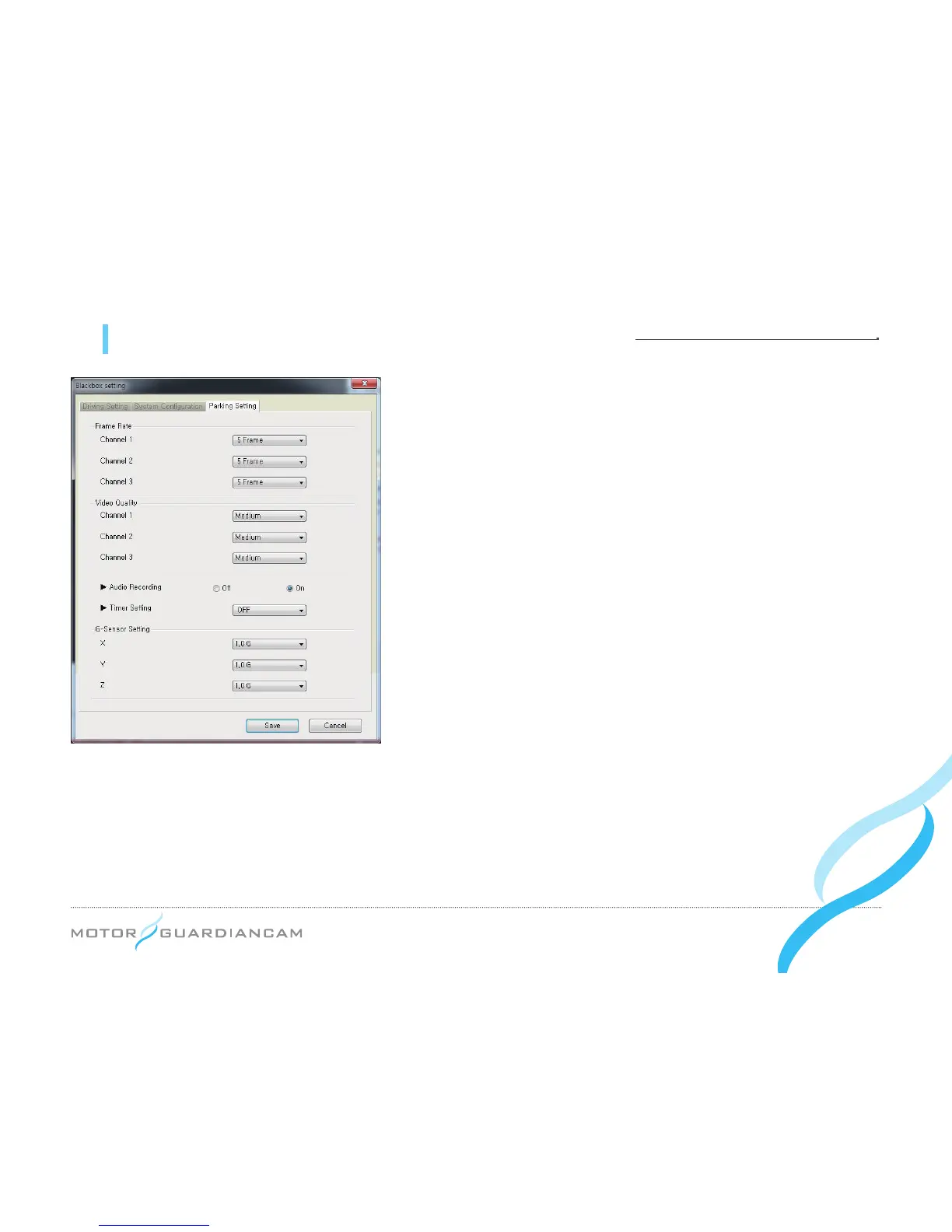
[Parking Setting]
1.
#
This menu is used to determine the Frame Rate, Video Quality,
Audio Recording, Cut Off Time, and G-sensor Data by channels
in the driving mode.
2.
#
If the Frame rate of Channel 2 is set to “0”, the Inner Cam will not
work.
3.
#
After a video is recorded for the time set as the Cut Off Time in
the parking mode, the power of the drive recorder will be turned
off (to prevent battery discharge).
4.
#
The G-sensor data is a menu used to set the value of sensitivity,
which is the degree of recognizing a shock. (The lower the value
is, the higher the sensitivity will be.)
*
As the size of a video file depends on the Frame Rate and Video Quality, a
higher Frame Rate and Video Quality can shorten the recording time.


 To Next Page