MGE UPS SYSTEMS - 5102761700/AC
20
Installation
Setting the input
voltage
Before making any connections, make sure
that the sources selected to supply the
Pulsar STS are compatible with its
characteristics.
Pulsar STS 10 and Pulsar STS 16: 208V -
220V - 230V - 240V.
Pulsar STS 1400: 120V.
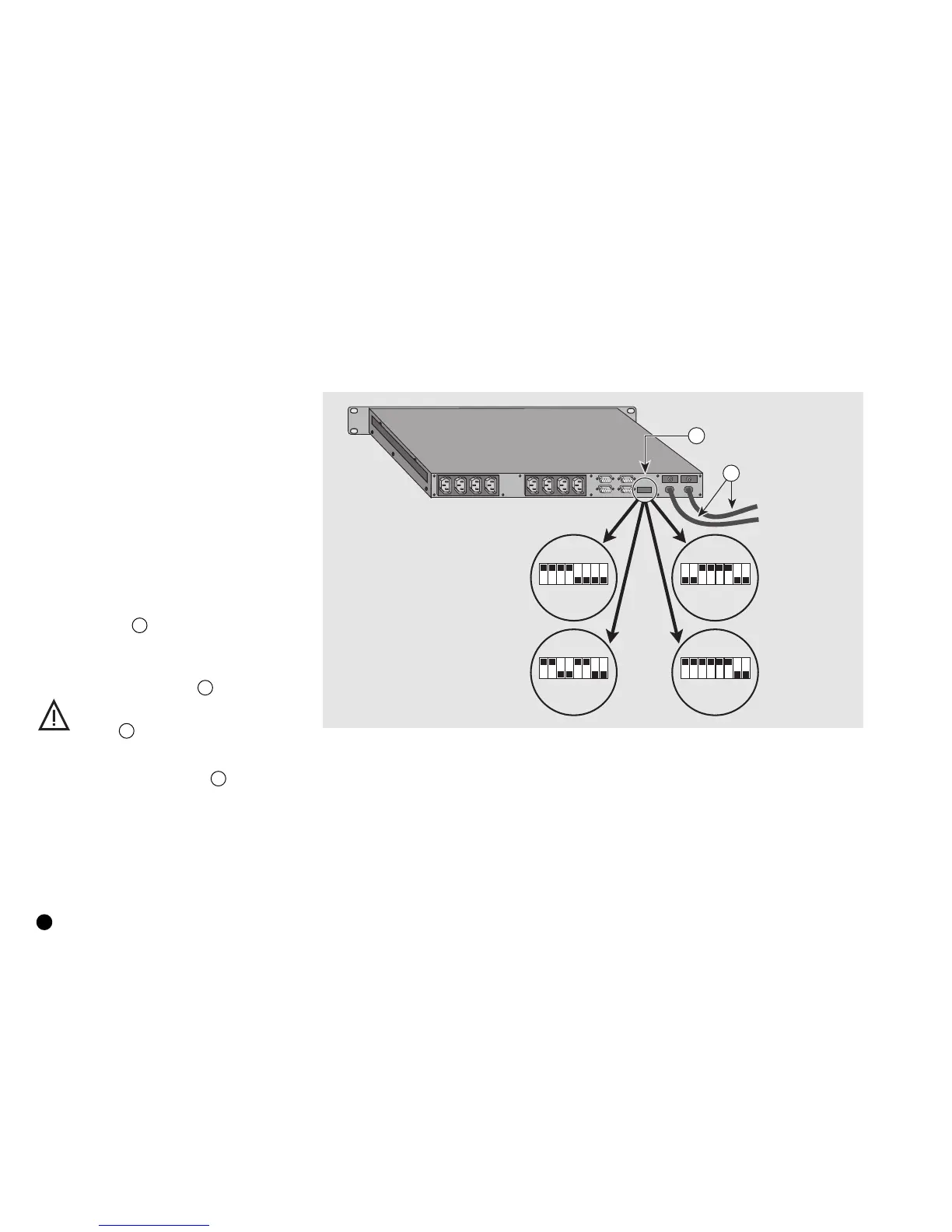
The factory input voltage setting for Pulsar
STS 10 and Pulsar STS 16 is 230V. If
necessary, set the voltage to another value
(208V, 220V, 230V or 240V) using the
voltage selector 14 (see figure 3).
In the event of an electrical fault, a circuit
breaker on each of the source inputs
protects the Pulsar STS module.
The voltage selector 14 may be
used only when the Pulsar STS
module is de-energized, i.e. power
cables 7 not connected to the
sources.
Once the module has been correctly set up,
connect the two power cables 7 to the two
sources.
230V input
voltage
240V input
voltage
208V input
voltage
220V input
voltage
Fig. 3
14
7
1 2 3 4 5 6 7 81 2 3 4 5 6 7 8
1 2 3 4 5 6 7 8 1 2 3 4 5 6 7 8


 To Next Page