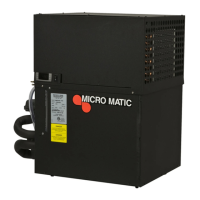
The provided document is a service manual for Micro Matic Power Packs, specifically covering models MMPP4301-EP, MMPP4301, MMPP4301-WC, MMPP4301-PKG, MMPP4301-PKG-WC, MMPP4302, MMPP4302-WC, MMPP4302-PKG, MMPP4302-PKG-WC, MMPP4303-PKG, MMPP4303-PKG-WC, MMPP4303-PKG-3, MMPP4305-PKG, MMPP4305-PKG-WC, MMPP4305-PKG-3, MMPP4305-PKG-WC3, MMPP4307-PKG, MMPP4307-PKG-WC, MMPP4307-PKG-3, MMPP4307-PKG-3-WC, MMPP4307-PKG-4, and MMPP4307-PKG-4-WC. These devices are designed to maintain a consistent glycol temperature for dispensing systems, ensuring optimal beverage cooling.
Function Description
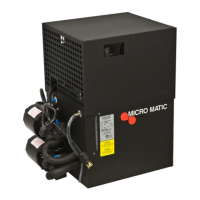
Micro Matic Power Packs are refrigeration units that chill a glycol-water solution, which is then circulated through insulated lines to cool beverage dispensing equipment. They are essential for maintaining the quality and temperature of dispensed beverages, particularly beer. The units come in various configurations, including air-cooled and water-cooled options, and with different pump and compressor capacities to suit diverse application needs. The primary function is to provide a continuous supply of chilled glycol to prevent temperature fluctuations in the dispensing lines.
Important Technical Specifications
The power packs offer a range of BTU capacities, from 2,300 BTUs for the MMPP4301 series to 11,500 BTUs for the MMPP4307 series. Compressor horsepower varies from 1/3 HP to 1 1/2 HP. Glycol pump configurations range from single vertical pumps (MMPP4301-EP) to multiple rotary vane pumps (up to 4 for MMPP4307-PKG-4 and MMPP4307-PKG-4-WC). Pump GPH (gallons per hour) is consistently 80 across most models, with pump motor HP at 1/3 HP.
Electrical specifications include 115V for lower BTU models (MMPP4301, MMPP4302 series) and 208/230V for higher BTU models (MMPP4303, MMPP4305, MMPP4307 series). Running amperage varies based on model and voltage, from 7.0A (MMPP4301-EP) to 17.7A (MMPP4301-PKG) at 115V, and from 8.4A (MMPP4303-PKG-WC) to 14.5A (MMPP4307-PKG-4, MMPP4307-PKG-4-WC) at 208/230V. Plug types include 5-15P, 5-20P, L5-30P, 6-15P, and 6-20P, indicating different current and voltage ratings.
All units use R134a refrigerant, with charge amounts ranging from 0.28 kg (10 oz) to 1.04 kg (37 oz). Running pressures are typically 18 (low) / 140 (high) or 55 (low) / 260 (high) depending on the model.
Dimensions vary, with smaller units like MMPP4301-EP measuring 26.12" x 17.12" x 21.56", and larger units like MMPP4307-PKG and MMPP4307-PKG-3 measuring 38" x 20" x 36" or 38" x 30" x 36". Weights range from 41 kg (90 lbs) to 134 kg (295 lbs). Bath capacities are either 4.5 gal (17 L) or 11.5 gal (43.5 L), with 1.5" bath insulation thickness.
Water-cooled models (indicated by "-WC" in the model name) require an inlet water pressure of Min 40 psi / Max 120 psi and use 9.52mm (3/8") water inlet/outlet fittings. The condenser inlet water temperature should be Minimum 45° F / Maximum 80° F. Water is used only when the condenser temperature rises, approximately 40% of the operating time. All models are ETL Listed.
Usage Features
The power packs are designed for ease of installation and operation. They should not be installed on top of a walk-in cooler or outside. A minimum clearance of 18 inches above and in front of the unit is required for proper airflow in air-cooled models. Ambient operating temperature range for air-cooled models is 50-90° F. Units must be wired to a ground fault circuit interrupter per UL guidelines.
Installation involves connecting glycol lines to pump inlets and outlets, filling the glycol bath with the appropriate Micro Matic Polar Flo® glycol solution, and connecting the unit to electrical outlets. The glycol solution mix varies by model series:
- MMPP4301, MMPP4302, MMPP4303 series: 2 ½ parts water to 1 part glycol.
- MMPP4305, MMPP4307 series: 7 parts distilled water to 5 parts glycol.
The glycol level should be filled to the indicator line. For models with multiple pumps (PKG, PKG-3, PKG-4), a glycol line must be connected to each pump outlet. Glycol temperature will slowly fall to 29° F (for MMPP4301, MMPP4302, MMPP4303 series) or 28° F (for MMPP4305, MMPP4307 series). The electronic thermostat allows users to adjust the glycol temperature, with factory presets of 29° F (3° F differential) for MMPP4301/4302/4303 and 28° F (5° F differential) for MMPP4305/4307.
Maintenance Features
Regular maintenance is crucial for optimal performance and longevity.
- Glycol Level: Inspect monthly and replenish with the correct Micro Matic Polar Flo® glycol solution mix.
- Glycol Solution Replacement: The glycol/water solution should be changed approximately every 18 months, or annually in high humidity regions. If ice buildup occurs, the solution should be replaced after melting the ice.
- Condenser Fins: Check and clean every sixty (60) days to ensure efficient heat exchange.
- Airflow: Ensure adequate air circulation around the unit and no obstructions in front of air vents.
- Trunk Line Insulation: Check the condition and effectiveness of the trunk line insulation.
- Electrical Safety: The unit should be checked for electrical safety at regular intervals determined by the owner.
The manual also provides detailed instructions for specific repairs:
- Changing Glycol Pump: Involves unplugging the unit, removing mounting screws, cutting tubing, and replacing the pump. For most models, a pinch-off tool is required to safely remove the pump and drive key.
- Replacing Motor: Requires unplugging the unit, supporting the pump, loosening the clamp, removing the drive key, and replacing the motor. New motors are supplied with a mounting bracket. The electrical cord from the defective motor must be reused.
- Replacing Thermostat: Involves unplugging the unit, removing the thermostat housing, noting wire connections, and reattaching wires to the new thermostat. Instructions for rewiring a Danfoss thermostat into a control box with a Dixell thermostat are also provided.
Troubleshooting guidance covers common issues such as excessive foam, compressor not starting or running continuously, compressor not running but humming, and warm beer, offering potential causes and solutions.
All Micro Matic Power Packs come with an 18-month warranty on parts and a 1-year warranty on labor for defects in material and workmanship. The compressor carries an extended warranty of an additional 3 1/2 years. Loss of sales is borne by the purchaser. Warranty claims require notifying Micro Matic, obtaining a return authorization number, and shipping the product for repair or replacement. Unauthorized repairs are not reimbursed. The warranty does not cover damage from misuse, neglect, alteration, accident, unauthorized service, abuse, transportation damage, or normal wear and tear (gaskets, seals, o-rings). The purchaser is responsible for any loss, damage, or injury arising from the use of products. The warranty explicitly disclaims all other express or implied warranties, including merchantability and fitness for a particular purpose. The sole remedy for breach of warranty is repair, correction, replacement, or refund of the purchase price.


 To Next Page
 General