EasyManua.ls Logo

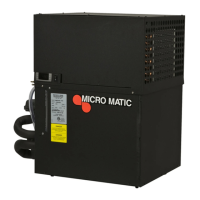
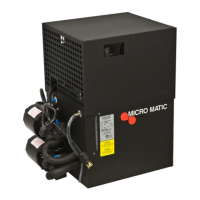
Micro Matic MMPP4307-PKG-4-R - User Manual

Micro Matic MMPP4307-PKG-4-R
16 pages
Print Icon
To Next Page IconTo Next Page
Loading...
MMPP4302-R
MMPP4302-PKG-R
MMPP4303-PKG-R
MMPP4303-PKG-3-R
MMPP4305-PKG-R
MMPP4305-PKG-3-R
MMPP4307-PKG-R
MMPP4307-PKG-3-R
MMPP4307-PKG-4-R
REMOTE POWER PACK
SERVICE MANUAL
v1.0

Questions and Answers

  • O
    onobleAug 9, 2025
    Why is my Micro Matic Power Pack dispensing excessive foam?
    • S
      Summer LeAug 9, 2025
      Excessive foam can be caused by several factors. First, ensure your walk-in cooler is set between 36° to 38°F using a quality thermometer. Next, check the pressure applied to the keg and adjust the regulator for a proper flow rate of two (2) ounces per second. Also, examine the physical equipment from the keg to the faucet. Warm product lines can also cause excessive foam.
  • J
    Jamie BrownAug 21, 2025
    What to do if Micro Matic MMPP4307-PKG-4-R compressor doesn't start (no hum), but the fan motor runs?
    • J
      jensenclaudiaAug 21, 2025
      If the compressor isn't starting but the fan motor is running, the issue might stem from a compressor relay or capacitor malfunction, in which case you should replace the compressor relay or capacitor. Another potential cause is inadequate voltage. Measure the voltage across the common and run terminals on the compressor; the voltage must not drop below 90% of the rated voltage. If neither of these resolves the issue, the compressor itself may have failed and require replacement.
  • S
    Steven SandersAug 27, 2025
    What to do if Micro Matic Power Pack compressor does not run but hums?
    • L
      laura47Aug 27, 2025
      If the compressor hums but doesn't run, first measure the voltage across the common and run terminals; it should not drop below 90% of the rated voltage. If voltage is adequate, the starting relay may be malfunctioning and needs replacement. Ensure you use the correct relay, as using the wrong one can cause compressor failure. If these steps don't solve the problem, the compressor itself may be malfunctioning and require replacement.
  • J
    Jason SuarezSep 2, 2025
    Why does my Micro Matic Power Pack compressor run continuously and freeze up?
    • T
      Tami ThompsonSep 2, 2025
      A compressor that runs continuously and freezes up could be due to a thermostat control failure, requiring thermostat replacement. Alternatively, there may be a freon leak that needs to be repaired and the system recharged.
  • G
    Gary JenkinsNov 13, 2025
    What to do if my Micro Matic Power Pack is dispensing warm beer?
    • D
      David BartlettNov 13, 2025
      If your beer is warm, consider these potential causes: * Check the pump. Look for liquid flow in the return line of the reservoir. Replace the pump on 125’, 250’, and 500’ units, and inspect the motor, checking the condition of the key between the pump and motor. * Replace a defective motor (check pump also). * Remove trunk lines from any hot water pipes or kitchen areas with stoves or glass washers if they are located in overheated areas. * If trunk lines are flooded in a PVC chase, remove the lines, thoroughly dry the PVC, and repair or replace the trunk line as needed. * Ensure all lines are fully insulated from the cooler to the dispenser, including glycol lines from the power pack to the cooler. * Adjust the thermostat to a colder setting. * Replace the condenser fan m...

Summary

Equipment Specifications

Installation and Operation

Placement Guidelines

Guidelines for unit positioning, ensuring proper airflow and clearance.

Bath Installation Steps

Detailed procedure for filling and connecting the glycol bath.

Condensing Unit Installation

Procedures for installing the condensing unit, including electrical and refrigerant connections.

Maintenance Procedures

Glycol Solution Management

Procedures for maintaining and replacing glycol solution.

External Unit Checks

Checks for condenser fins, airflow, and trunk line insulation.

Electrical Safety Inspection

Periodic inspection of the unit for electrical safety compliance.

Electronic Temperature Control

Changing Glycol Pump

Step-by-step guide for replacing the glycol pump.

Replacing Motor

Replacing Thermostat

Instructions for replacing the unit's thermostat.

Troubleshooting Guide

Typical Spare Parts

Wiring Diagrams

MMPP4302-R Wiring Diagram

Electrical schematic for the MMPP4302-R model.

MMPP4303-05-07-R Wiring Diagram

Electrical schematic for MMPP4303, MMPP4305, and MMPP4307 models.

Warranty Information

Warranty Claims Procedure

Steps for submitting and processing warranty claims.

Purchaser Responsibility

Outlines buyer's responsibilities concerning product use and damages.

Disclaimer of Other Warranties

States that express warranties replace all other implied warranties.

Limitation of Remedy

Defines exclusive remedies available for warranty breaches.

Micro Matic MMPP4307-PKG-4-R Specifications

General IconGeneral
BrandMicro Matic
ModelMMPP4307-PKG-4-R
CategoryPower Pack
LanguageEnglish

Related product manuals