12
Connecting Two AC Power Cells
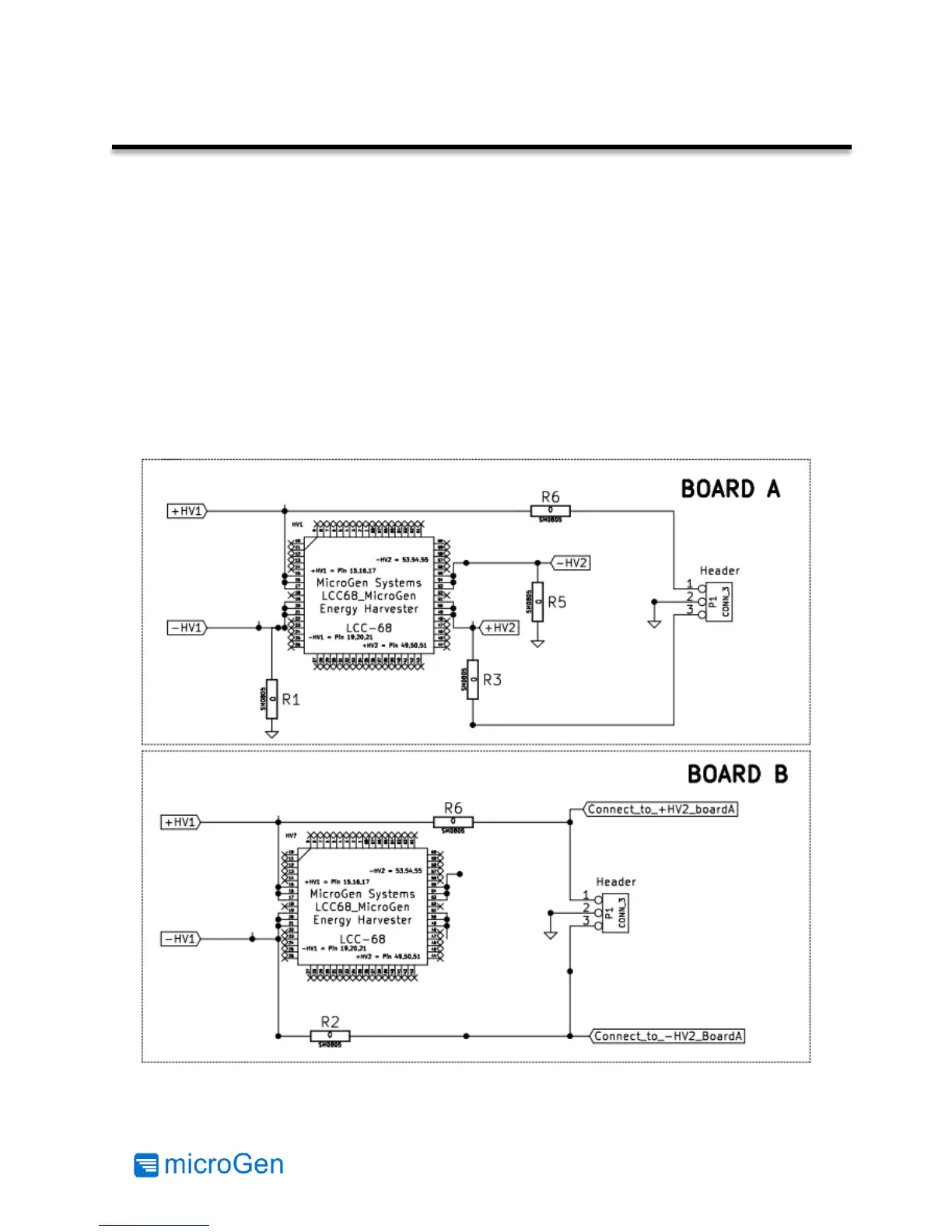
Both of the AC Power Cells included in the Evaluation Kit can be used in conjunction to increase
the amount of energy harvested. This requires the user to modify one of the AC Power Cells to
match the resistor configuration pictured in BOARD A. To modify BOARD A, remove R2 and install
R1. The allows both AC Power Cells to share a common ground.
Board B must remain as the user received it. R3 and R5 may remain on both boards but not
shown below on BOARD B as they are not used. The user must undo this modification when using
BOARD A by itself.
Connect BOARD A, the modified AC Power Cell
,
to one of the Power Management Boards supplied
and use jumpers to connect Board B to BOARD A. Output connector P1 on Board B connects to
Board A using probe points (-HV2 and +HV2).
Figure 7: Two AC Power Cell Connection Schematic



 To Next Page