Operating instruction:
1. Manual operation
a. Depress the POWER button, and the POWER LED will illuminate. The system will go into
standby mode.
b. Turn the MASTER volume knob and the POWER LED TURNS OFF.
The 5.1CH LED illuminates and the display panel indicates .
c. Depress INPUT SEL button and the Aux LED illuminates, and the
display indicates .
d. Start your playback device and adjust the volume to your preferred
volume level.
2. Remote control
a. Depress the POWER button on the remote control and the POWER LED will illuminate.
The system goes into standby mode.
b. Depress ST-BY button and the POWER LED turns off. The 5.1CH LED illuminates and the display
paned indicates .
c. Depress the volume button on the remote control, adjusting the level between 0-80dB.
e. Depress the SURR, CENTER or SUB-W to adjust surround, center and subwoofer volume
separately, adjusting range -5dB~+5dB.
f. Depress the BALANCE R or BALANCE L to adjust FRONT R L volume separately and adjust
between -5dB~+5dB range.
g. Depress mode and the 2.1CH output LED illuminates. The system switches from 5.1CH to 2.1CH
output.
h. Depress MUTE and the MUTE LED blinks, and the system is muted. Depress again or press
volum to release the system 8mm mute mode.
Illustrations
4
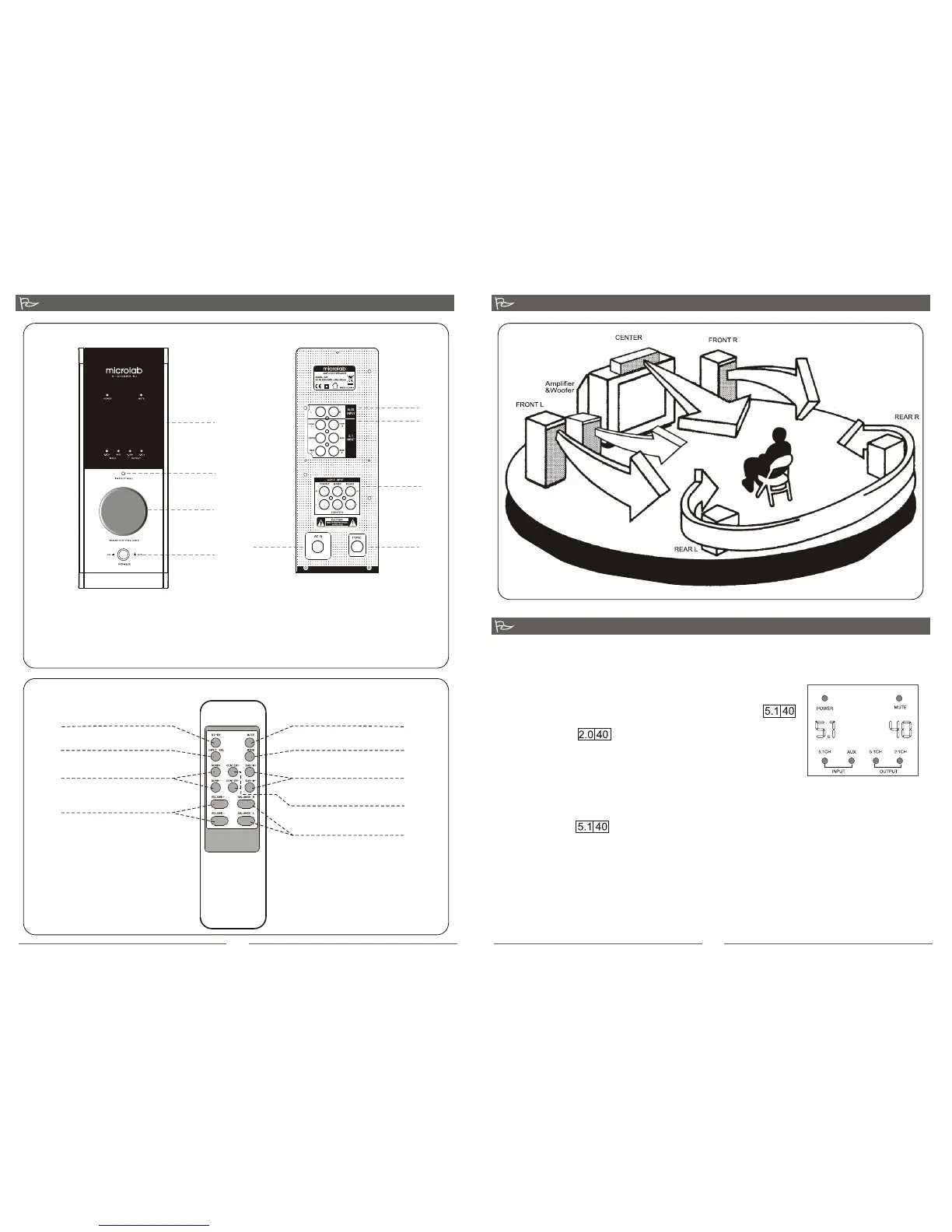
Front View of the Amplifier
1
2
3
4
1
2
3
4
5
Back View of the Amplifier
Controls on the front of Amplifier
1. LED Display
2. Input select button
3. Master Volume Knob
The master volume could be adjusted either manually
or remote control
4. Power button
The rear of the Amplifier consists
1. Stereo Signal Input Socket (AUX)
2. 5.1 Channel (AC-3) Signal Input Socket
3. Audio Output Socket
4. Fuse
5. AC power supply
Instruction for the Remote Control:
3
Stand by
Input select
Surround fine adjustment
Master Volume control
Mute
Output select
Bass fine adjustment
Balance adjusting
Center fine adjustment
Product connection and operation
Illustrations


 To Previous Page