Components Provided by Micron
Hardware
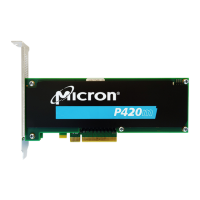
Micron provides the number of P420m/P320h drives in the appropriate capacity that
were ordered or specified by the customer.
NOTE: The drive is not usable until the support pack software is downloaded from mi-
cron.com and installed in the host system. For specific OEMs, the support pack is provi-
ded either separately on micron.com or directly from Micron.
Software
Micron provides support pack software which contains:
• Micron-specific P420m and P320h drivers (required)
• Linux driver source code and makefile for non-supported Linux operating systems
• Drive firmware update as a unified binary image (UBI) file (required)
• RealSSD Manager (RSSDM) drive management software
• P420m/P320h installation guide (this guide)
Visit micron.com and go to the Software tab to access and download the support pack.
P420m/P320h HHHL PCIe SSD Installation Guide
Components Provided by Micron
PDF: 09005aef8497e00a
P420m_P320h_HHHL_installation_guide.pdf - Rev. V 12/14 EN
8
Micron Technology, Inc. reserves the right to change products or specifications without notice.
© 2012 Micron Technology, Inc. All rights reserved.


 To Next Page