EasyManua.ls Logo

Micronta 22-214A - Making Measurements; DC Current Measurements

Default Icon
20 pages
Print Icon
To Next Page IconTo Next Page
To Previous Page IconTo Previous Page
Loading...
24
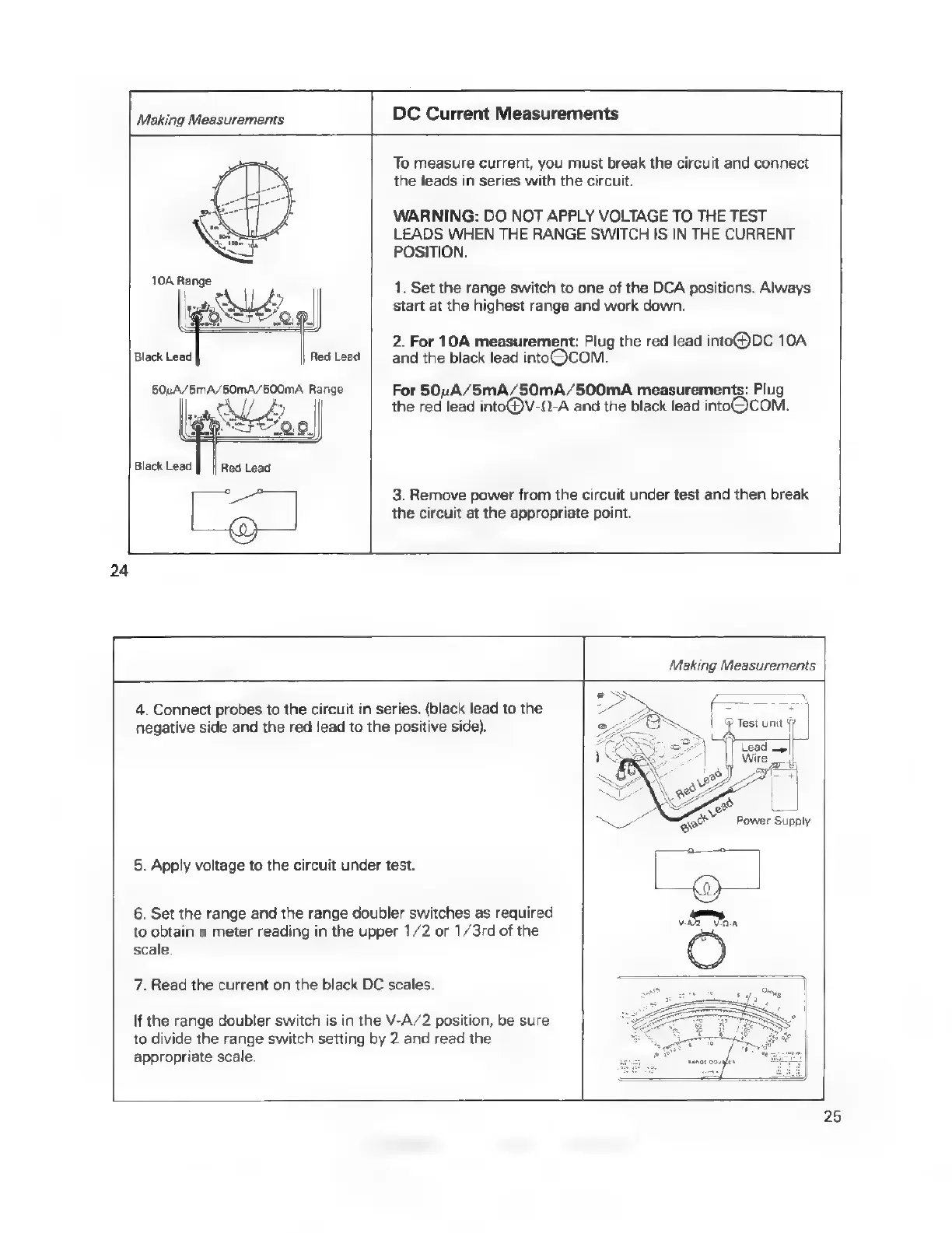
Making
Measurements
DC
Current
Measurements
POSITION.
50uA/5MA/50MA/500mA
Range
For
50uA/5mA/50mA/500mA
measurements:
Plug
the
red
lead
into@®V-(-A
and
the
black
lead
intoOQCOM.
Qe
||
eg
peg
|
b
SFT
1:0)
Black
Lead
Red
Lead
tnenh
3.
Remove
power
from
the
circuit
under
test
and
then
break
To
measure
current,
you
must
break
the
circuit
and
connect
the
leads
in
series
with
the
circuit.
WARNING:
DO
NOT
APPLY
VOLTAGE
TO
THE
TEST
LEADS
WHEN
THE
RANGE
SWITCH
IS IN
THE
CURRENT
1.
Set
the
range
switch
to
one
of
the
DCA
positions.
Always
start
at
the
highest
range
and
work
down.
2.
For
10A
measurement:
Plug
the
red
lead
into@)DC
10A
Red
Lead
and
the
black
lead
intoQCOM.
the
circuit
at
the
appropriate
point.
Making
Measurements
4.
Connect
probes
to
the
circuit
in
series.
(black
lead
to
the
negative
side
and
the red
lead
to
the
positive
side).
5.
Apply
voltage
to
the
circuit
under
test.
6.
Set
the
range
and
the
range
doubler
switches
as
required
to
obtain
a
meter
reading
in
the
upper
1/2
or
1/3rd
of
the
scale.
7,
Read
the
current
on
the
black
DC
scales.
If
the
range
doubler
switch
is
in
the
V-A/2
position,
be
sure
to
divide
the
range
switch
setting
by
2
and
read
the
appropriate
scale.
25

Related product manuals