ENG: Install the software. The ngerprint reader will not work without the software.
PTB: Instale o software. O leitor de impressões digitais não funcionará sem o software.
FRA: Installez le logiciel. Le lecteur d’empreintes digitales ne fonctionnera pas sans le
logiciel.
ITA: Installare il software. Il lettore di impronte digitali non funzionerà senza software.
PTG: Instale o software. O leitor de impressões digitais não funciona sem o software.
ESP: Instale el software. El lector de huellas digitales no funciona sin el software.
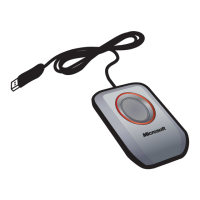
ENG: When prompted during software Setup, plug the ngerprint reader into a USB
port on your computer.
PTB: Quando solicitado durante a instalação do software, conecte o leitor de
impressões digitais a uma porta USB do computador.
FRA: À l’invite, au moment de l’installation du logiciel, branchez le lecteur d’empreintes
digitales sur l’un des ports USB de votre ordinateur.
ITA: Durante l’installazione del software, quando richiesto, collegare il lettore di
impronte digitali a una porta USB del computer.
PTG: Durante a Conguração, ligue o leitor de impressões digitais a uma porta USB do
computador quando tal lhe for solicitado.
ESP: Cuando se le pida durante la instalación del software, enchufe el lector de huellas
digitales en un puerto USB del equipo.
ENG: After restarting your computer, register your ngerprints for at least two ngers.
PTB: Depois de reiniciar o computador, registre as impressões digitais de pelo menos
dois dedos.
FRA: Après avoir redémarré votre ordinateur, enregistrez les empreintes digitales d’au
moins deux de vos doigts.
ITA: Dopo aver riavviato il computer, registrare le impronte digitali di almeno due
dita.
PTG: Depois de reiniciar o computador, registe as impressões digitais de pelo menos
dois dedos.
ESP: Después de reiniciar el equipo, registre las huellas digitales de al menos dos de
sus dedos.
ENG: Start > All Programs > DigitalPersona Password Manager > Help
PTB: Iniciar > Todos os programas > DigitalPersona Password Manager > Ajuda
FRA: Démarrer > Tous les programmes > DigitalPersona Password Manager > Aide
ITA: Start > Tutti i programmi > DigitalPersona Password Manager > Guida
PTG: Iniciar > Todos os Programas > DigitalPersona Password Manager > Ajuda
ESP: Inicio > Todos los programas > DigitalPersona Password Manager > Ayuda
X130337001bro.indd 1 9/7/06 3:26:49 PM

 Need help?
 General



 To Next Page