!
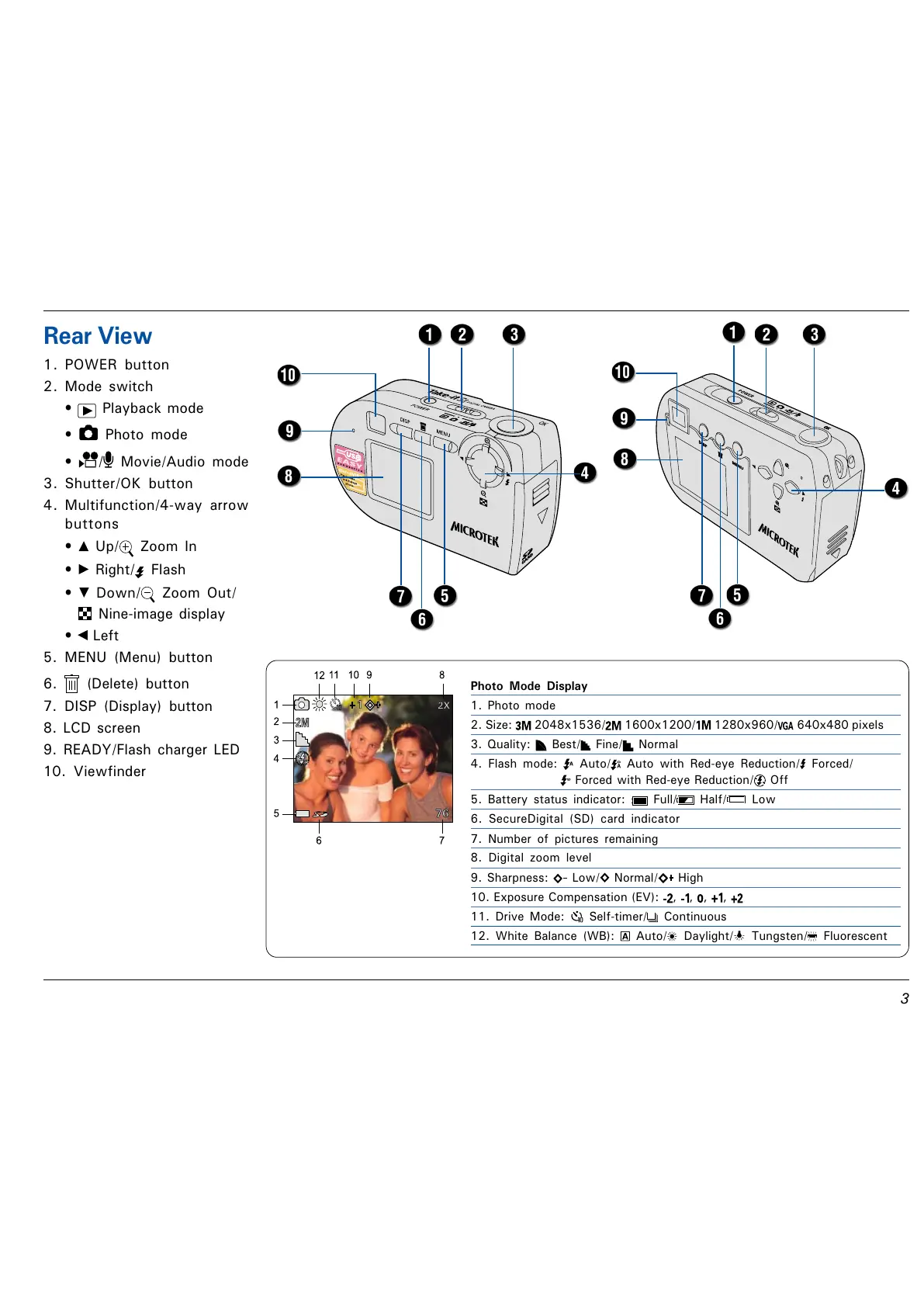
Rear View
1. POWER button
2. Mode switch
Playback mode
Photo mode
/ Movie/Audio mode
3. Shutter/OK button
4. Multifunction/4-way arrow
buttons
Up/ Zoom In
Right/ Flash
Down/ Zoom Out/
Nine-image display
Left
5. MENU (Menu) button
6. (Delete) button
7. DISP (Display) button
8. LCD screen
9. READY/Flash charger LED
10. Viewfinder
Photo Mode Display
1. Photo mode
2. Size: 2048x1536/ 1600x1200/ 1280x960/ 640x480 pixels
3. Quality: Best/ Fine/ Normal
4. Flash mode: Auto/ Auto with Red-eye Reduction/ Forced/
Forced with Red-eye Reduction/ Off
5. Battery status indicator: Full/ Half/ Low
6. SecureDigital (SD) card indicator
7. Number of pictures remaining
8. Digital zoom level
9. Sharpness: Low/ Normal/ High
10. Exposure Compensation (EV): , , , ,
11. Drive Mode: Self-timer/ Continuous
12. White Balance (WB): Auto/ Daylight/ Tungsten/ Fluorescent



 To Next Page