Take channel 1 as an example, when the reverse switch is pulled down, pull the joystick from left to right, the servo will swing
from left to right, and when the reverse switch is pulled up, pull it from left to right When the joystick is pressed, the servo
will swing from right to left, as shown in the figure below.
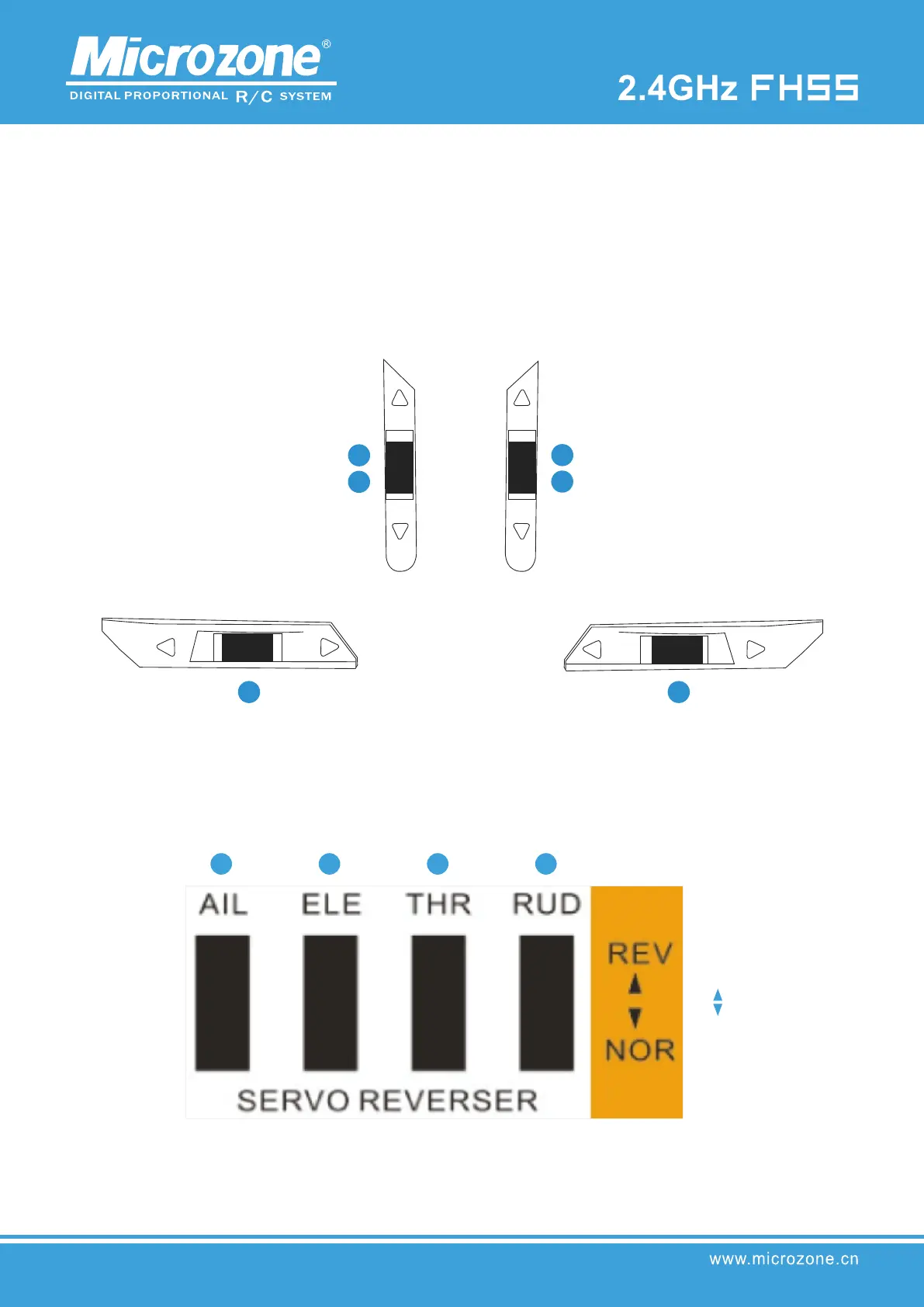
Forward and reverse switch:
The 4 channel reverse switches correspond to channels 1, 2, 3, and
4 from left to right, as shown in the figure below.
DR switch:
Large and small rudder switches, the signal output of the large rudder is 100%, that is, 1000-2000, and the output of the small
rudder is 50%, that is, 1250-1750.
Trimmer switch:
The lower left trim switch corresponds to channel 4, and the right trim switch corresponds to channel 1; the upper left trim
switch corresponds to channel 3 in left-hand mode, and channel 2 in right-hand mode; the upper right trim switch corresponds
to channel 2 in left-hand mode, and corresponds to channel 2 in right-hand mode. Channel 3; as shown below.
4 1
left handed mode
3
right hand mode 2
2 left handed mode
3 r
ight hand mode
Forward
Feverse



 To Next Page