04
2 Operation Instructions
2.1 Gateway Hardware
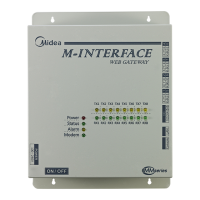
GW3-CLOUD Gateway [hereinafter referred to as the "Gateway"] is used together with "Cloud
Service" to upload VRF unit data to the cloud server through the Gateway.
The system protocol supported is V8 or V6 protocol.
The Gateway supports one RS-485 bus and is capable of taking in 8 refrigerant systems (the
maximum IDU quantity is 64); Supports 1 DI port which is dened as an emergency stop interface;
Supports 1 LAN port used for Web page conguration.
77
Port Function
12V 0V 12 V DC power supply
X Y E
Connect the ODU XYE port (*1) and support 8 refrigerant systems (up to 64 IDUs).
Multiple refrigerant system access gateways (*2), with the X/Y/E ports on the ODU
master unit of each refrigerant system connected to the X/Y/E ports of the Gateway
in serial. XYE port of the gateway also connect to the D1 D2 Port of the IDU(up to 64
IDU)(* 3)
A B E Reserved
DI1 M DI2
Dry contact for short circuit connection of DI1 and M when the Gateway will start
emergency shutdown logic.
* This function will release the startup lock of the IDU. The emergency stop function is
described in detail in the following sections.
LAN Data are uploaded to the cloud server over the LAN.
*1: The X port of the Gateway is connected to the X port of the ODU, and the Y port of the Gateway
is connected to the Y port of the ODU.
*2: When multiple refrigerant systems are connected, they need to use different addresses.
*3: The X port and Y port of the gateway connect to the D1 port and D2 Port of the V8 IDU, the E
port of the gateway connect to the E port of the IDU.



 To Next Page