05
LED Function
PWR
When the power supply is working normally, the power supply indicator PWR remains
illuminated.
Note: When the power supply indicator ashes, the power supply is abnormal.
CLOUD
Indicate whether the connection to the cloud server is successful: remains on when
the connection is successful; turns off when the connection fails.
XYE
When the VRF unit and IDU can communicate normally, the light ashes once each
time normal data are received.
A B E Reserved
Operating ambient temperature -10°C to +50°C
Operating ambient humidity RH25%-RH90%
2.2 Gateway Functions
2.2.1 Gateway Web
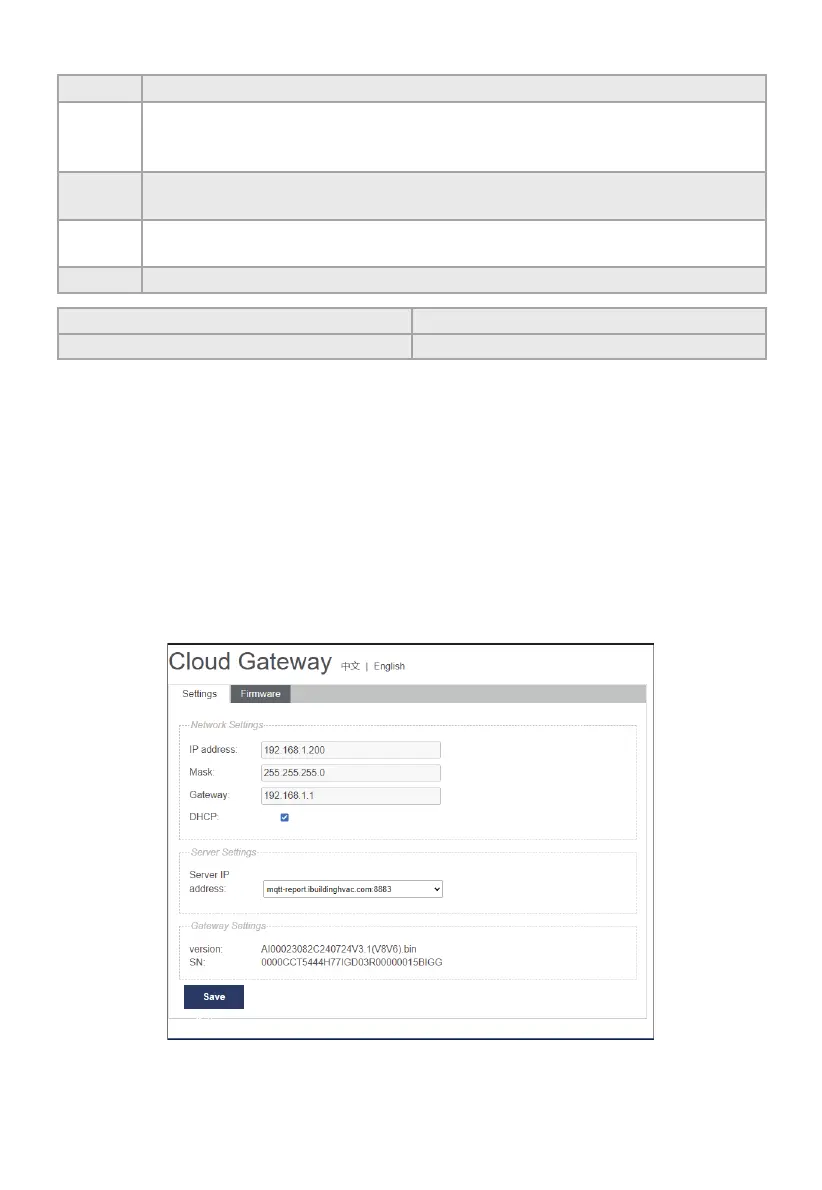
The default IP of the gateway is DHCP when it leaves the factory. You can check the IP address
assigned to the gateway on the router, and then enter the IP address to log in to the gateway's web
display interface. The Web page of the Gateway is shown in the gure below:
Note: If the gateway fails to obtain an IP address from DHCP, it will become the default static
IP:192.168.1.200.
Note: Please use chrome browser to login the web page, other browsers may be incompatible,
preventing the Web function from working properly.



 To Next Page