Installation & Owner's Manual
7
NOTE
4) Specication parameters of M-INTERFACE gateway controller
5) Denitions for code switch as follow
:
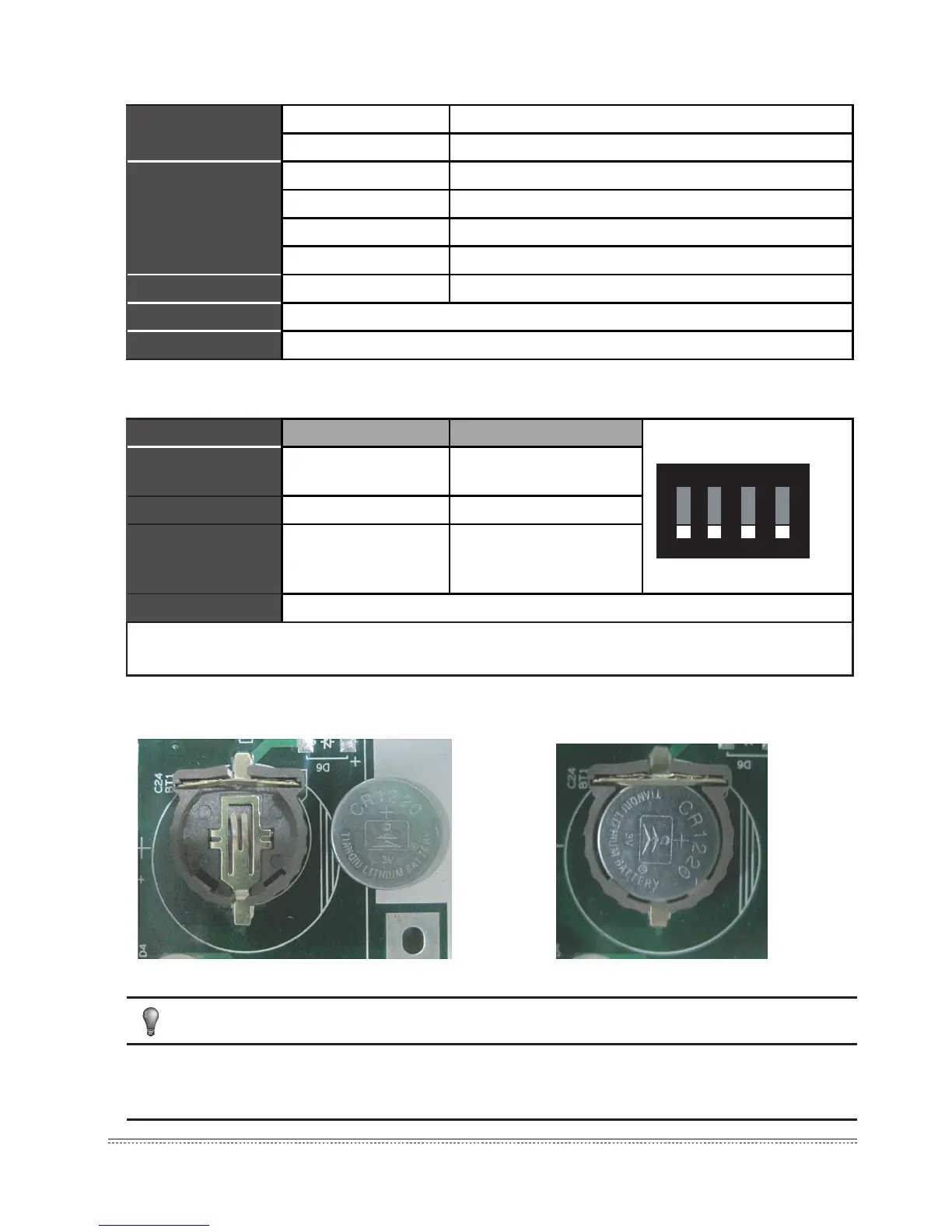
6) Button battery installation
Fig.3-7
Table.3-2
Table.3-3
Fig.3-8
After adjusted the dial code switch, please install the button batteries (attached in the
accessories package) as the above gure. And synchronize the time refers to 5.2 Time setting.
Power specication
Voltage range Single phase AC 100~240V, 50/60 Hz
Consumed power Max.15W
Using conditions
Voltage uctuation Rated value ±10%
Ambient temp. 0~50
℃
Ambient humidity 25%~90%
Storage temp. -20~60
℃
Capacity Insulated resistance When it is DC 500VM, it will over 50MΩ
Weight 4.4kg
Color of the cover Milky white
Gateway controller On Off (Factory state)
SW1-1
No power
consumption function
power consumption
function
SW1-2 Dial code setting IP WEB setting IP
SW1-3
No power
consumption function
Dial code setting IP
Auto topology
SW1-4 Reserve
Note: Dial code switch needs to take off the cover of control box, and take down four screws
on the cover.
O ND I P


 To Next Page