Steam Washing (Cleaning inner of the hood)
1
2
3
4
5
6
7
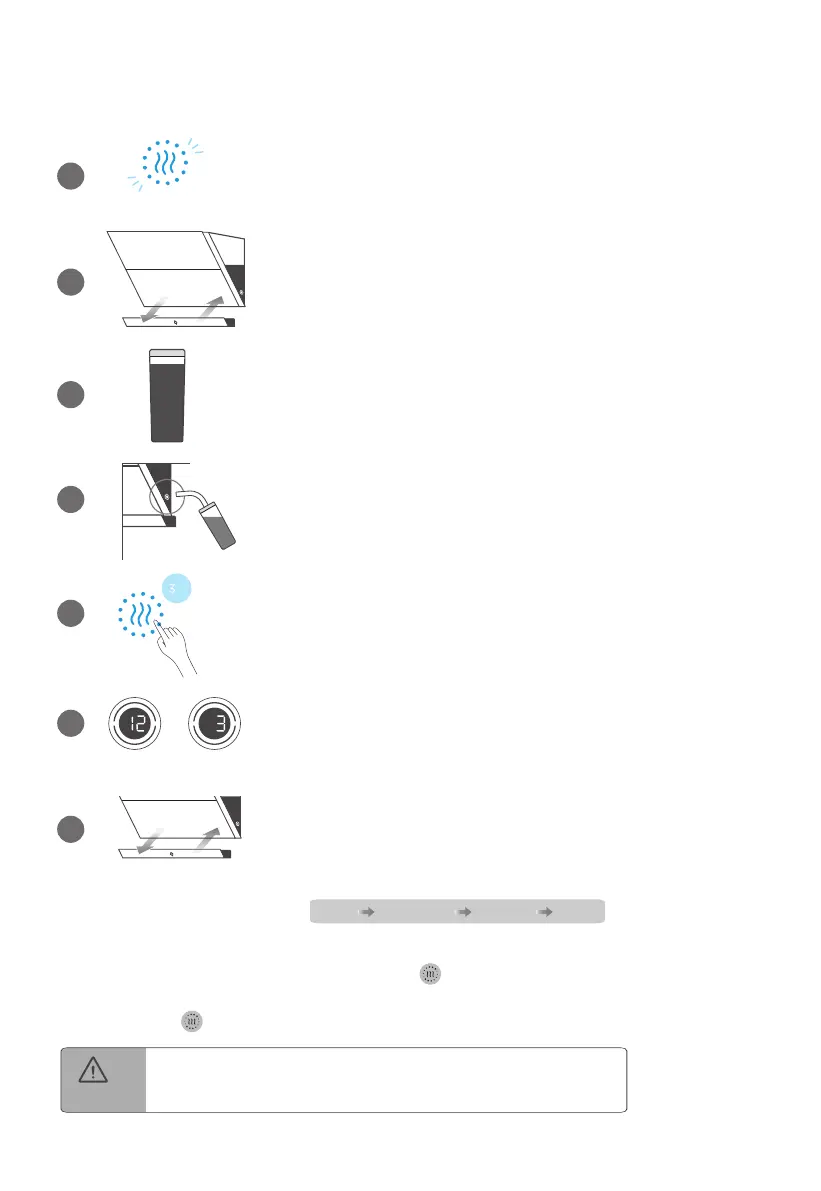
water inlet
washing drying
As the indicator light turns red and flashes,
it is indicated that steam washing is required.
a) Remove oil cup
b) Dump accumulated oil
c) Install oil cup
Cup filled with purified water or distilled water.
Plug the tube into the water inlet.
Press "Steam Washing" for 3 seconds to start
the steam washing.
Steam washing: 12 min
Drying: 3 min
a) Remove oil cup
b) Dump accumulated water
c) Install oil cup
Steam washing process
During steam washing, do not touch the surface
of glass panels or deflector to avoid scalding.
CAUTION
start washing drying over
1.
Cancel the steam washsing reminder (not washing):
Long press 2 seconds + short press twice
to fast forward to the end.
2. Fast forward or end in advance(during washing):
Short press
again to fast forward to the next step.


 To Next Page